

Answer

BOM Import Scenario

  • January 5, 2024
  • 2 replies
  • 319 views

Forum|alt.badge.img

Working an import scenario for BOM details which include both header BOM information and materials on the BOM within the same Excel. The Excel file is set up which row type 0 including header information and row type 4-8 including the materials on the BOM. 
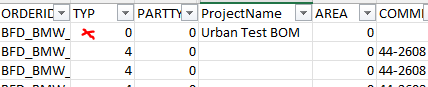


How do I set up the import scenario so I populate the header level information (for example the BOM description) based on information sitting within the row for TYP = 0. 
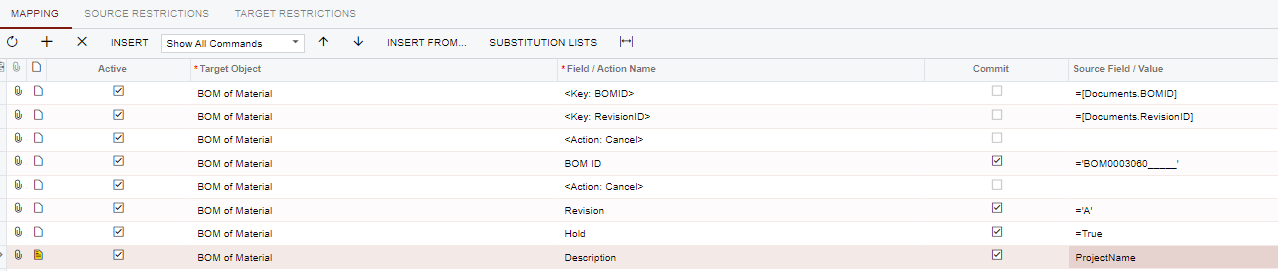
 

I’ve tried some IF statements but not achieving what I need.

Best answer by Laura03

Hello,

I noticed some prior posts related to import scenarios for BOM’s (1st one has attached XML’s).  Have you already checked these out?


https://community.acumatica.com/manufacturing%2D89/bom%2Dimport%2Dwith%2Dmulti%2Dlevel%2Dtemplate%2Dneeded%2D5050


https://community.acumatica.com/import%2Dand%2Dexport%2Dscenarios%2D117/import%2Dscenario%2Dto%2Dload%2Dbom%2Dnotes%2Ddoes%2Dnot%2Dwork%2D11720

Laura

2 replies

Laura03
Captain II
Forum|alt.badge.img+19
  • Captain II
  • Answer
  • January 5, 2024

Forum|alt.badge.img
  • Author
  • Semi-Pro I
  • January 5, 2024

Thanks @Laura02 .


A quick read through that answered my question - here it is in case others have the same question:


You must have the header level information present in every row - in my example the Project Name field which represents the BOM description must be present in every row in your Excel/SQL.
