
Solved

Adding Default to Vendor on Stock Items with multiple vendor options using Import Scenario

  • June 21, 2022
  • 5 replies
  • 623 views

BDSTG2009
Freshman I

Just to preface, I am self-teaching on Import Scenarios for the most part, and I don’t have a lot of experience with them yet. This is around the third Import Scenario I have built from scratch, and it has one complicated part I am really having trouble getting right. Now on to the problem:

I have some Stock Items that I want to make default a certain vendor. The vendor is already on the Stock Items, I just want to use Import Scenarios to check the default box for that specific vendor. There are multiple vendors on these items, so I need the Import Scenario to choose the line that vendor is already on and check that lines box for the default. I have set it up a ton of different ways, and I can get it to check the box, but it always checks the box on the first vendor in the list. Alternatively, the way I have it set up at the moment is giving an error about adding a duplicate line. Screen shots below. If any other info would help just let me know.


Stock Item Vendor List:
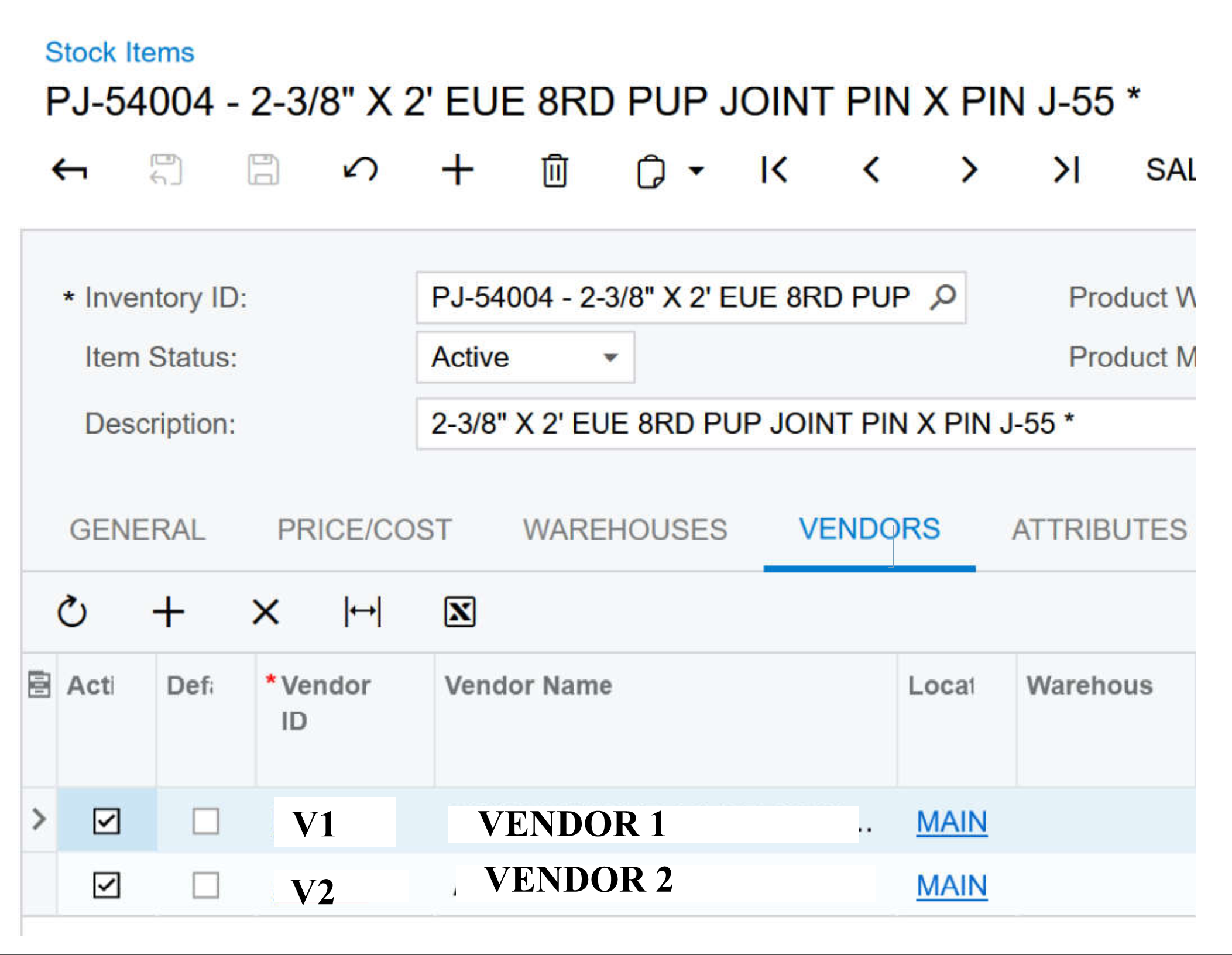
 

I have cut the excel down to a single line until I can get it work.

 

The Scenario I am using is a combo, and the Replenishment end works perfectly. The only action left off is the “Save” at the end.
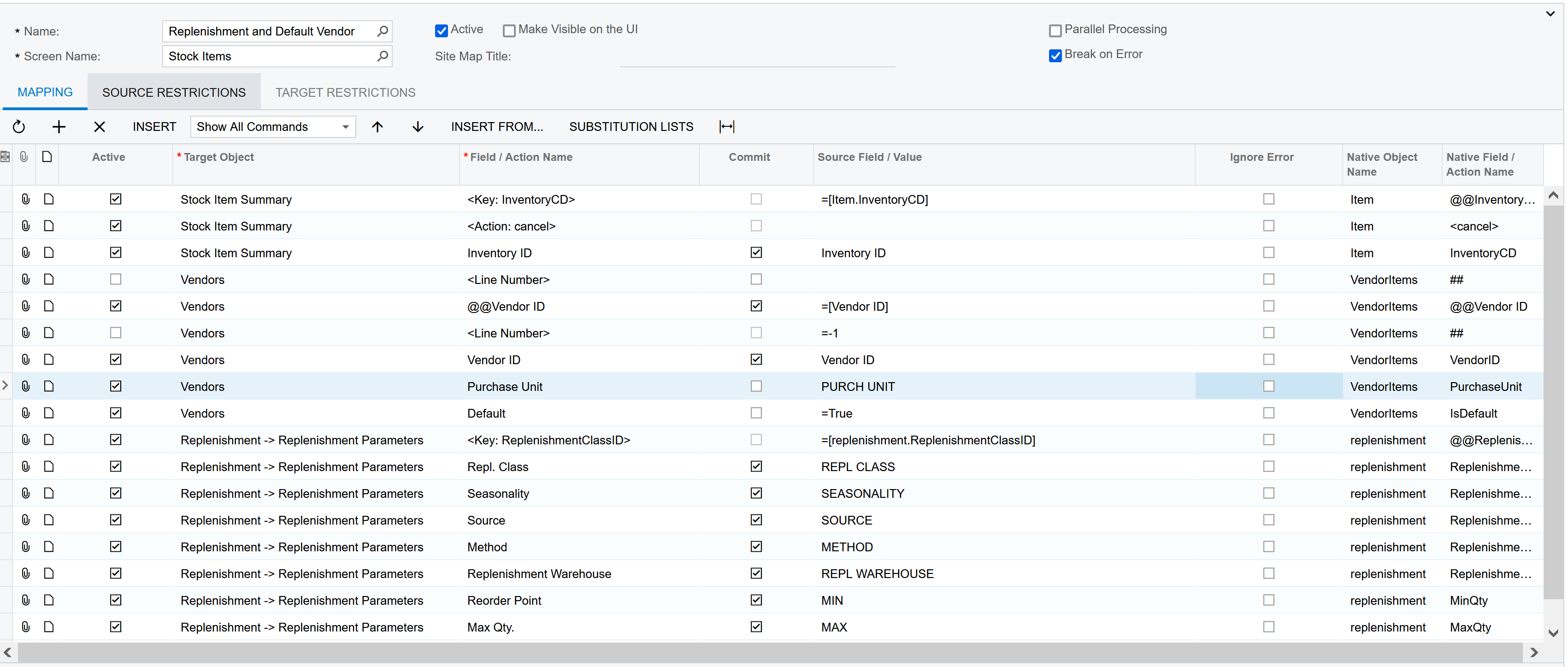
 

Any help is appreciated!

Thanks, Trey

Best answer by rkerr58

The vendor section should look like this:

I tested it and it worked.

5 replies

rkerr58
Jr Varsity I
  • Jr Varsity I
  • Answer
  • June 29, 2022

The vendor section should look like this:

I tested it and it worked.


BDSTG2009
Freshman I
  • Author
  • Freshman I
  • June 30, 2022

That worked! Thanks!


Forum|alt.badge.img
  • Freshman I
  • November 1, 2025

The vendor section should look like this:

I tested it and it worked.

Hi. I am working on the opposite - making the default box unticked and followed this which has worked. Just curious though, what does @@Vendorid mean and what does <Line Number> =-1 mean? Made some research and they said we can make it to -2 and so on. Can you please clarify for me and for everyone who will see this? Many thanks in advance!


kkeating24
Varsity III
Forum|alt.badge.img+1
  • Varsity III
  • December 15, 2025

-2 deletes the row.  

@@vendorid means you want to take the field “Vendor ID” and locate it in the screen you are updating using the Vendor ID from your data provider.  

<Line Number> = -1 is the default import scenario logic for ADDING a new line if you need to add records via an import scenario. 


MissyMain41
Jr Varsity I
Forum|alt.badge.img
  • Jr Varsity I
  • December 16, 2025

The vendor section should look like this:

I tested it and it worked.

Hi. I am working on the opposite - making the default box unticked and followed this which has worked. Just curious though, what does @@Vendorid mean and what does <Line Number> =-1 mean? Made some research and they said we can make it to -2 and so on. Can you please clarify for me and for everyone who will see this? Many thanks in advance!

Hey Mark! 

What Kkeating said is true, however I really wanted to add onto this. 
It seems like a lot of people are winging these imports and learning as they are built/tested.

However, I do want to let everyone on this post know that there is training available for import/export scenarios that explain what -1, -2, and @@ means, how they work, and even guides you into testing with them with test scenarios to better understand these intricacies. 

For anyone else who questions these things, or just wants to know more to be better at building these, please check out the publicly available i100 training found here: 

I100 Integration Scenarios 2025 R2