Solved

Import Scenario to create Sales Order and complete Quick action process

  • October 7, 2021
  • 2 replies
  • 890 views

Forum|alt.badge.img

Hi , @Naveen B,


is it possible to create the Sales Order and do the Quick process all in the one Import Scenario?

so using the attached Scenario,  I’d need to somehow create all lines prior to the “Process Order”.

If not I can do separate scenario but would be cool if I could do all in one :-).  @Naveen B could probably do it :-).


Thanks in Advance.

Laura


Best answer by Naveen Boga

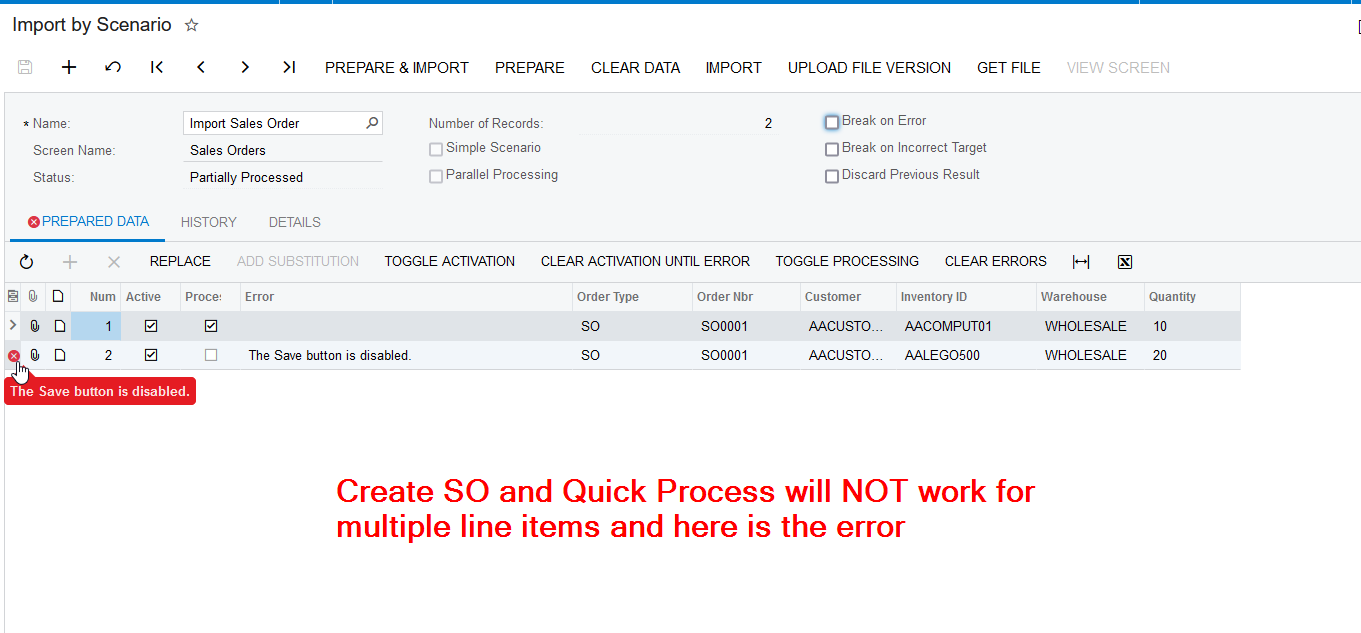
Hi Laura,  We can create Sales Order and Quick Process the order below action only when we have 1 line item in the Sales Order. If you have multiple line items, we can not perform Create SO and Quick Process and you will get the below issue (Attached screenshot)

  • Create Shipment
  • Confirm Shipment
  • Prepare Invoice 
  • Release Invoice

If you have multiple line items on the Sales Order, please have separate import scenarios. I have attached below 3 import scenario XML files for your reference.

  • Create Sales Order 
  • Quick Process
  • Create SO and Quick Process (works for only 1 line item)

Hope this helps!


2 replies

Naveen Boga
Captain II
Forum|alt.badge.img+19
  • Captain II
  • Answer
  • October 7, 2021

Hi Laura,  We can create Sales Order and Quick Process the order below action only when we have 1 line item in the Sales Order. If you have multiple line items, we can not perform Create SO and Quick Process and you will get the below issue (Attached screenshot)

  • Create Shipment
  • Confirm Shipment
  • Prepare Invoice 
  • Release Invoice

If you have multiple line items on the Sales Order, please have separate import scenarios. I have attached below 3 import scenario XML files for your reference.

  • Create Sales Order 
  • Quick Process
  • Create SO and Quick Process (works for only 1 line item)

Hope this helps!


Forum|alt.badge.img
  • Author
  • Varsity I
  • October 8, 2021

Thank you @Naveen B