

Answer

Workflow Approvals

  • February 21, 2025
  • 3 replies
  • 159 views

Forum|alt.badge.img

Scenario: Issuing a Bill with a 5-Step Approval Flow A company, prepare bill to customer and needs approval before processing the payment.

🔹 Approval Steps:

1️⃣ Step 1: Accountant Review – Checks bill details and submits for approval.

2️⃣ Step 2: Finance Manager Approval – Verifies bill accuracy and compliance.

3️⃣ Step 3: Department Head Approval – Confirms budget availability.

4️⃣ Step 4: General Manager Approval – Ensures approval for major expenses.

5️⃣ Step 5: CEO Final Approval – Authorizes high-value payments before processing. Thanks in Advance 
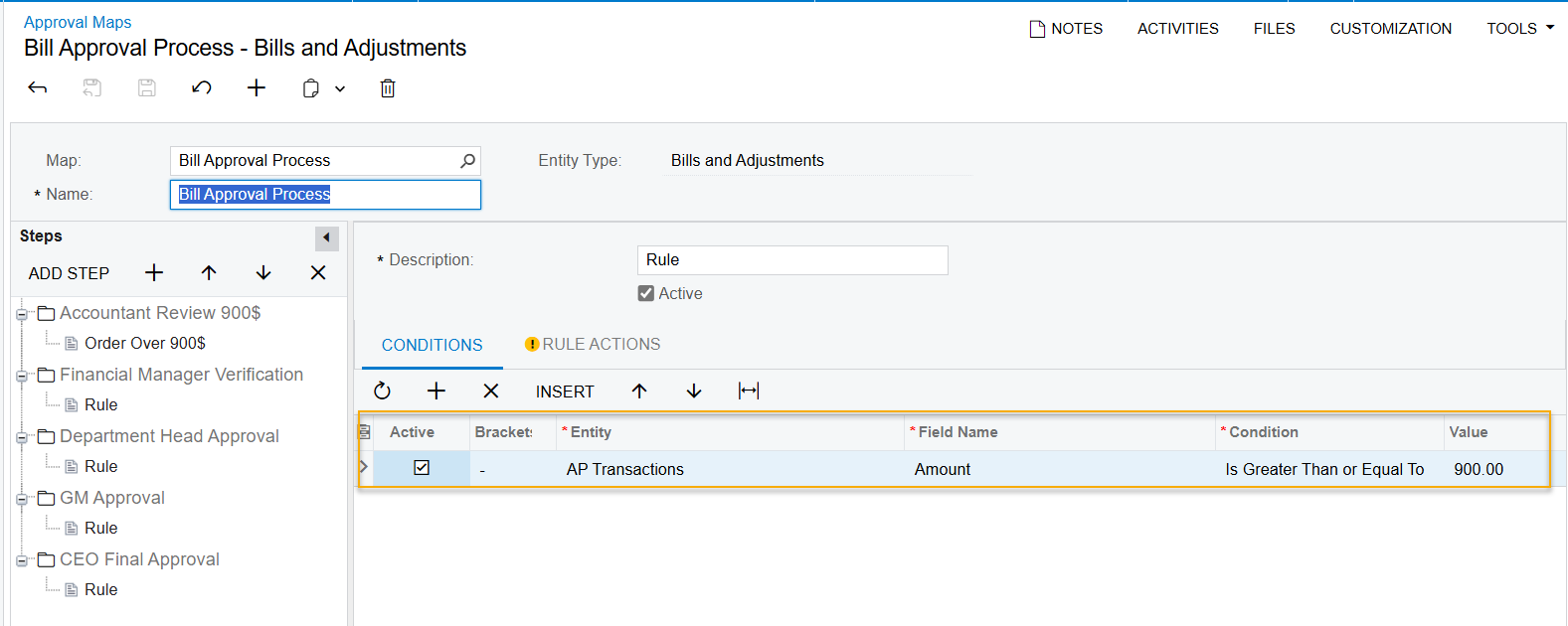
 

Best answer by nhatnghetinh

Hi ​@nthea23 

I attach the XML file of "Sales Order_Approval_Process" in your previous post. You do each step as follows:
1/. Import the XML file into the Approval Maps screen.
2/. Create Users and Employees corresponding to each Role in Approval Maps
3/. Test by logging in to the User of each Role like Approval Maps => you will see that the screen will only allow you to perform the next step after Approve at the last step

Please refer to the Youtube Videos below.


Best Regards,

NNT

3 replies

nhatnghetinh
Captain II
Forum|alt.badge.img+11
  • Captain II
  • February 21, 2025

Hi ​@nthea23 

I see that this post is similar to your previous solved post.


Which step are you having problems with?


Best Regards,

NNT


Forum|alt.badge.img
  • Author
  • Freshman I
  • February 21, 2025

I am first time to do it, and I try to set up by myself but still can't. After, I had testing it has error. Could you give the condition to set up all step. Thanks so much  


nhatnghetinh
Captain II
Forum|alt.badge.img+11
  • Captain II
  • Answer
  • February 21, 2025

Hi ​@nthea23 

I attach the XML file of "Sales Order_Approval_Process" in your previous post. You do each step as follows:
1/. Import the XML file into the Approval Maps screen.
2/. Create Users and Employees corresponding to each Role in Approval Maps
3/. Test by logging in to the User of each Role like Approval Maps => you will see that the screen will only allow you to perform the next step after Approve at the last step

Please refer to the Youtube Videos below.


Best Regards,

NNT

