Question

Why RGOL in Fund Transfer is zero (o)?

  • February 16, 2026
  • 5 replies
  • 10 views

Forum|alt.badge.img

Hi everyone, i want to ask about the fund transactions. So, I want to send my money from bank account (USD) to the other bank account (IDR), so it’s different bank accounts and currency. 
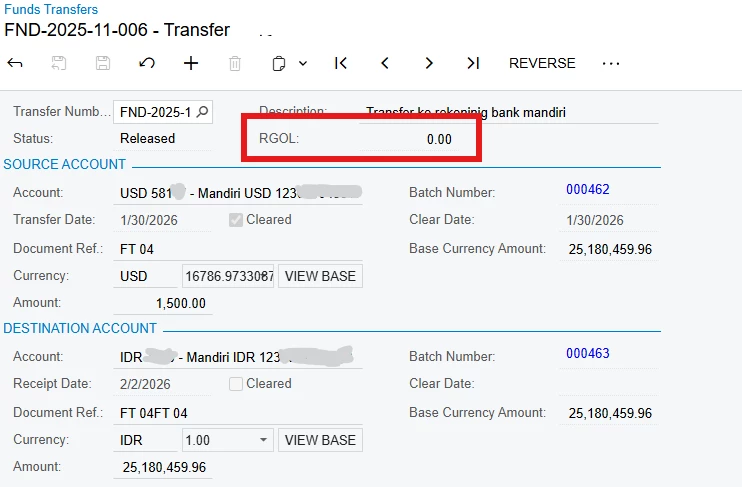
I already fill the blank item in the Fund Transactions, but I don’t get it why my RGOL is still zero (0)?
I mean in my source dan destinations have a different date but why it’s still zero RGOL.

Please help me to answer this, I’m just confused, where I should put the adjustment transactions of RGOL?

Here I put the screenshoot bellow, Please help me to solve this, I really appreciate it. 

Thank you
 

5 replies

aryanjadhav50
Jr Varsity I
Forum|alt.badge.img
  • Jr Varsity I
  • February 16, 2026

Hi ​@dinda56,

RGOL in a Funds Transfer will only be generated if there is an exchange rate difference that impacts the base currency amount. In your case, RGOL is 0.00 because there is no difference in base currency calculation.

How RGOL works in Fund Transfer:

  1. What triggers RGOL
    Acumatica compares the exchange rate used in the transfer against the system currency rate for the transaction date.
    If both sides result in the same base currency amount, no realized gain or loss is created.

  2. Different dates alone do not create RGOL
    Even if the source and destination dates are different, RGOL will still be zero if:
    – The exchange rates for those dates are the same, or
    – The calculated base currency amount does not change

RGOL is driven by rate differences, not just date differences.

  1. When will RGOL appear?
    RGOL will be posted if:
    – The currency rate for USD to IDR differs between the effective dates, and
    – That difference changes the base currency value of the transaction

  2. Where RGOL is posted
    You do not manually enter RGOL.
    If a rate difference exists, Acumatica automatically posts it to the Realized Gain or Realized Loss accounts defined in Currency Management Preferences or Cash Account settings.

If you expect a gain/loss due to rate changes after the transfer date, you may need to run Cash Account Revaluation instead.


Forum|alt.badge.img+1

hey ​@dinda56 ,
Did you compare the dates with the exchange rate dates? As this might result in 0 (no difference) if the dates are same.


Forum|alt.badge.img
  • Author
  • Varsity I
  • February 18, 2026

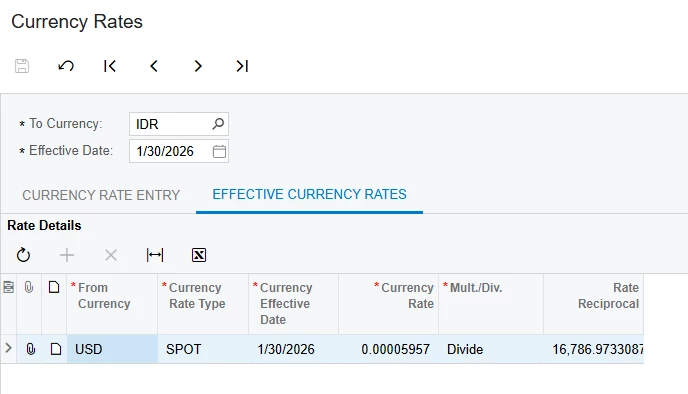
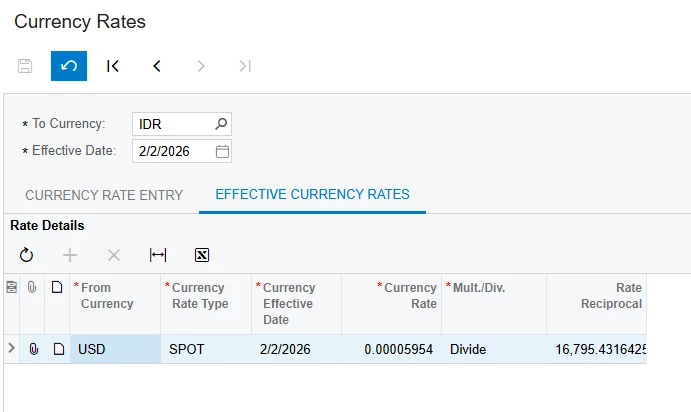
Hi ​@aryanjadhav50 thank you for your response, I have input the currency rates for each date (I will put the picture bellow) so there is difference currency rates between the Source Account and the Destination Account. There is set up that I missing or wrong for the currency rates so RGOL in Fund Transfers can not read it.

If the RGOL is worked in Fund Transfers so it will directly goes to Revaluation rights? but in Revaluations menu is for GL, AP, and AR and there is no Revaluations for Cash Accounts, can you help me where is the Revaluations for the Cash Accounts?

I hope you can help me to solve this, I really appreciate

Thank you.


aryanjadhav50
Jr Varsity I
Forum|alt.badge.img
  • Jr Varsity I
  • February 18, 2026

Hi ​@aryanjadhav50 thank you for your response, I have input the currency rates for each date (I will put the picture bellow) so there is difference currency rates between the Source Account and the Destination Account. There is set up that I missing or wrong for the currency rates so RGOL in Fund Transfers can not read it.

If the RGOL is worked in Fund Transfers so it will directly goes to Revaluation rights? but in Revaluations menu is for GL, AP, and AR and there is no Revaluations for Cash Accounts, can you help me where is the Revaluations for the Cash Accounts?

I hope you can help me to solve this, I really appreciate

Thank you.


Hi ​@dinda56 

Even if you entered different rates, RGOL will only appear if the base currency amount changes between source and destination.

Please check:

  1. Currency Rate Type
    Make sure both cash accounts and the transfer use the same Rate Type (for example, SPOT).

  2. Effective Date
    Confirm the transfer date matches the rate’s effective date.

  3. Base Currency Amount
    If the Base Currency Amount is the same on both sides, RGOL will be 0.00.

About revaluation:

RGOL from Funds Transfer is realized gain/loss and is posted automatically at release to the Realized Gain or Loss accounts (set in Currency Management Preferences or Cash Account).

It does not go to Revaluation.

Cash Account Revaluation is under:
Cash Management → Processes → Revalue Cash Accounts
This is only for unrealized gain/loss on foreign currency balances.

If RGOL is zero, the system is calculating the same base amount, even if the rates look different.


aryanjadhav50
Jr Varsity I
Forum|alt.badge.img
  • Jr Varsity I
  • February 19, 2026

Hi ​@aryanjadhav50 thank you for your response, I have input the currency rates for each date (I will put the picture bellow) so there is difference currency rates between the Source Account and the Destination Account. There is set up that I missing or wrong for the currency rates so RGOL in Fund Transfers can not read it.

If the RGOL is worked in Fund Transfers so it will directly goes to Revaluation rights? but in Revaluations menu is for GL, AP, and AR and there is no Revaluations for Cash Accounts, can you help me where is the Revaluations for the Cash Accounts?

I hope you can help me to solve this, I really appreciate

Thank you.


Hi ​@dinda56 

Even if you entered different rates, RGOL will only appear if the base currency amount changes between source and destination.

Please check:

  1. Currency Rate Type
    Make sure both cash accounts and the transfer use the same Rate Type (for example, SPOT).

  2. Effective Date
    Confirm the transfer date matches the rate’s effective date.

  3. Base Currency Amount
    If the Base Currency Amount is the same on both sides, RGOL will be 0.00.

About revaluation:

RGOL from Funds Transfer is realized gain/loss and is posted automatically at release to the Realized Gain or Loss accounts (set in Currency Management Preferences or Cash Account).

It does not go to Revaluation.

Cash Account Revaluation is under:
Cash Management → Processes → Revalue Cash Accounts
This is only for unrealized gain/loss on foreign currency balances.

If RGOL is zero, the system is calculating the same base amount, even if the rates look different.

Have you get the solution?