Answer

What are some options for GIs when datasets start getting large

  • October 9, 2025
  • 6 replies
  • 82 views

Forum|alt.badge.img

I have clients that are trying to create GIs and work with their GLTran data.  The amount of data in this table has gotten very large over a few years of usage.  It significantly limits the GI filter capabilities as this dataset gets larger.  What options do customers have to create helpful GIs as their dataset gets larger.


Here is an example:

A client created a GI on just the GLTran table.  There are no table joins.

The GI will pull back a record count if the last filter is removed (BETWEEN).  It sometimes pulls back a record count if the two filters with the date range are turned on.

This is very frustrating that the filter capabilities become extremely more limited as the dataset gets larger.

Does anyone have any suggestions or recommendations as we have experienced this in other places as well?

Best answer by aaghaei

Although the SQL Views are not Acumatica’s suggested approach, I have found that on some high-volume scenarios pushing the load to DB layer alleviate some of the pain we experience at Application/Presentation layer. On occasions I have received 4-5 times faster result by creating neat Views and using them as corresponding DAC in Acumatica instead of doing all the joins on GI and having Acumatica create some queries that in some cases it takes a day to decipher what is doing. Long story short create View on SQL, Create corresponding DAC and use the custom DAC. This is best you can d from the performance perspective.

6 replies

aaghaei
Captain II
Forum|alt.badge.img+10
  • Captain II
  • Answer
  • October 10, 2025

Although the SQL Views are not Acumatica’s suggested approach, I have found that on some high-volume scenarios pushing the load to DB layer alleviate some of the pain we experience at Application/Presentation layer. On occasions I have received 4-5 times faster result by creating neat Views and using them as corresponding DAC in Acumatica instead of doing all the joins on GI and having Acumatica create some queries that in some cases it takes a day to decipher what is doing. Long story short create View on SQL, Create corresponding DAC and use the custom DAC. This is best you can d from the performance perspective.


Forum|alt.badge.img+8
  • Captain II
  • October 10, 2025

@stephaniet98 


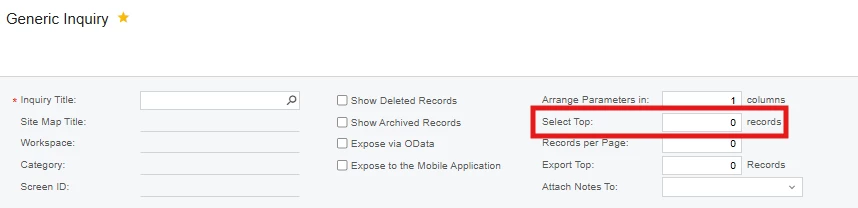
You could try to retrieve the top X records to limit how many records are loaded and have another copy GI which contains the total no. of records.


Forum|alt.badge.img
  • Author
  • Freshman II
  • October 10, 2025

A SQL View was actually what were in the process of creating to test.  Thanks for the feedback on you finding that you have found that it can help improve performance.  


As far as the top records, the problem they are having is they want to export the records to excel.  When you do not get a record count it does not allow you to export all of the records.  Unfortunately if we only select the top records it won’t give them the ability to export all of the records that meet the criteria.


darylbowman
Captain II
Forum|alt.badge.img+15

Have you considered using Velixo? I know next to nothing about it, except that it is (I think) exclusively for working in Excel.


aaghaei
Captain II
Forum|alt.badge.img+10
  • Captain II
  • October 10, 2025

Gabriel’s Velixo is a great tool if you need structured data primarily from GL/PM for financial reporting and writebacks. I have used Velixo a little while back and they might have expanded on it since then but for Velixo to work you need to have GIs anyway and this is the struggle I believe.


aaghaei
Captain II
Forum|alt.badge.img+10
  • Captain II
  • October 10, 2025

Just I was thinking if you need this for internal use and can ignore Acumatica certification rules you can even better use Stored Procedures so you can filter the data right from the source tables. This way you can apply WHERE on each table as you wish to limit the records and retrieve only the data you need. In SQL Views you still are loading all data but of course selecting only the fields you need.

Here is a sample how you can execute an existing SQL SP in Acumatica but you will need to fine tune it for your use case. I have not tried this in GI context but it works in regular screens.

        public static string executeCustomRouteProcedure(int? approvalID, string status)
{
StringBuilder sb = new StringBuilder("");

PXSPInParameter _companyID = new PXSPInParameter("CompanyID", PXInstanceHelper.CurrentCompany);
PXSPInParameter _approvedByID = new PXSPInParameter("ApprovedByID", PXAccess.GetContactID());
PXSPInParameter _approvalID = new PXSPInParameter("ApprovalID", approvalID);
PXSPInParameter _status = new PXSPInParameter("Status", status);

PXSPOutParameter outParam = new PXSPOutParameter("out", PXDbType.NVarChar, 50, null);

object[] results = PXDatabase.Execute("uspTest", new PXSPParameter[] { _companyID, _approvedByID, _approvalID, _status, outParam });

foreach (object result in results)
{
sb.Append(result.ToString());
}

return sb.ToString().Trim();
}