Answer

Trouble Posting Fixed Asset Transactions

  • May 23, 2024
  • 6 replies
  • 349 views

Forum|alt.badge.img

Hello, 

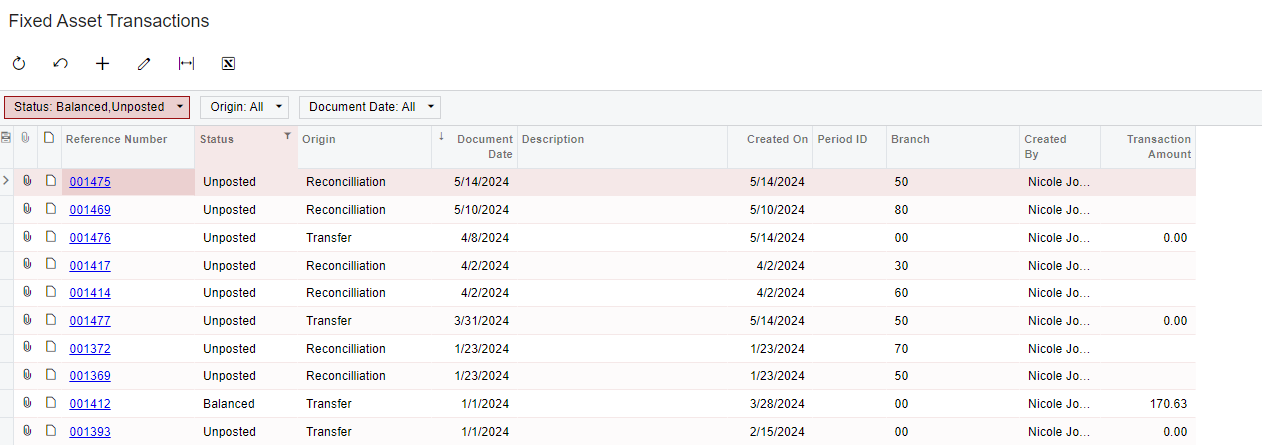
There is an issue with several older fixed asset transactions that are in Unposted status, and I’m curious if anyone knows why they are unposted and how to get them to post. 


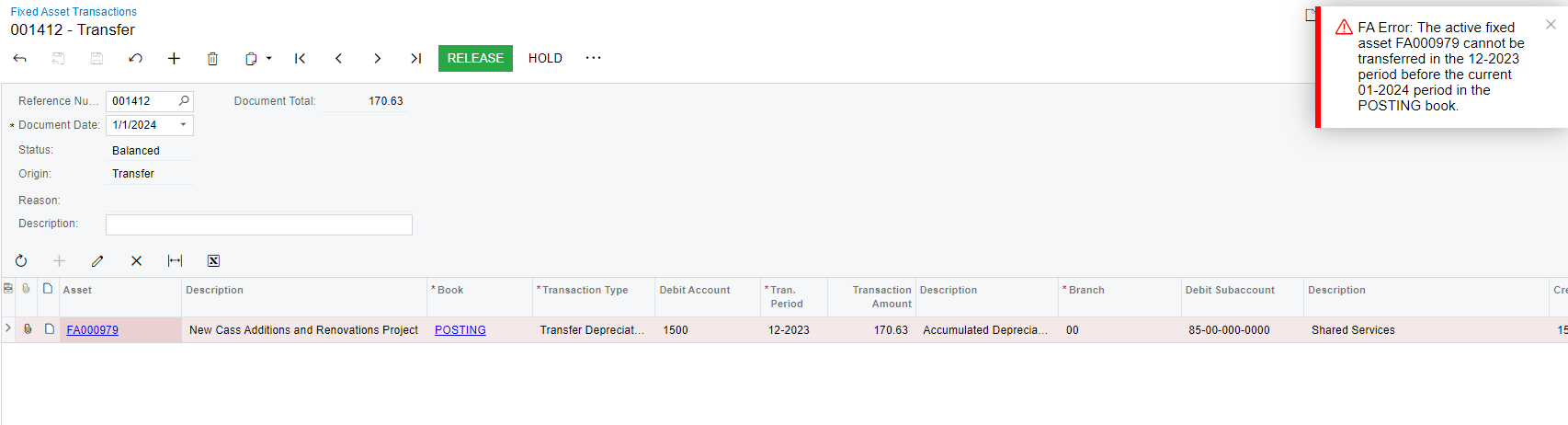
Also, there is another one that is in balanced status and returns the following error when trying to release: 


Any tips or advice is greatly appreciated!

Best answer by Robert Sternberg

Unposted transactions in fixed assets is described as a transaction that does not need to be posted.  This status can be caused by migrated transactions as @AmaanFazeer11 noted or by transactions that only interacted with non-posting books.  This is likely why you see more recent unposted transactions. 


Here is a prior suggestion I have made which might provide clarity on the topic:

[Unposted FA Transactions are] a continued concern and requires constant training caused by the presence of Unposted transactions in the system, which users are unable to post or delete. This confusion often stems from transactions originating either from data migration or involving non-posting books.

To address this, I propose a change in the status terminology.

Transactions generated during a period when 'Update GL' is deactivated in FA Preferences should be labeled as 'Migrated'. Furthermore, for transactions that are finalized [but not in need of further processing, such as those that do not involve posting books], the status should be changed to 'Complete' (alternatively, 'Released' could also be considered). This modification will enhance clarity and reduce the need for repetitive training.


Hope this helps!

6 replies

Forum|alt.badge.img+2
  • Acumatica Employee
  • May 23, 2024

Hello @bclark 

The Fixed Asset transactions that are showing as "Unposted" are Fixed Asset transactions that have been bought into Acuamtica in Migration Mode.(Update GL turned off)

Hence all these transaction have actually been Released and Posted on the Fixed Asset Subledger but do not have a GL batch posting.

Kind Regards,

Amaan


Laura03
Captain II
Forum|alt.badge.img+19
  • Captain II
  • May 23, 2024

Hello,

Please vote for improvements to migrated Fixed Assets transactions here:

Ideas for part 2 of your question, unable to transfer an asset: 

  • Does it make any difference if the FA Transaction is placed on hold, then the date is changed to a different date/period?
  • What is the status of the periods involved in the transaction?  Can someone in the Financial Supervisor role release/post the entry for you?

Laura


Forum|alt.badge.img
  • Author
  • Varsity I
  • May 23, 2024

@AmaanFazeer11 

We are still seeing these unposted transactions even for more recent orders that are entered in Acumatica, though. 

Is this different than migration mode?


Chris Hackett
Community Manager
Forum|alt.badge.img
  • Acumatica Community Manager
  • July 2, 2024

Hi @bclark were you able to find a solution? Thank you!


Robert Sternberg
Captain II
Forum|alt.badge.img+7

Unposted transactions in fixed assets is described as a transaction that does not need to be posted.  This status can be caused by migrated transactions as @AmaanFazeer11 noted or by transactions that only interacted with non-posting books.  This is likely why you see more recent unposted transactions. 


Here is a prior suggestion I have made which might provide clarity on the topic:

[Unposted FA Transactions are] a continued concern and requires constant training caused by the presence of Unposted transactions in the system, which users are unable to post or delete. This confusion often stems from transactions originating either from data migration or involving non-posting books.

To address this, I propose a change in the status terminology.

Transactions generated during a period when 'Update GL' is deactivated in FA Preferences should be labeled as 'Migrated'. Furthermore, for transactions that are finalized [but not in need of further processing, such as those that do not involve posting books], the status should be changed to 'Complete' (alternatively, 'Released' could also be considered). This modification will enhance clarity and reduce the need for repetitive training.


Hope this helps!


  • Freshman I
  • November 11, 2025

If the cost is zero, then you perform the following steps:

  1. Activate the GL function

  2. Post those assets

  3. Go back to the asset and select Reverse in the action box or dispose of the asset

  4. It will post to GL with zero values

  5. Then you can redo the information