

Answer

Transfer Customer A's debt to Customer B's debt in Acumatica

  • October 23, 2024
  • 3 replies
  • 77 views

nhatnghetinh
Captain II
Forum|alt.badge.img+11

Dear ALL,

Is it possible to transfer Customer A's debt to Customer B's debt in Acumatica?


Best Regards,

NNT

 

Best answer by Laura03

Hello,

There is no easy way to move documents from one customer to another.

We can’t change the Customer IDon a released document. As Aleks mentions, one option is to reverse all documents on Customer A and re-create them with new numbers on Customer B.

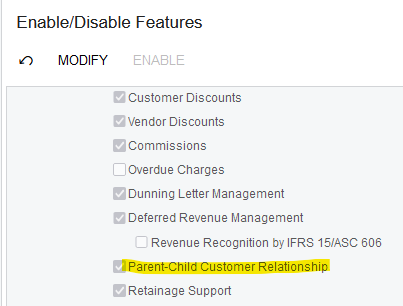
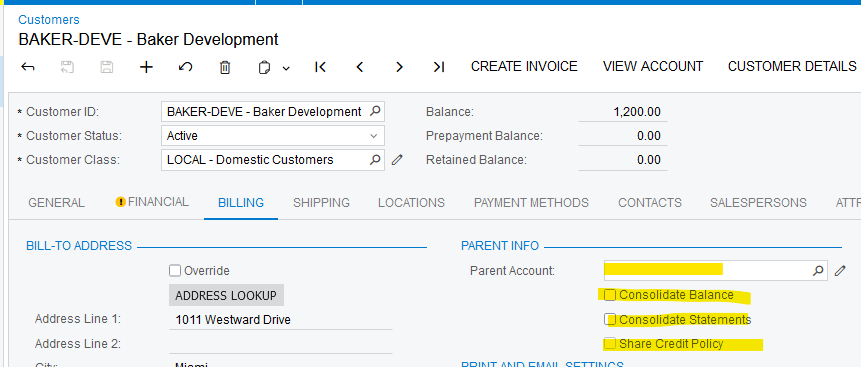
One more idea that may help:  Turn on Parent-Child Customer Relationship feature and then add Customer B as the Parent of Customer A.

Now you can provide Customer B with a Combined Statement showing documents from Customer A and Customer B combined. In Payments screen, a payment from Customer B can be applied to an Invoice from Customer B.
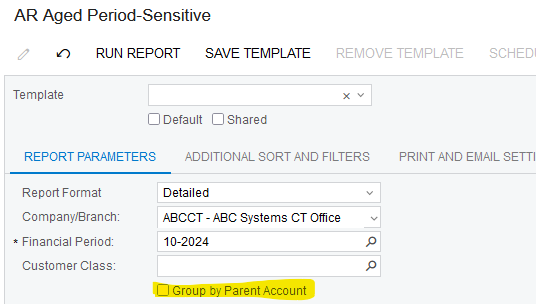
Aging report can be printed for each customer separately, or combined:
I hope this idea helps you.

Laura

3 replies

Manikanta Dhulipudi
Captain II
Forum|alt.badge.img+15

@nhatnghetinh Are you referring below screnario 


Forum|alt.badge.img+8
  • Captain II
  • October 23, 2024

Hi @nhatnghetinh 


Would posting a dummy credit note to satisfy the invoice for customer A and raising a dummy invoice for customer B work?


Aleks


Laura03
Captain II
Forum|alt.badge.img+19
  • Captain II
  • Answer
  • October 23, 2024

Hello,

There is no easy way to move documents from one customer to another.

We can’t change the Customer IDon a released document. As Aleks mentions, one option is to reverse all documents on Customer A and re-create them with new numbers on Customer B.

One more idea that may help:  Turn on Parent-Child Customer Relationship feature and then add Customer B as the Parent of Customer A.

Now you can provide Customer B with a Combined Statement showing documents from Customer A and Customer B combined. In Payments screen, a payment from Customer B can be applied to an Invoice from Customer B.

Aging report can be printed for each customer separately, or combined:

I hope this idea helps you.

Laura


