Question

Skip the approval process if the Cash Transaction is created through the Process Bank Transactions form.

  • March 4, 2026
  • 6 replies
  • 27 views

Forum|alt.badge.img

Hello, 

I am required to initiate an approval process for Cash Transactions.

However, I do not want the approval process to apply when the Cash Transaction originates from the Process Bank Transactions form, as those transactions are released by default without manual intervention.

Is there a way to identify the origin of a Cash Transaction and bypass the approval process when it has been created through the Process Bank Transactions form?

Thank You

Amanda

 

6 replies

Forum|alt.badge.img+2
  • Acumatica Employee
  • March 4, 2026

Hello ​@apallawala21 

You can try using the condition “Last Modified By” > Does not equal > Admin.

Usually automated processes are run by the system admin account

If a user makes modifications to the document it would be recorded as any user other than Admin

Hope this helps

Amaan


Forum|alt.badge.img
  • Author
  • Jr Varsity III
  • March 4, 2026

Hi ​@AmaanFazeer11 

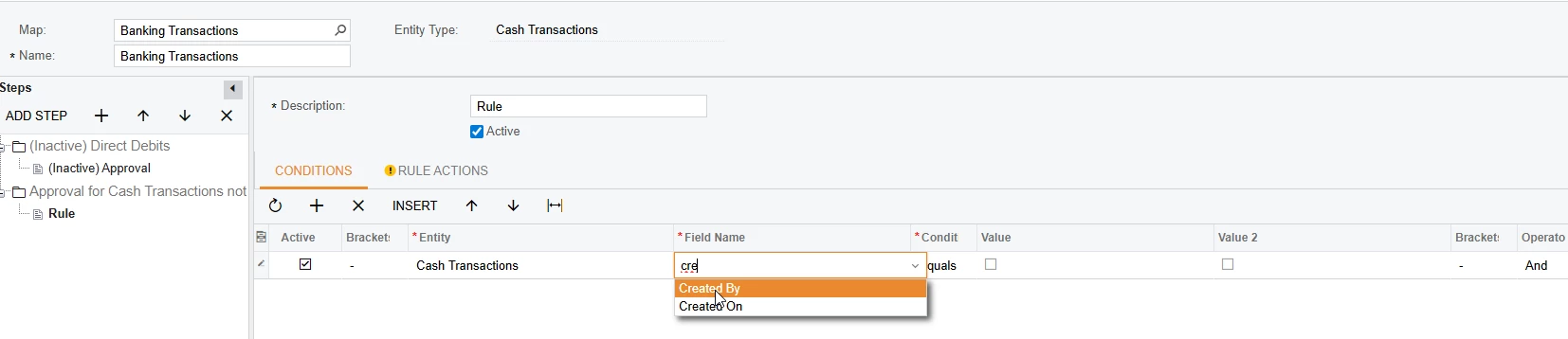
Unfortunately, for Cash Transactions the created user is shown as the user who has processed Bank Transactions. 

It could be identified through Created Through screen but this is not an option in the approval map. 


Laura03
Captain II
Forum|alt.badge.img+20
  • Captain II
  • March 4, 2026

Hello,

Do your cash transactions entered in Process Bank Transactions screen, and cash transactions entered in Cash Transactions screen have the same Owner?  If the Owners are different, Owner could be used as a Condition for Approvals.


Forum|alt.badge.img

Hello, 

I am required to initiate an approval process for Cash Transactions.

However, I do not want the approval process to apply when the Cash Transaction originates from the Process Bank Transactions form, as those transactions are released by default without manual intervention.

Is there a way to identify the origin of a Cash Transaction and bypass the approval process when it has been created through the Process Bank Transactions form?

Thank You

Amanda


@apallawala21 
Yes, you can do.
Use CreatedByScreenID

Transactions created from:

  • Manual Cash Transactions → CreatedByScreenID = CA304000

  • Process Bank Transactions → CreatedByScreenID = CA306000

How to Configure the Approval Condition(you may already know)

Go to:

System Management → Automation → Approval Maps
Find your Cash Transaction approval map, then add a condition:

Apply Approval ONLY when:
CreatedByScreenID != 'CA306000'
 

This will do:

✔ Apply approval for manual cash transactions
✔ Skip approval for transactions created from Process Bank Transactions

I hope it may help you.


Forum|alt.badge.img
  • Author
  • Jr Varsity III
  • March 5, 2026

Hi ​@Srinivas Kota 

My first thought is also the created through screen, but the approval map does not provide the field as a condition option. 

Is there any other way that I can enter a condition than using only the available fields to be chosen as condition fields?

Thank You!


Forum|alt.badge.img
  • Author
  • Jr Varsity III
  • March 5, 2026

Hi ​@Laura03 

The owner is the created employee, it is the same person who creates Cash Transactions either from the Bank Feed or manually.

Hence this cannot be taken as a condition in my scenario. 

Thank You!