Question

Screens that show customer transactions

  • September 3, 2024
  • 5 replies
  • 52 views

Forum|alt.badge.img

Good morning,

Other than Receivables - Customer Details.

Is there screens accessible to most users that would show a customers transactions, whether it be invoices, credits, payments, etc?

Trying to get some members of the the team accessible screens to look at when dealing with customers other than giving them full access to Receivables.

or is it more plausible to just work behind the scenes to get them access to Customer Details?

5 replies

Manikanta Dhulipudi
Captain II
Forum|alt.badge.img+15

Hi @rfrantz 

Please provide only one screen access to users,


Created a new user role and set permissions for customer details, and assign to the role to the needed user.


Thanks


Forum|alt.badge.img
  • Author
  • Freshman I
  • September 3, 2024

Hi @rfrantz 

Please provide only one screen access to users,


Created a new user role and set permissions for customer details, and assign to the role to the needed user.


Thanks

Good morning,

Just to confirm...we have capability of just selecting certain screens in Receivables to give access to in a role rather than the entire Receivables tab?


Laura03
Captain II
Forum|alt.badge.img+19
  • Captain II
  • September 3, 2024

Hello @rfrantz ,

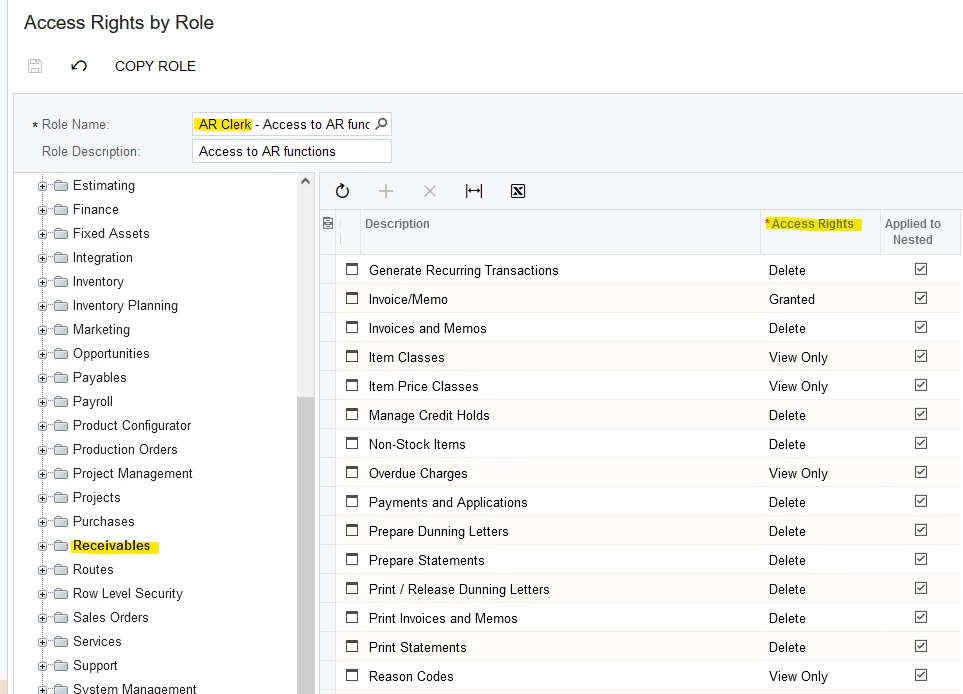
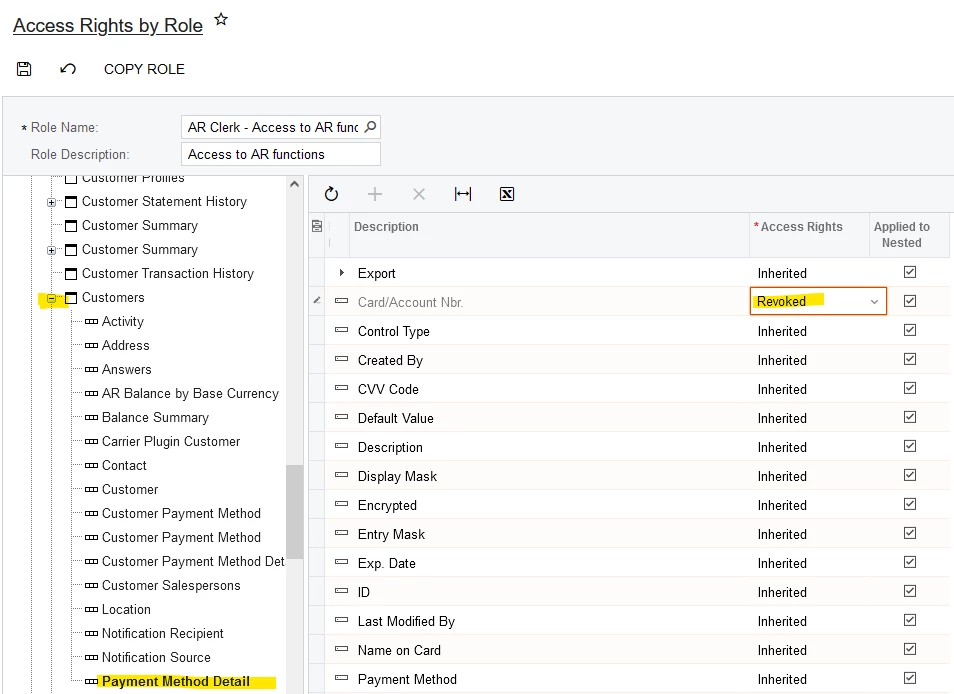
Yes, each role may have different rights per screen within Receivables and other modules. Each role can have field-level rights too, such as to Hide a certain field (Access Rights = Revoked) or to make a certain field Read-only for the role:

Different screens & Reports can have different Access Rights.
Expand a Screen and a section to Hide certain fields.

Laura


Forum|alt.badge.img
  • Author
  • Freshman I
  • September 3, 2024

Hello @rfrantz ,

Yes, each role may have different rights per screen within Receivables and other modules. Each role can have field-level rights too, such as to Hide a certain field (Access Rights = Revoked) or to make a certain field Read-only for the role:

Different screens & Reports can have different Access Rights.
Expand a Screen and a section to Hide certain fields.

Laura

Excellent!  Thank you for the help!!


Laura03
Captain II
Forum|alt.badge.img+19
  • Captain II
  • September 3, 2024

Tip:  If you have any trouble changing & saving new rights in “Access Rights By...” screens, change the next highest level (such as from Revoked to Granted, or from Granted to Revoked), then come back to the lower levels and change screen by screen or field by field.

I think levels can’t be changed to Granted/Revoked when they are beneath an “Inherited” level.


Laura