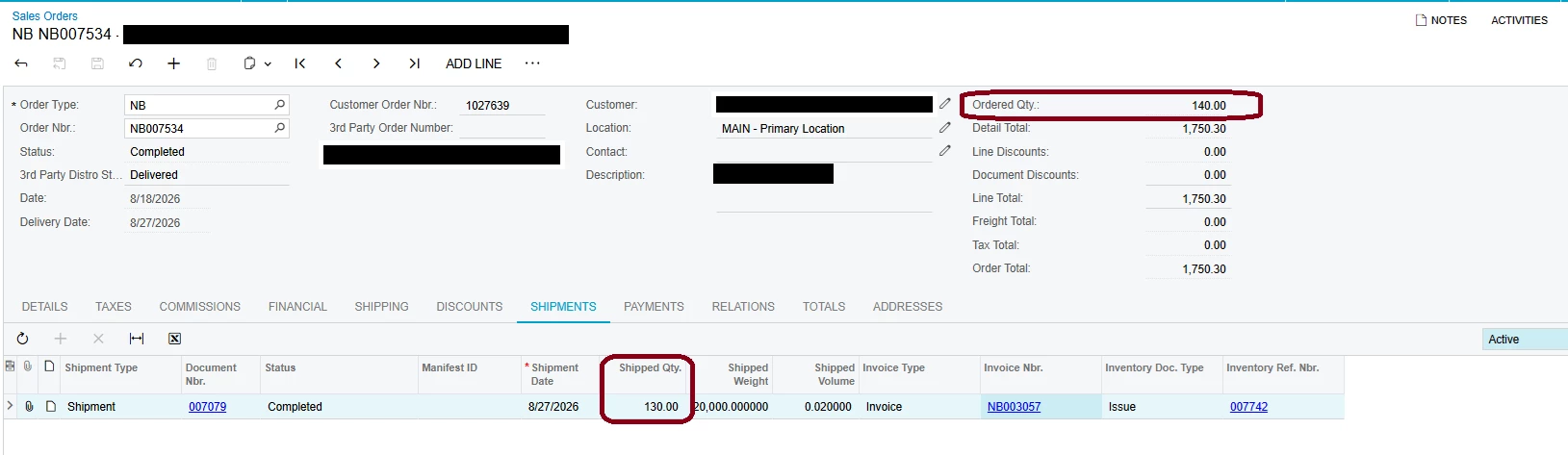
@jenniferquina It depends on whether your customer has to see a single invoice for the 140.
If two invoices are acceptable, don't reverse anything. The 10 units are still on the order. Open it, click Reopen Order on the More menu, then clear the Completed check box on that line and save. Reopen Order by itself won't free the quantity, the line stays Completed with 0 open. Once cleared the 10 come back as open quantity, so Create Shipment for them, confirm, and invoice.
If it has to be one invoice, Eric's Cancel Invoice is the right first move. It voids the invoice with a credit memo and returns the shipment to Confirmed and uninvoiced. Reopen the order and ship the remaining 10 the same way, then instead of invoicing that shipment on its own, go to Process Shipments (SO503000), select Prepare Invoice, and select both shipments. They combine into one invoice for the full 140, as long as Bill Separately is clear and both shipments carry the same invoice date. Watch that date if Use Shipment Date for Invoice Date is turned on in SO101000, since shipments made on different days will bill separately.
Either way you can't edit the 130 on that first shipment. The inventory issue stays attached and released, so Correct Shipment errors out and those 130 stay out of stock with the COGS posted. Cancel Invoice reverses the AR side only, never inventory. That's what you want when the goods really shipped, since the new invoice bills that same shipment. If stock genuinely has to come back, that's still an RC or an inventory adjustment.