

Question

reverse invoice to re-open shipment?

  • September 15, 2026
  • 3 replies
  • 36 views

Hi Community, I’m hoping I can get some help with this.

We are running into some instances where an orders shipment and invoice are processed short. For example, the order called for 140 units, but only 130 units were processed under the associated shipment and invoice. 
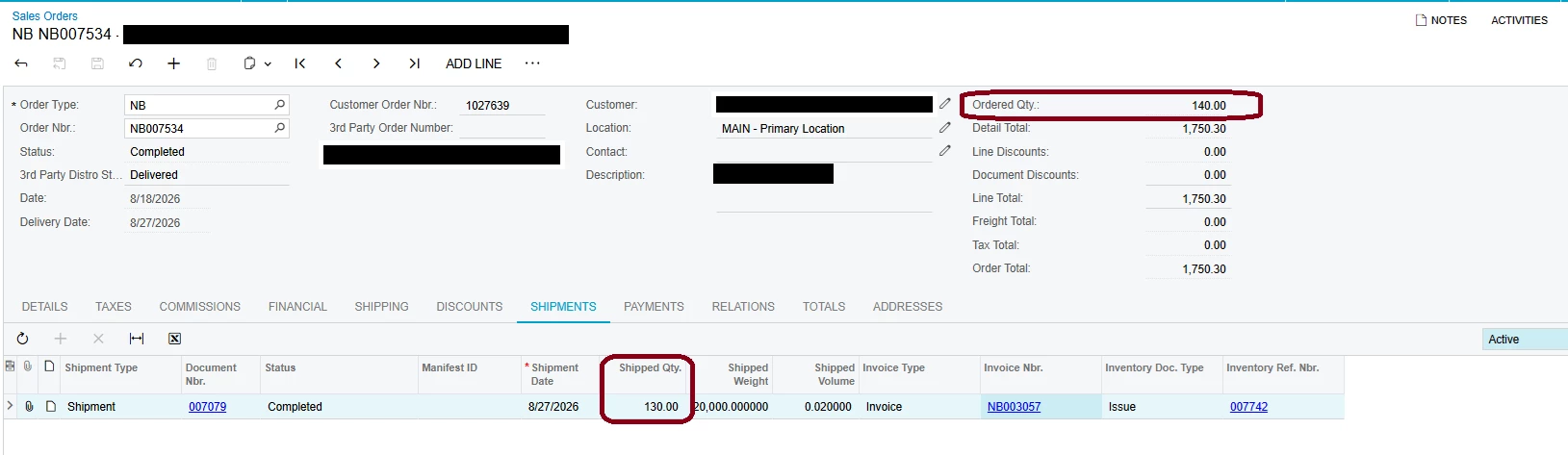
Is there a way to reverse the invoice where it re-opens the shipment so that the shipment can be modified? We are currently using the RC order method to return the inventory and generate the CM to then apply to the invoice with incorrect value. We are then re-doing the order at the correct unit quantity/value. Trying to see if there is a faster way to do this without having to use the RC order method.

Appreciate any feedback! Thanks

3 replies

Eric Ratté
Jr Varsity I
Forum|alt.badge.img+1
  • Jr Varsity I
  • September 15, 2026

Hi

On the Sales Invoice, you can use the Cancel Invoice action. That will create a credit memo change the status of the corresponding shipment.


Steve Milner
Varsity III
Forum|alt.badge.img+2
  • Varsity III
  • September 16, 2026

@jenniferquina It depends on whether your customer has to see a single invoice for the 140.

If two invoices are acceptable, don't reverse anything. The 10 units are still on the order. Open it, click Reopen Order on the More menu, then clear the Completed check box on that line and save. Reopen Order by itself won't free the quantity, the line stays Completed with 0 open. Once cleared the 10 come back as open quantity, so Create Shipment for them, confirm, and invoice.

If it has to be one invoice, Eric's Cancel Invoice is the right first move. It voids the invoice with a credit memo and returns the shipment to Confirmed and uninvoiced. Reopen the order and ship the remaining 10 the same way, then instead of invoicing that shipment on its own, go to Process Shipments (SO503000), select Prepare Invoice, and select both shipments. They combine into one invoice for the full 140, as long as Bill Separately is clear and both shipments carry the same invoice date. Watch that date if Use Shipment Date for Invoice Date is turned on in SO101000, since shipments made on different days will bill separately.

Either way you can't edit the 130 on that first shipment. The inventory issue stays attached and released, so Correct Shipment errors out and those 130 stay out of stock with the COGS posted. Cancel Invoice reverses the AR side only, never inventory. That's what you want when the goods really shipped, since the new invoice bills that same shipment. If stock genuinely has to come back, that's still an RC or an inventory adjustment.


mohammadnawaz51
Varsity I
Forum|alt.badge.img+7

@jenniferquina 

  • Open the incorrect SO Invoice.
  • Use Cancel Invoice 
  • Release the generated credit memo if required.
  • Go back to the related Shipment.
  • Confirm whether the shipment status changed back to Confirmed / Uninvoiced.
  • Use Correct Shipment on the shipment.
  • Update the shipped quantity from 130 to 140.
  • Confirm the shipment again.
  • Prepare and release the corrected invoice.


