

Answer

Report Definition

  • January 10, 2021
  • 3 replies
  • 281 views

Forum|alt.badge.img

Hi 

i encountered a problem to recreate a new report for P&L 

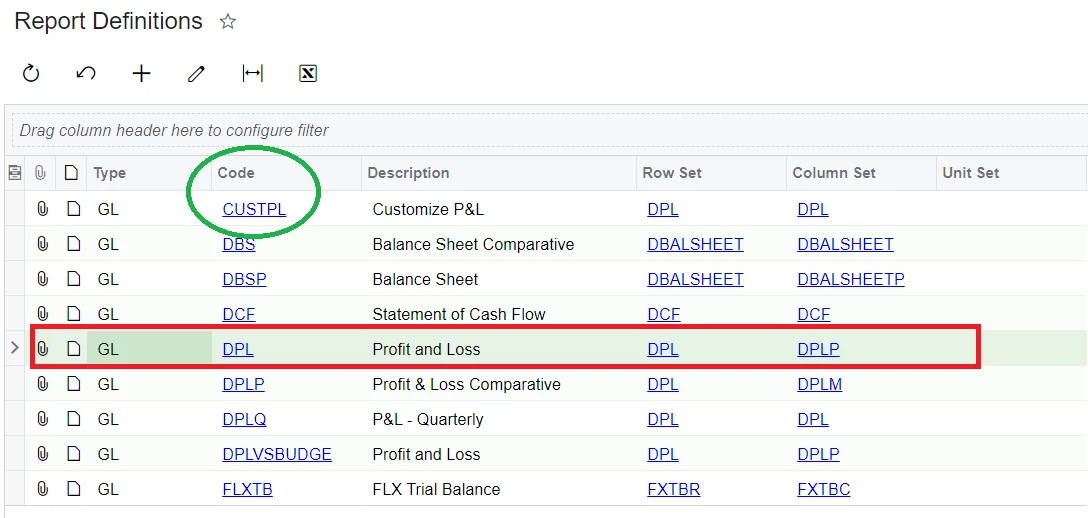
For green circle is the report i want to new create , the row and column based on DPL

However, when i do some changes in DPL in new report (green circle) , it will affected the format in DPL (Red box)

Not sure if there is any way that i can use DPL format to create a new report but i can change the format in new report where not affect the existing DPL format .
 

Best answer by CFritsch

Hello Erin,

Have you copied the row and column set yet to create new row/ column sets? Do this just like you copied the report and it will generate your new row/column sets which you can edit without affecting your original row/column sets.

3 replies

  • Freshman III
  • Answer
  • January 10, 2021

Hello Erin,

Have you copied the row and column set yet to create new row/ column sets? Do this just like you copied the report and it will generate your new row/column sets which you can edit without affecting your original row/column sets.


Forum|alt.badge.img
  • Author
  • Jr Varsity II
  • January 10, 2021

Hi CFritsch

Thanks.

I never copy :(

Could you please guide me how to copy the row and column set


Forum|alt.badge.img
  • Jr Varsity II
  • June 20, 2023

Double click on the DPL→ Click on the COPY ROW SET. This will then ask you to give it a new name (for the Code). It is recommended that you type in the Description box basically the same name as your Code with a brief text such as My P&L Row Set. The same idea can be applied to the COLUMN SET.