Answer

Recalculate Functions

  • June 22, 2022
  • 9 replies
  • 884 views

dougmcbride79
Semi-Pro I
Forum|alt.badge.img

Acumatica has a built in function to “recalculate” various balances such as vendor and inventory.  We have been live for eighteen months and have never run these “recalculate” functions.  Recently, we noticed an error in our inventory and our VAR suggested we run the “recalcuate inventory” function. We ran the fuction and it fixed our error.  My questions is should we run all of these “recalculate” functions regularly such as monthly or quarterly?  Is there any harm in running these recalculate funtions more often?  

Best answer by Kandy Beatty

HI @dougmcbride79 

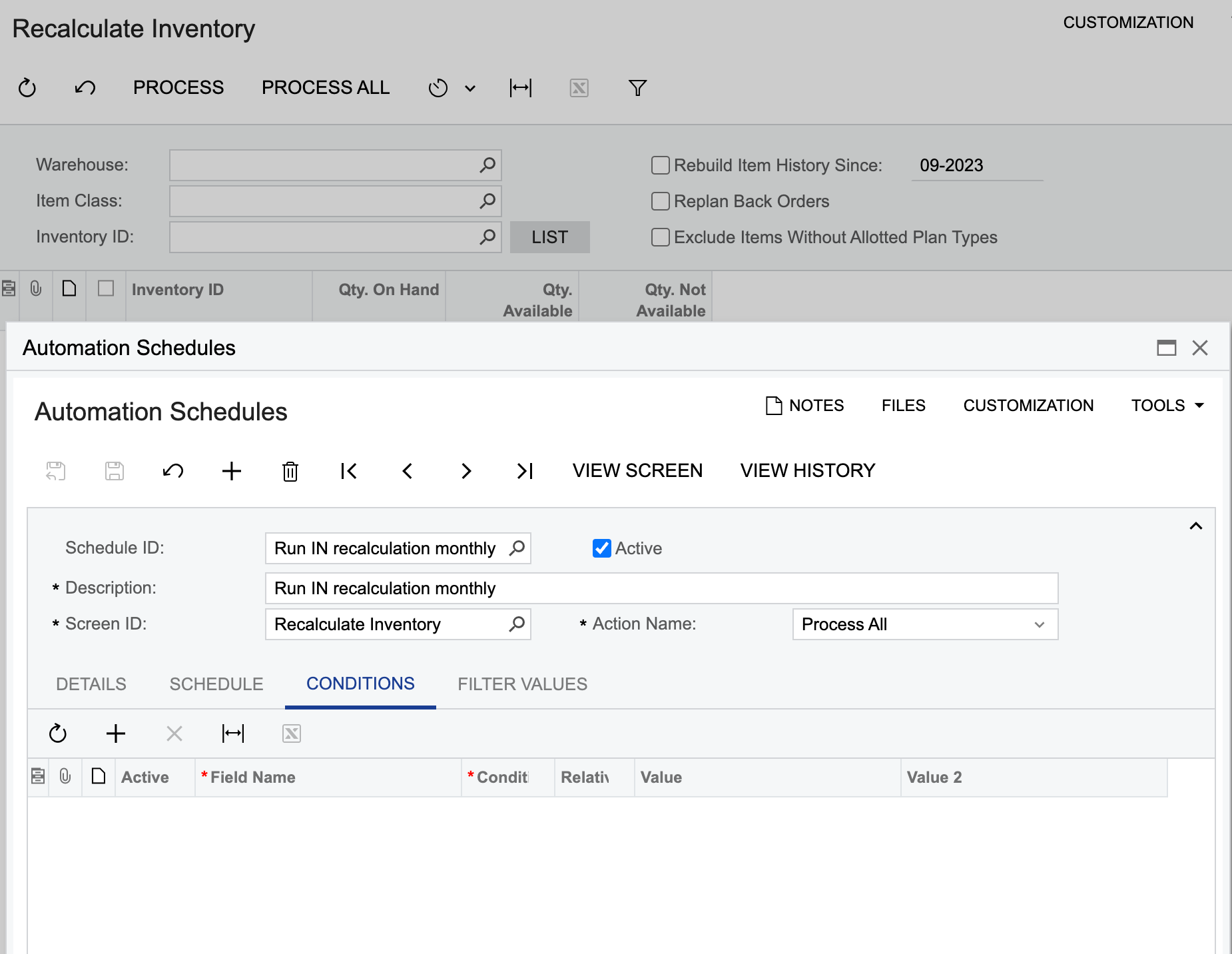
I always suggest clients to run these recalculations on a regular basis. Most run them at end of month and then when they do yearly close. You can put these on a schedule also, which I have recently done for a few as well so you don’t have to remember to do them. 

9 replies

Laura03
Captain II
Forum|alt.badge.img+19
  • Captain II
  • June 22, 2022

Hello @dougmcbride79 ,

When you see a number that is off, or mismatched between reports, it is OK to use the recalculation processes provided by Acumatica.

Under normal business activities, it is not usually needed to schedule these processes or to run them regularly.  I have seen migration activities occasionally produce off-balance situations. Bugs/system errors, power outages, etc. may occasionally produce off-balance situations; this is a guess. In my experience, 9 years using Acumatica, the situation is rare, to be out of balance after ‘going live’.

That being said, I have not had any experiences where the recalculation processes themselves caused any problem. I don’t think it will hurt anything to run them. Did you already search the forum and/or online knowledge-base, for known bugs or posts that report recalculation causing issues?


dougmcbride79
Semi-Pro I
Forum|alt.badge.img
  • Author
  • Semi-Pro I
  • June 22, 2022

I have not, but will search the knowledge base.  And thank you for your answer.  


Kandy Beatty
Captain II
Forum|alt.badge.img+17
  • Captain II
  • Answer
  • June 22, 2022

HI @dougmcbride79 

I always suggest clients to run these recalculations on a regular basis. Most run them at end of month and then when they do yearly close. You can put these on a schedule also, which I have recently done for a few as well so you don’t have to remember to do them. 


DavidEichner
Captain II
Forum|alt.badge.img+13
  • Captain II
  • June 22, 2022

I agree with @kbeatty21 that this would be a good thing to do as part of month end processes.  It would probably also be good to do a snapshot prior to running those recalc operation (just as a precaution).


Forum|alt.badge.img
  • Freshman I
  • September 13, 2023

Hi @kandybeatty49, on the schedule, how do I set up the filters or conditions if there are multiple warehouses?


TimRodman
Pro I
Forum|alt.badge.img+1
  • Pro I
  • July 28, 2025

Does anyone know what tables get updated when you click the PROCESS button on the Recalculate Inventory (IN505000) screen? I’m assuming that it’s INItemCostHist, but I’m not sure.


PeterNicholson
Freshman II
Forum|alt.badge.img

Hi Tim,

This is something that I wouldn’t mind finding out.  I imagine INItemSiteHist, INLocationStatus, INSiteStatus, and INLotSerialStatus get touched as well.  Maybe it depends on the valuation method setup too, especially on the costing tables.


  • Freshman II
  • August 19, 2025

In my experience, recalcing inventory is most relevant when you are modifying availability calculations

There are probably equivalent scenarios in AR and AP with cash flow forecasting, but we have only used it for inventory


Forum|alt.badge.img
  • Jr Varsity II
  • September 24, 2025

On all the recalculate with all the modules:

GL, Banking, AP, AR, Projects, and Inventory

Does anyone know if you select the current period and the first period if it will go back or forward and recalculate the prior periods? I noticed it is defaulted to the first period in the system.