

Question

Pulling updated contact information for customer on invoice?

  • June 15, 2026
  • 3 replies
  • 24 views

Forum|alt.badge.img

Good morning,

Curious, it seems like the native function is set up to pull whichever information is in the system at the time the order is entered into the system.

Is there a way or option to change to pull the most up to date information?  Say we update the customer’s email address and we want all invoices in the system to go to that email rather than whichever email was listed the time the invoice was created.
3 replies

Laura03
Captain II
Forum|alt.badge.img+20
  • Captain II
  • June 15, 2026

Good day, ​@rfrantz ,

I don’t htink Acuamtica has a “get the email address with latest modified date from all sources” setting. We do have control over where in the system the email address originates from.

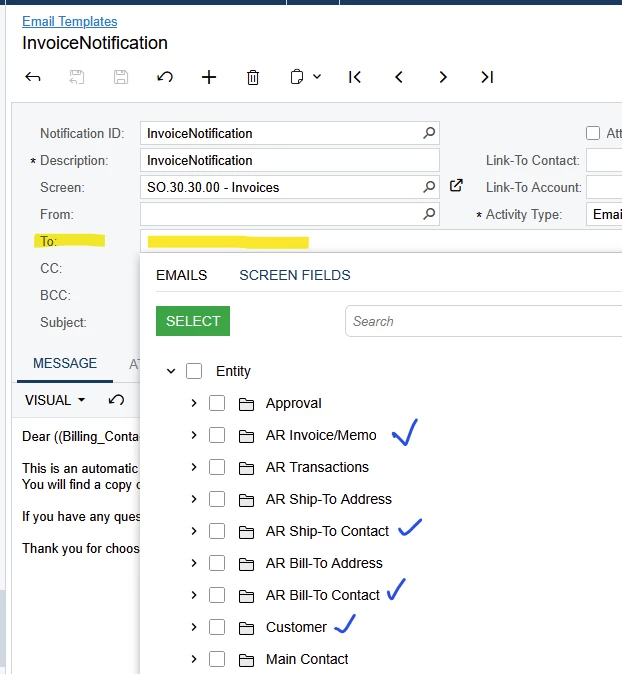
For example, Email Templates may be set up to direct email to an email address from the Invoice, from Ship-to, Bill-to, Customer main address, etc:


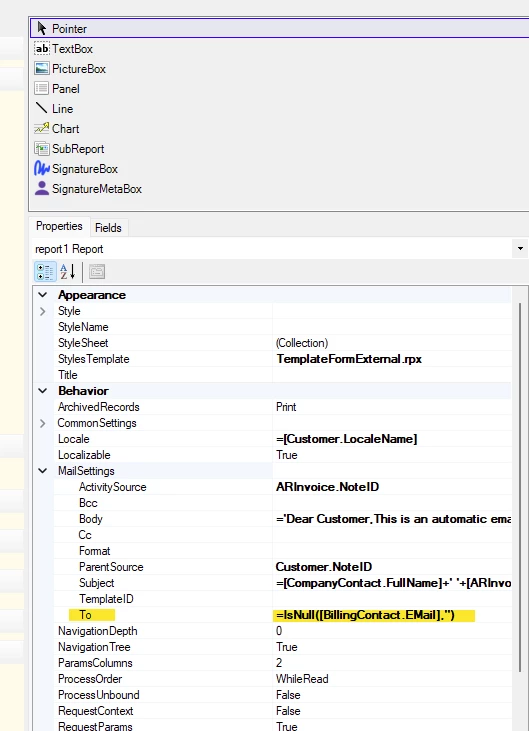
Keep in mind that Email settings may be embedded inside the related report in Report Designer, like this example from SO Invoice:


Forum|alt.badge.img
  • Author
  • Freshman II
  • June 15, 2026

I’ll check the report designers to see which email address the templates are pulling, thanks!


Yeah looking more to the customer rather than from us situation.  Customers old email addresses receiving the occasional invoice because their order was placed prior to a change they made.


meganfriesen37
Captain II
Forum|alt.badge.img+13

Hello,

Another thing to check (if you know contact information has changed) would be to go to the “Addresses” tab of the screen (i.e. Sales Orders, Invoices, etc.) and then check the “override” checkbox for the address/contact sections and then de-select it.  This will pull in the current information from the Customer account/location and that usually works for me.

Megan


