

Answer

Print Customer Statement

  • August 15, 2025
  • 4 replies
  • 107 views

Forum|alt.badge.img

In the settings of the Statement Cycle, there is an option not to print empty statements.
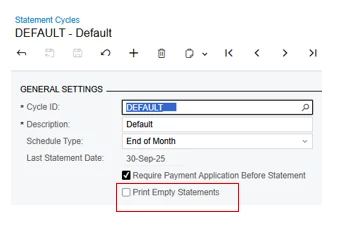
In our understanding, these are customers with 0 or negative balance. However, when we unselect it our Print Statement screen still show the Customers with 0 or negative balance.
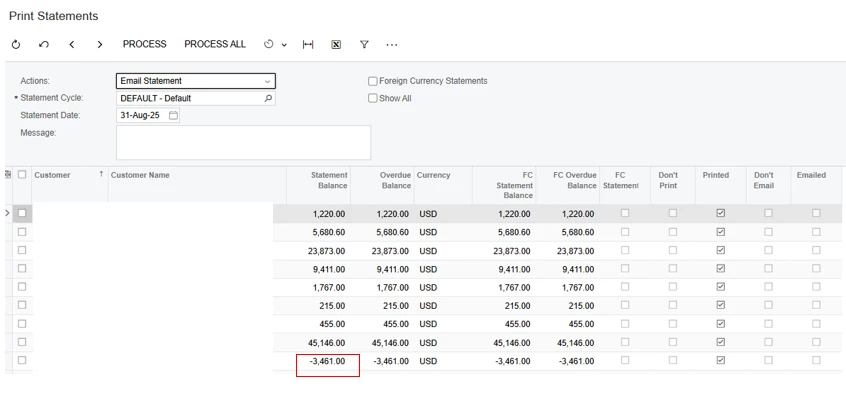


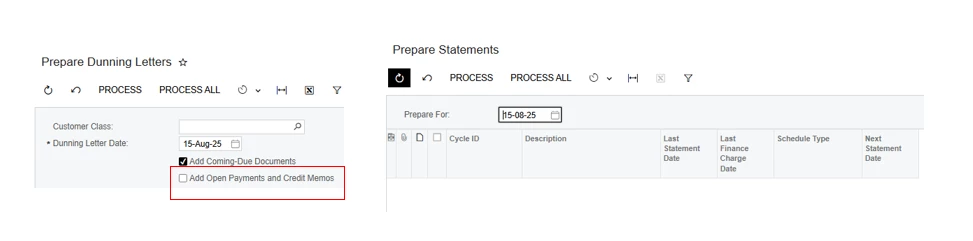
Another thing is that, in the screen Prepare Dunning Letter there is an option to exclude Credit Memos. Is there a way to do this for Statements without doing customization? Thank you. 
 

Best answer by gdewald

@Crisel Have you considered just making a filter for the Print Statement screen where the Statement Balance must be greater than zero? That is what we do when we are emailing and printing our customer statements. 

4 replies

jhouser
Captain II
Forum|alt.badge.img+6
  • Captain II
  • August 16, 2025

Hi ​@Crisel - I believe it’s based on whether the customer has open documents on their account, so it would not exclude negative balances, because there is probably an unapplied credit memo. I also wouldn’t expect it to hide a 0 balance if there are open positive and negative documents totaling 0. It should exclude the customer if they have no open documents. 


To change this you would need to modify the statement itself in Report Designer. Same for dunning letter. Let me know if you would like help accomplishing this. 


Forum|alt.badge.img
  • Author
  • Jr Varsity III
  • August 18, 2025

Hi ​@Crisel - I believe it’s based on whether the customer has open documents on their account, so it would not exclude negative balances, because there is probably an unapplied credit memo. I also wouldn’t expect it to hide a 0 balance if there are open positive and negative documents totaling 0. It should exclude the customer if they have no open documents. 


To change this you would need to modify the statement itself in Report Designer. Same for dunning letter. Let me know if you would like help accomplishing this. 

Thanks for your input. Modifying the report in the Report Designer is the route we’re looking at however this would mean that the user would not have the freedom to change it according to preference. 


Forum|alt.badge.img
  • Jr Varsity II
  • Answer
  • August 18, 2025

@Crisel Have you considered just making a filter for the Print Statement screen where the Statement Balance must be greater than zero? That is what we do when we are emailing and printing our customer statements. 


Forum|alt.badge.img
  • Author
  • Jr Varsity III
  • August 21, 2025

@Crisel Have you considered just making a filter for the Print Statement screen where the Statement Balance must be greater than zero? That is what we do when we are emailing and printing our customer statements. 

Thanks for the input. I guess we will do this.

