Answer

Prevent Wrong nonsense Year being entered on Documents

  • August 17, 2023
  • 8 replies
  • 105 views

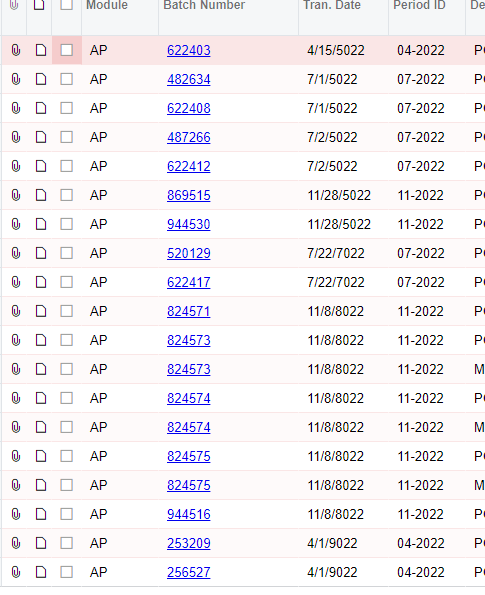
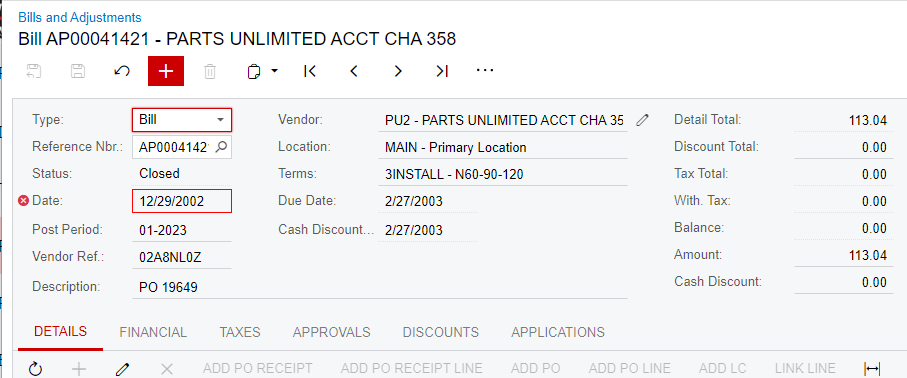
Acumatica allows for nonsense years to be entered such as 2222 and 2044 on AP and AR documents. How can this be prevented? 

Best answer by Bbelknap

We had this issue with a payment accidently entered as 2121 instead of 2021. 

Our Support said it must have been due to having the Finanical Periods opened too far in advance. No, it wasn’t. We create our Finanical Periods one Fiscal Year at a time and only open the months up that are needed - usually current and next month.

I was told there was no correction for it However, we recently updated our version to the latest one and now it has a reverse open for it. I reversed it and recreated it with the correct year. 

8 replies

Kandy Beatty
Captain II
Forum|alt.badge.img+17
  • Captain II
  • August 17, 2023

Hi @borem 

Will you share an example?

How far out are your financial periods opened for also?


Forum|alt.badge.img+2
  • Acumatica Employee
  • August 17, 2023

Hello @borem,

I believe this issue is addressed on this article:


  • Author
  • Freshman I
  • August 17, 2023


AP Bills Entered into Nonsense Years


  • Author
  • Freshman I
  • August 17, 2023


AP entered 1/2023 and paid 1/2023 but Dated Far in the past


  • Author
  • Freshman I
  • August 17, 2023

Our Financial Periods are open just through 12/2023. This issue pitches our AP aging out of balance with our AP trial balance total. 


  • Author
  • Freshman I
  • August 17, 2023

Future dated prepayments cause a variance as well but we haven’t had any dated with nonsense future or past years. 


  • Freshman II
  • Answer
  • August 18, 2023

We had this issue with a payment accidently entered as 2121 instead of 2021. 

Our Support said it must have been due to having the Finanical Periods opened too far in advance. No, it wasn’t. We create our Finanical Periods one Fiscal Year at a time and only open the months up that are needed - usually current and next month.

I was told there was no correction for it However, we recently updated our version to the latest one and now it has a reverse open for it. I reversed it and recreated it with the correct year. 


  • Author
  • Freshman I
  • August 18, 2023

We just updated last Monday so hopefully that will solve the problem for us as well.