Solved

Prepayment Sales Invoice

  • July 10, 2026
  • 5 replies
  • 37 views

What method does everyone use for prepayments on SOs when customer requires a prepayment invoice? Sometimes we will have customers who do not accept SOs with prepayment options. They will not pay on that. Our current fix is to utilize a user-defined field that generates a document which says prepayment invoice but still has the SO number on there. When payment comes through, I apply to the SO so that it will deduct from the balance once we invoice. One issue that arises is that the SO will still show as unbilled given that no invoice is actually generated. Just curious if there is built in functionality that we are not using which handles this situation better. 

Best answer by jstreet06

Megan, thank you for this! I had previously looked for this button on SO payments before. It wasn’t there b/c you have to turn on VAT capability (not applicable to US). I looked for it at that time but we were unable to enable that feature. We just upgraded to 26R1 and finally have that VAT. So thank you for this reminder which led me back to that. I really like that it creates an invoice # for you. 

5 replies

rkenna
Captain II
Forum|alt.badge.img+4
  • Captain II
  • July 10, 2026

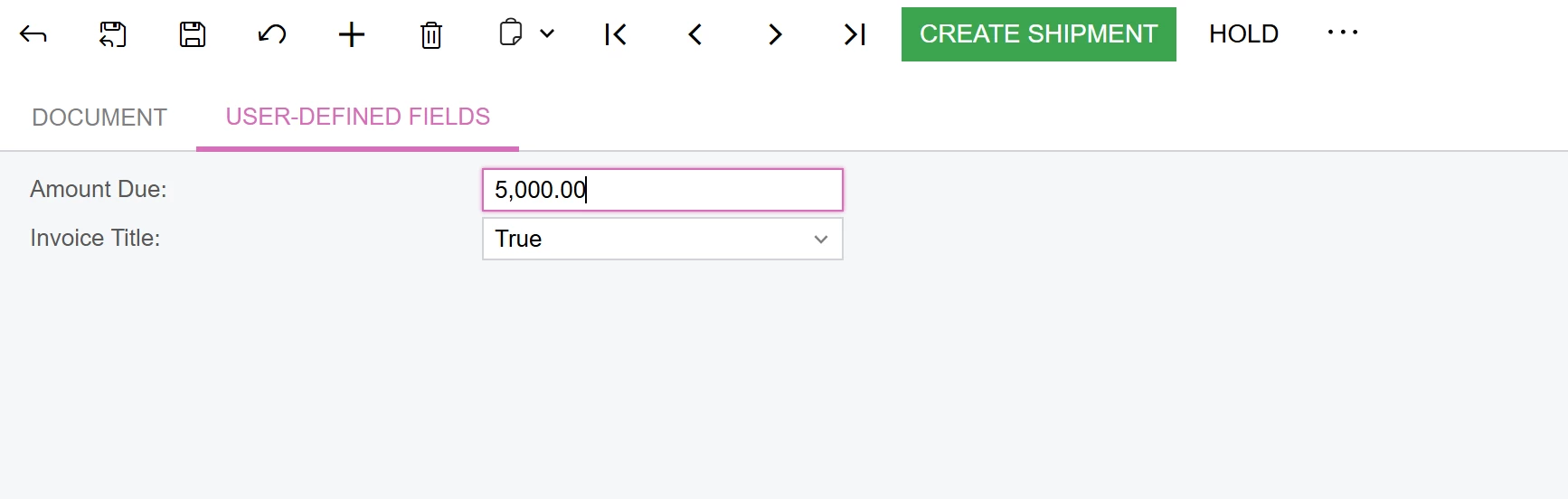
Hi ​@jstreet06, this is something I do wish Acumatica had a better functionality on. What we do with our members who need this Pro-Forma Invoice on the Sales Orders is have a few Attribute UDF’s that a User can use to generate one to send to the customers.

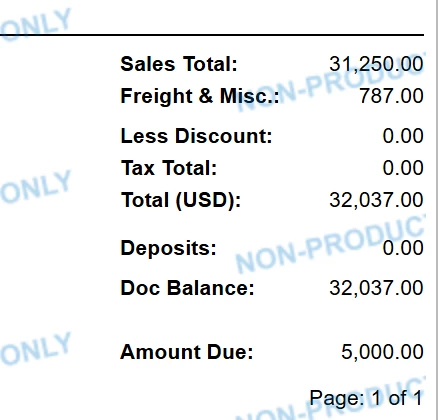
We usually setup a check box for the layout to be a ProForma Invoice to be printed vs the regular Sales Order. This changes the title of the document and displays a second Attribute UDF at the bottom that is the amount due. The User can enter the Amount Due which shows at the bottom. You’ll notice at the bottom we do Deposits (from the totals tab on the Sales Order) as well as the Doc Balance too if they’ve made a previous payment.
 

Cheers,

RJ


meganfriesen37
Captain II
Forum|alt.badge.img+13

rkenna
Captain II
Forum|alt.badge.img+4
  • Captain II
  • July 10, 2026

@meganfriesen37, I am familiar with this process of the recording of the Prepayment Invoice, but there is not a printed form to accompany this prepayment, is there? You would have to do the Prepayment, leave it in the balanced status, then print the Prepayment Invoice from the Invoice screen, not the Sales Order screen, then release it once you have received the Prepayment?

The proforma we use off the Sales Order is just so there can be a quick document generated from the Sales Order to get out to a Customer quickly so they then can go ahead and send in the payment. 


  • Author
  • Freshman II
  • Answer
  • July 10, 2026

Megan, thank you for this! I had previously looked for this button on SO payments before. It wasn’t there b/c you have to turn on VAT capability (not applicable to US). I looked for it at that time but we were unable to enable that feature. We just upgraded to 26R1 and finally have that VAT. So thank you for this reminder which led me back to that. I really like that it creates an invoice # for you. 


meganfriesen37
Captain II
Forum|alt.badge.img+13

I was excited when they introduced this feature a couple years ago, as it really reduces the friction around prepayments!  Glad you were able to get this to work ​@jstreet06