

Since we updated to 2024 R1 and checks now print in whatever order, they are no longer showing up in the Checks and Payments screen in numerical order (in the payment ref. column) See attached.
Is there a way to fix this?
Thank you,
Gretchen
Since we updated to 2024 R1 and checks now print in whatever order, they are no longer showing up in the Checks and Payments screen in numerical order (in the payment ref. column) See attached.
Is there a way to fix this?
Thank you,
Gretchen
Best answer by nhatnghetinh
Hi
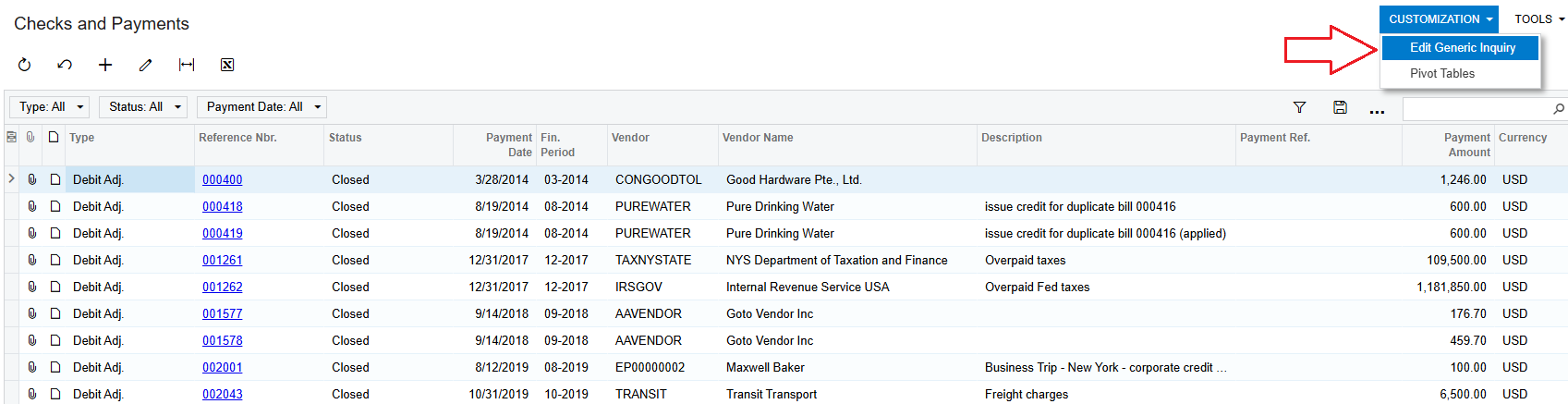
You perform the "Edit Generic Inquiry" feature on the Checks and Payments screen (AP3020PL)
On the Generic Inquiry screen > Click "SORT ORDER" Tab > Create the conditions that you want to sort.
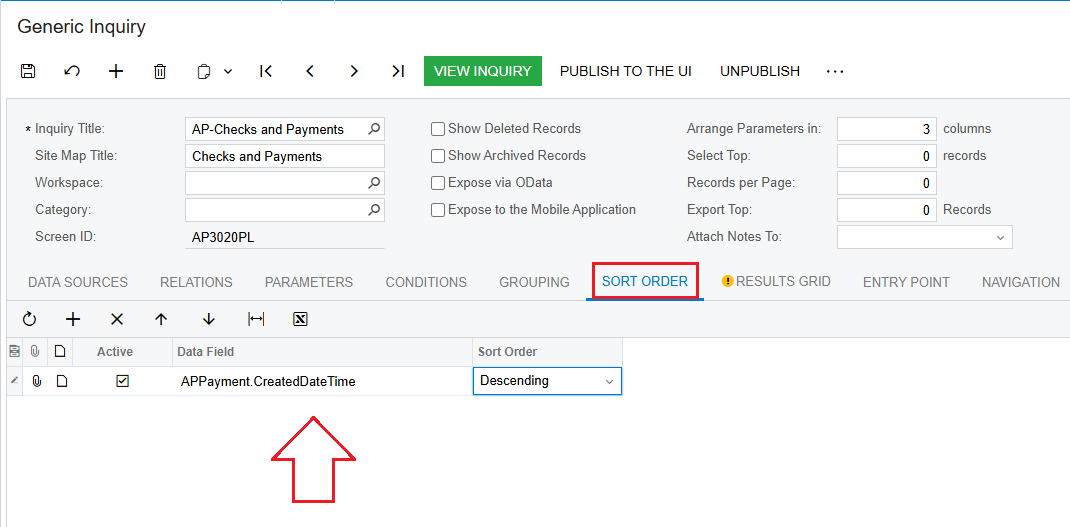
Then click SAVE > And click VIEW INQUIRY.
Best Regards,
NNT
Enter your E-mail address. We'll send you an e-mail with instructions to reset your password.


