

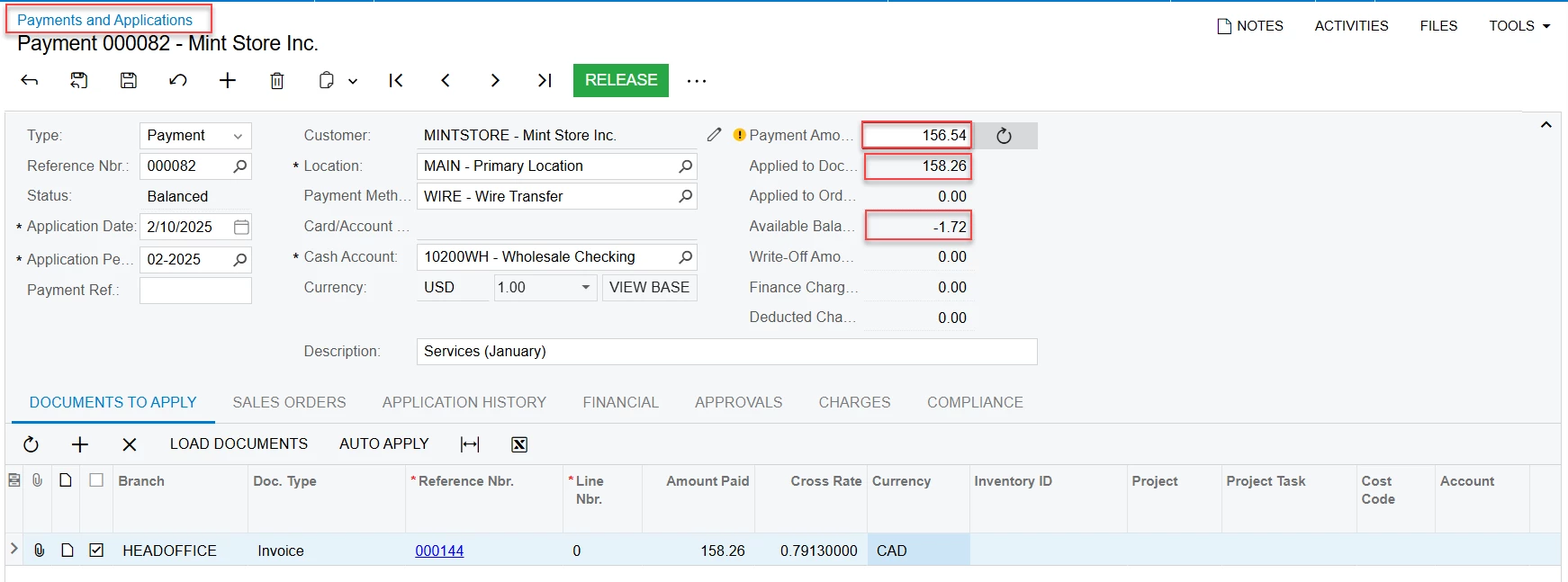
Please kindly advise, How can I change invoice from 156.54$ to 158.26$ ? and I am using cross rate. Thanks in advance
Please kindly advise, How can I change invoice from 156.54$ to 158.26$ ? and I am using cross rate. Thanks in advance
Best answer by smuddurthi81
You cannot directly change the amount of an invoice that has already been paid, especially if it's linked to a payment and the payment is applied. Invoices, once finalized and linked to payments, are generally locked for editing to maintain audit trail integrity.
Here's what you likely need to do instead:
1. Void the Existing Payment and Adjust the Invoice (If Possible):
If the payment is recent and your accounting practices allow:
Void the Payment: Navigate to the payment (000082) and use the "Void" action. This will unlink the payment from the invoice.
Edit the Invoice (If Allowed): Go to the invoice (000144). If it's now editable (depending on your Acumatica setup and the stage of the accounting period), you might be able to adjust the amount to $158.26.
Reapply the Payment: Create a new payment for $158.26 and apply it to the corrected invoice.
Caution: Voiding payments and editing past invoices should be done cautiously and only if your accounting policies permit. Consult with your finance team if you're unsure.
2. Create a Credit Memo and Re-Invoice (Recommended):
This is the cleaner and more auditable approach, especially if the payment is older or if directly editing the invoice is not allowed.
Create a Credit Memo: Issue a credit memo for the difference ($1.72) or the originally incorrect portion of the invoice. Apply it to the invoice (000144). This will offset the invoice amount.
Create a New Invoice (If Needed): If the original invoice was entirely incorrect, you might need to create a completely new invoice for $158.26.
Apply the Payment to the Corrected Invoice(s): Apply the original payment (or a new payment if needed) to the corrected invoice amount.
3. Adjust the Exchange Rate (If Applicable):
If the discrepancy is due to exchange rate fluctuations:
Review Exchange Rates: Check the exchange rates used for the original invoice and payment.
Adjust Exchange Rate (If Allowed): If the rate was entered incorrectly, you might be able to adjust it (depending on Acumatica settings and permissions). This would retroactively affect the invoice and payment amounts.
Important Considerations:
Cross Rate: You mentioned you're using a cross rate. Ensure that the cross rate is correctly set up and used throughout the process, especially if dealing with credit memos and re-invoicing.
Audit Trail: Acumatica maintains a detailed audit trail. All changes, voids, and adjustments are logged.
Accounting Periods: Be mindful of accounting periods. If the period in which the original transaction occurred is closed, you might need to make adjustments in the current period with appropriate documentation.
Consult with Finance: It's crucial to consult with your finance or accounting team before making any changes to paid invoices, especially if they involve adjustments to past periods. They can guide you on the correct procedure and ensure compliance with accounting standards.
Which Method to Choose:
Voiding and Adjusting: Only if the payment is very recent, the accounting period is still open, and your company policy allows it.
Credit Memo and Re-Invoicing: This is generally the preferred and more auditable method, especially if the payment is older or if direct invoice editing is restricted.
Exchange Rate Adjustment: Only if the discrepancy is solely due to an incorrect exchange rate.
Enter your E-mail address. We'll send you an e-mail with instructions to reset your password.

