Solved

Multiple Prepayments against Balanced Invoice

  • January 17, 2025
  • 3 replies
  • 134 views

Forum|alt.badge.img+1

Acumatica does not allow us to apply a 2nd Prepayment against a Balanced Invoice if a Prepayment  already transferred to the Invoice from the Sales Order.

Here is our process:

  1. Create SO
  2. Apply Prepayment of 10% to SO
  3. Create Balanced Invoice (do not release, we have to wait until our customer picks up the product to release the invoice) - Acumatica automatically pulls the SO Prepayment over to be applied to the Invoice.
  4. When customer makes final payment prior to picking up the product, we want to apply a 2nd Prepayment against the Balanced Invoice - Acumatica does not allow this (I found a quirky workaround that if you temporarily unapply the SO Prepayment from the Invoice, apply the 2nd Prepayment, then reapply the SO Prepayment, it will allow you to apply both Prepayments).  The reason we use a Prepayment for the final payment prior to pickup is because we have situations where a customer makes a final payment but doesn’t pick up until the next month.  If we would use a ‘Payment’ type transaction, it creates negative A/R  which our CFO does not want to see on the balance sheet - he wants to see the dollars in a liability account (and we have Prepayments set to post to a liability account).

Any thoughts on how to be able to apply a 2nd Prepayment against a Balanced invoice?
Best answer by shyamalav71

Hi ​@danielklumpp 

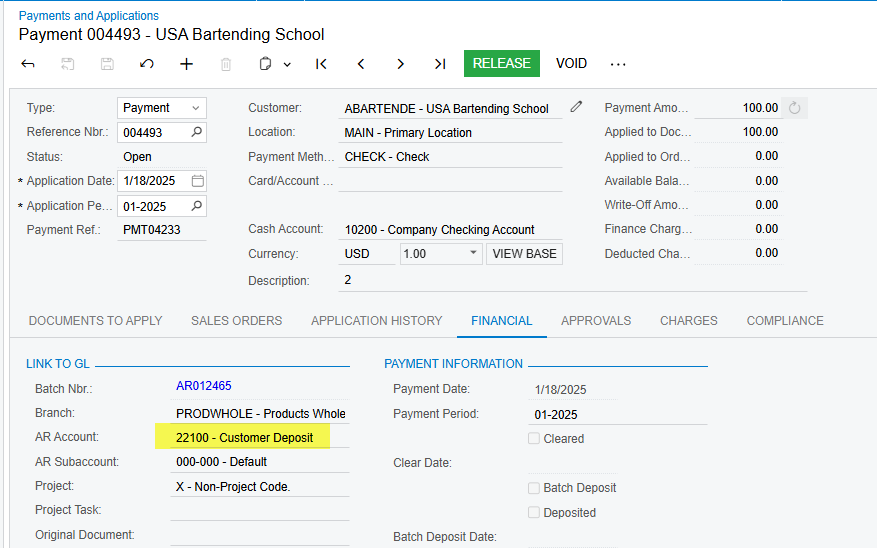
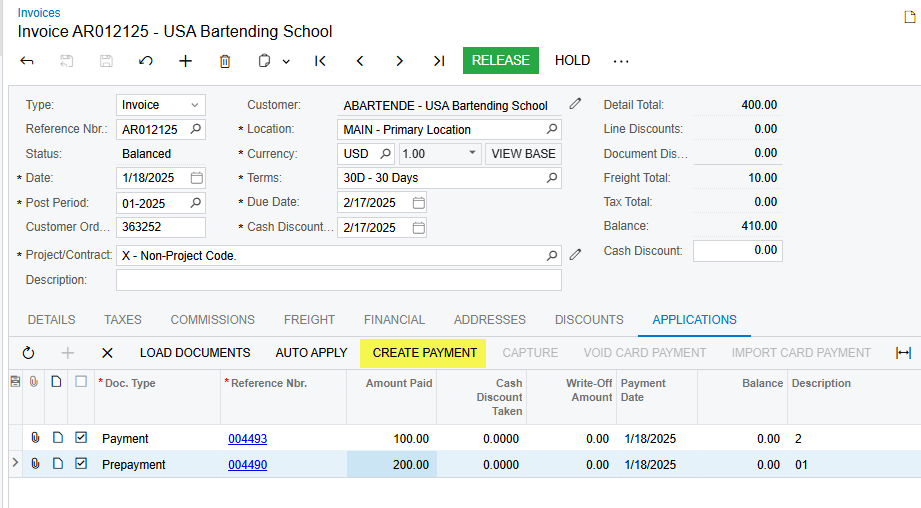
The Work around solution could be, you can create a Payment Using Create Payment button from Invoice screen and in the Payment document > Financial tab Change the AR Account from Accounts Receivable to Customer Deposits (Liability Account) and release the entry. So the Invoice is still in Balanced status and you can apply both Prepayment and Payment entries which are posted to Customer Deposits (Liability A/C).


3 replies

Forum|alt.badge.img
  • Jr Varsity III
  • Answer
  • January 18, 2025

Hi ​@danielklumpp 

The Work around solution could be, you can create a Payment Using Create Payment button from Invoice screen and in the Payment document > Financial tab Change the AR Account from Accounts Receivable to Customer Deposits (Liability Account) and release the entry. So the Invoice is still in Balanced status and you can apply both Prepayment and Payment entries which are posted to Customer Deposits (Liability A/C).


Forum|alt.badge.img+1
  • Author
  • Varsity I
  • January 20, 2025

@shyamalav71, that is the best workaround so far - thank you!

I’m curious if anyone else out there has other workarounds or has a non-workaround solution?


We are now processing progressive payments via prepayments for our vendors.  Everything works ok to produce and process payments for the prepayments from the PO until the bill is released and then everything breaks.  The first prepayment becomes available to be released and then won’t release because the dates of application are a problem (closed period).  If you take the dollars out of the original prepayment application and save and then go into the prepayment and pay it again to the original invoice then you should be able to manually apply the remaining prepayments after.  Mostly I think this effectively changes the application date of the first prepayment to today instead of the day that the prepayment was actually paid. (most likely now in a closed period because Acumatica is somewhat reopening a closed record due to the inability to apply multiple prepayments against a bill)

I believe Acumatica can not handle anything above a one to one match.