Solved

Minority (Non-Controlling Interest - NCI) Adjustment in Acumatica consolidation

  • January 5, 2026
  • 5 replies
  • 69 views

Forum|alt.badge.img

Hi, I’m trying to consolidate group of companies for financial reporting. I’m using ARM reports to consolidate different companies and there are minority adjustments to be made to remove the non-controlling interest of few companies. 

Is there any way that can be configured in Acumatica?

Thank you,

Dulanjana
Best answer by Laura03

Hello,

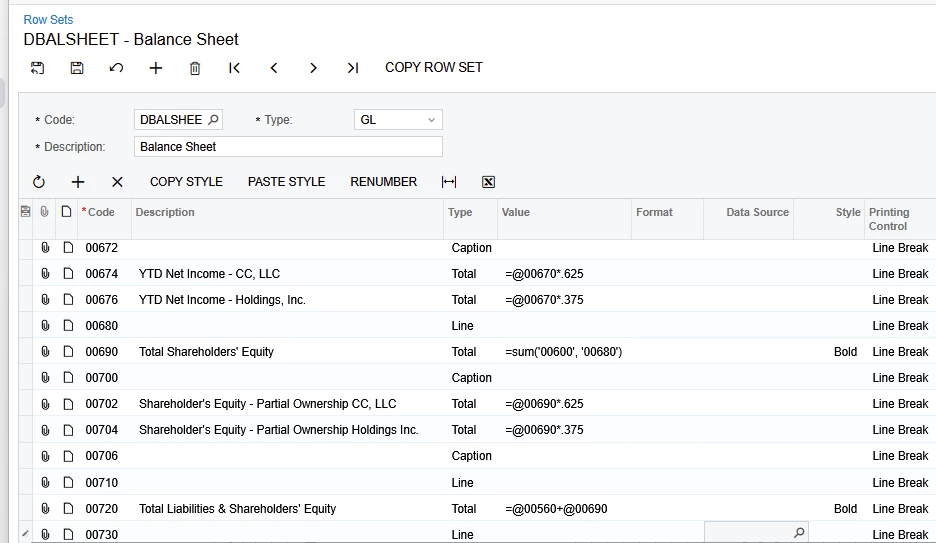
As Pranav mentions, we use calculations to show partial ownership.  Here is an example of ownership calculations from a Balance Sheet - Calculations performed in the Row Set:


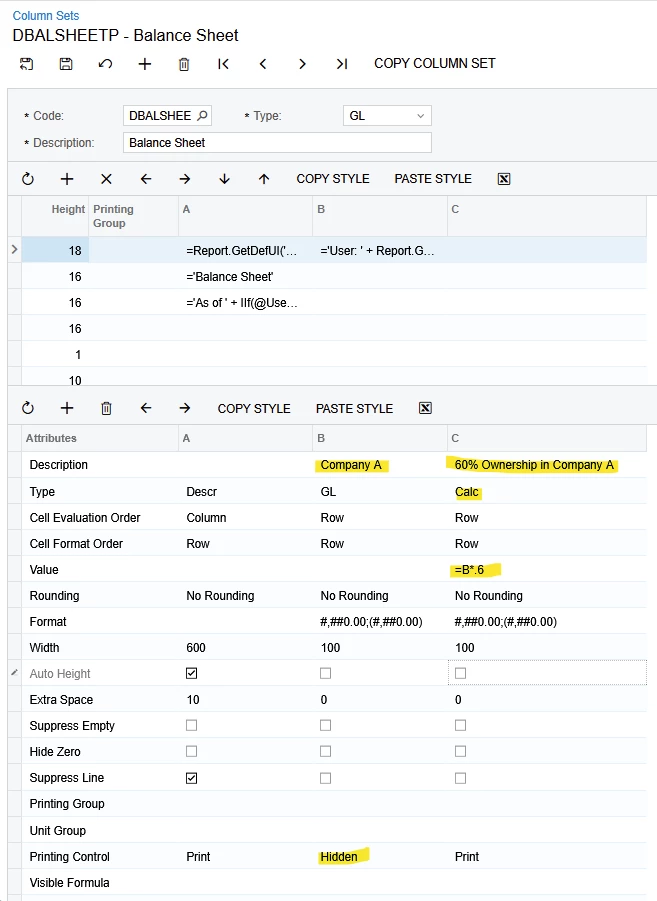
In your report, I expect you will Hide the columns containing the full amount, and add a Calc column to perform calculations. Here is an example of Partial ownership calculations performed in the Column Set:


As usual, check with your CPA for final approval on proper presentation and calculations in your reports.

HTH


Laura

5 replies

Laura03
Captain II
Forum|alt.badge.img+20
  • Captain II
  • January 5, 2026

Hello,

In Acumatica, we can use ARM reports to show companies side-by-side with or without elimination entries.

Please, can you show a sample of how your report looks now, versus how you want the report to look?

Seeing an example of “ minority adjustments to be made to remove the non-controlling interest of few companies,” helps us answer your question. Thank you.


Best regards,

Laura


Forum|alt.badge.img

Hi ​@Laura03 ,

Thank you for your comment.

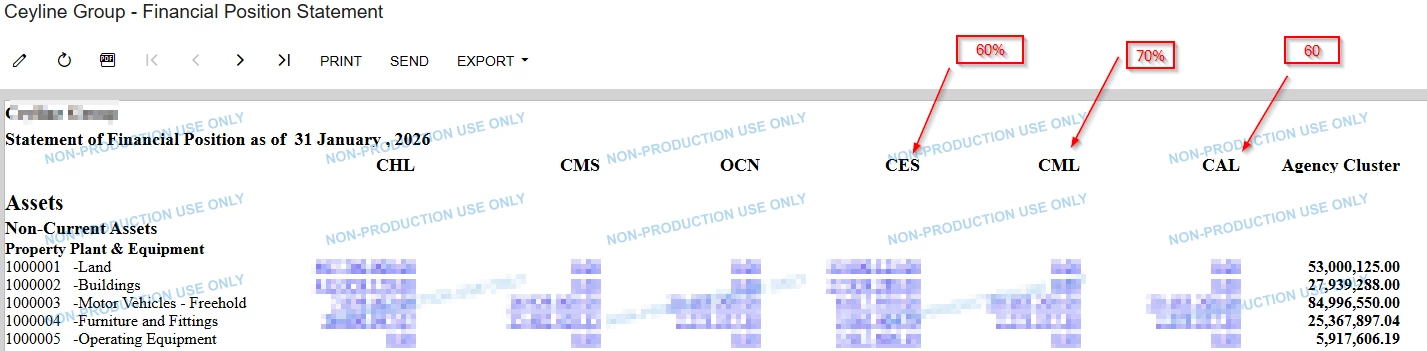
Here is how my current report. all companies are shown separately and then combined the under balances Agency Cluster which is the consolidated figure. 

Lets get an example of the current report, and the minority adjustment is that the parent company does not have full ownership of the company even thought they operate the company under their supervision. Company CES, CML, CAL owned only by the mentioned percentages and is such cases, 100% balances for the company cannot be taken into the consolidated amount. For CES, CML and CAL should consider the balances by 60%, 70% and 60% respectively for the consolidation. 

Hope this makes it clear and I’m looking for a way to adjust this in the ARM report or by another way.

Thanks,


Forum|alt.badge.img+1
  • Jr Varsity I
  • January 6, 2026

Hi ​@dsenevirathne54 

ARM does not support partial ownership or minority interest consolidation out of the box. If the report is intended for internal or management reporting purposes, the consolidation can be handled at the report level by editing the ARM report in Report Designer.

In such cases, a formula-based consolidated column can be created where balances of partially owned companies are multiplied by their ownership percentages (for example, CES × 0.6, CML × 0.7, CAL × 0.6) instead of being consolidated at 100%.

This approach provides a weighted consolidated view but does not represent a system-level accounting consolidation or automated minority interest adjustment.

Hope this helps.


Laura03
Captain II
Forum|alt.badge.img+20
  • Captain II
  • Answer
  • January 6, 2026

Hello,

As Pranav mentions, we use calculations to show partial ownership.  Here is an example of ownership calculations from a Balance Sheet - Calculations performed in the Row Set:


In your report, I expect you will Hide the columns containing the full amount, and add a Calc column to perform calculations. Here is an example of Partial ownership calculations performed in the Column Set:


As usual, check with your CPA for final approval on proper presentation and calculations in your reports.

HTH


Laura


Forum|alt.badge.img

@Laura03 ​@pranavkhare34 , Thank you both for your valuable inputs.