Answer

Items On Project Invoices Are Being Posted To The Incorrect Subaccount

  • October 27, 2025
  • 11 replies
  • 79 views

Forum|alt.badge.img

Hi All

Our users have an issue coming from Projects. When processing Project related invoices, the revenue for the items listed on the project go to the incorrect subaccount.

Our current setup for projects is as follows:

For our billing rule, we use 'Progress Billing' which is set up as:
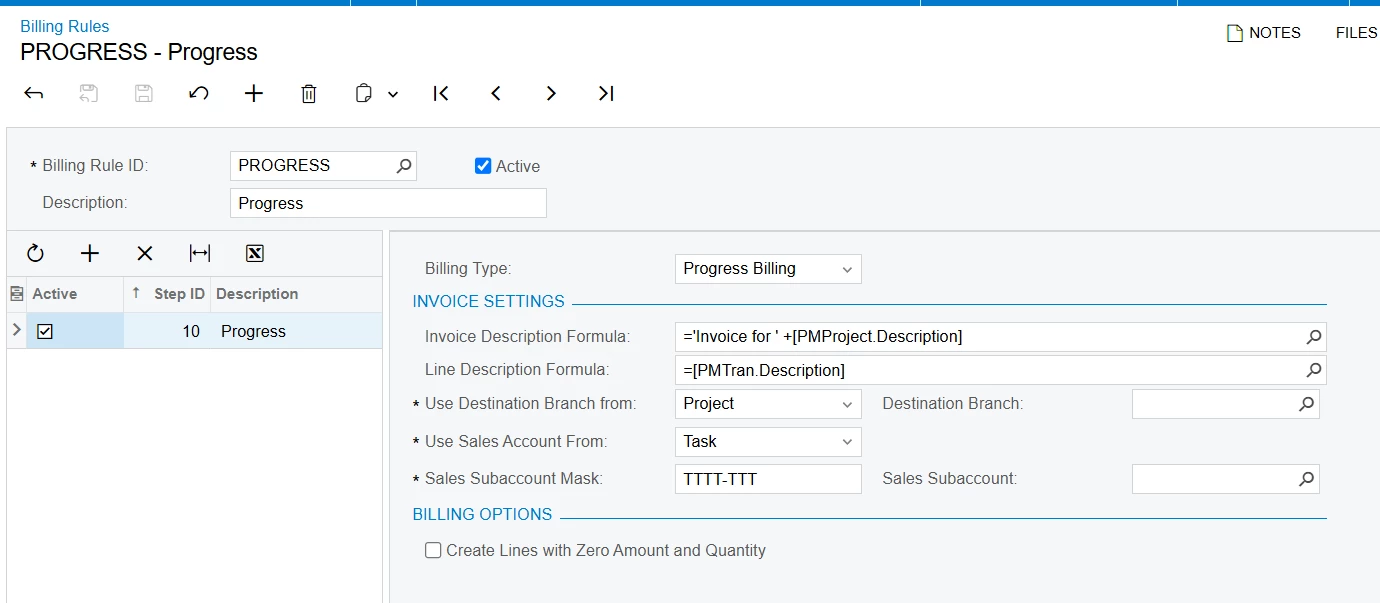
Where the sales account and the subaccount are taken from the task.


For example, in this project the tasks were assigned to it and the correct GLs and subaccounts were correctly populated:
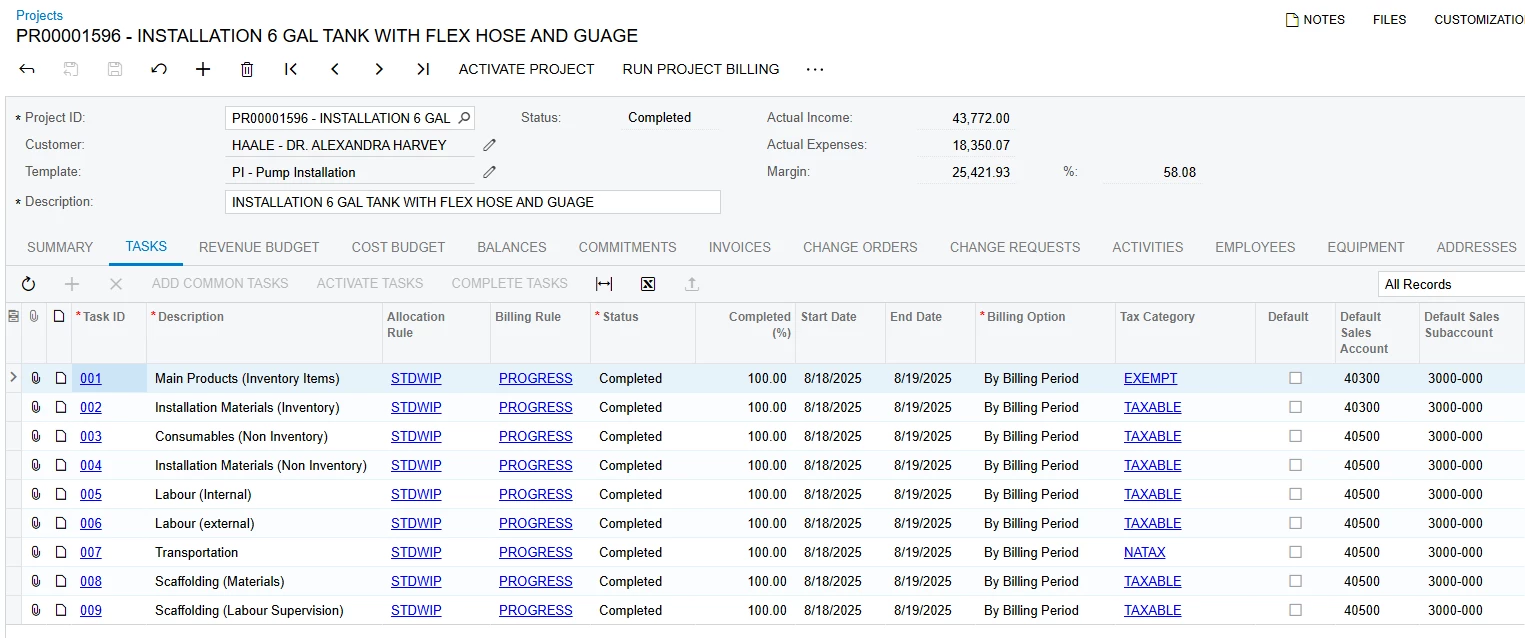
Task ID 001 has the following setup:

The Default Sales Account is 40300 (Solar Projects Revenue) and the Default Sales Subaccount is 3000-000 (Small Solar Installations - Products) these settings are correct and populated as such in the project.

When Project Billing is run, the following shows up on the Invoice:
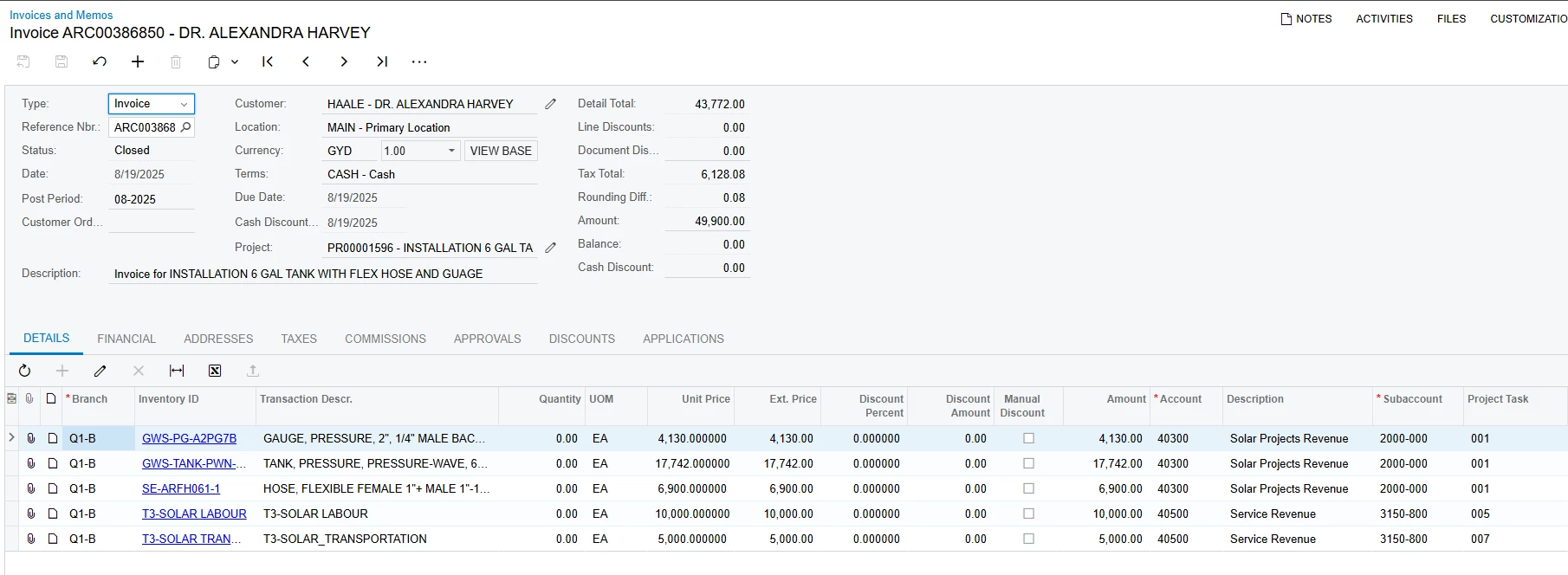
The invoice shows the correct GL but the incorrect subaccount based on what was defined in the project, which should have been everything goes to the 3000-000 subaccount.

I know that it is more than likely it’s a setup issue somewhere. But for the life of me, I cannot find it.

Any advice or assistance on this is greatly appreciated.

The version is 24R1 Build 24.114.0020 if that’s needed.

Thanks

Amit
Best answer by nickcerri32

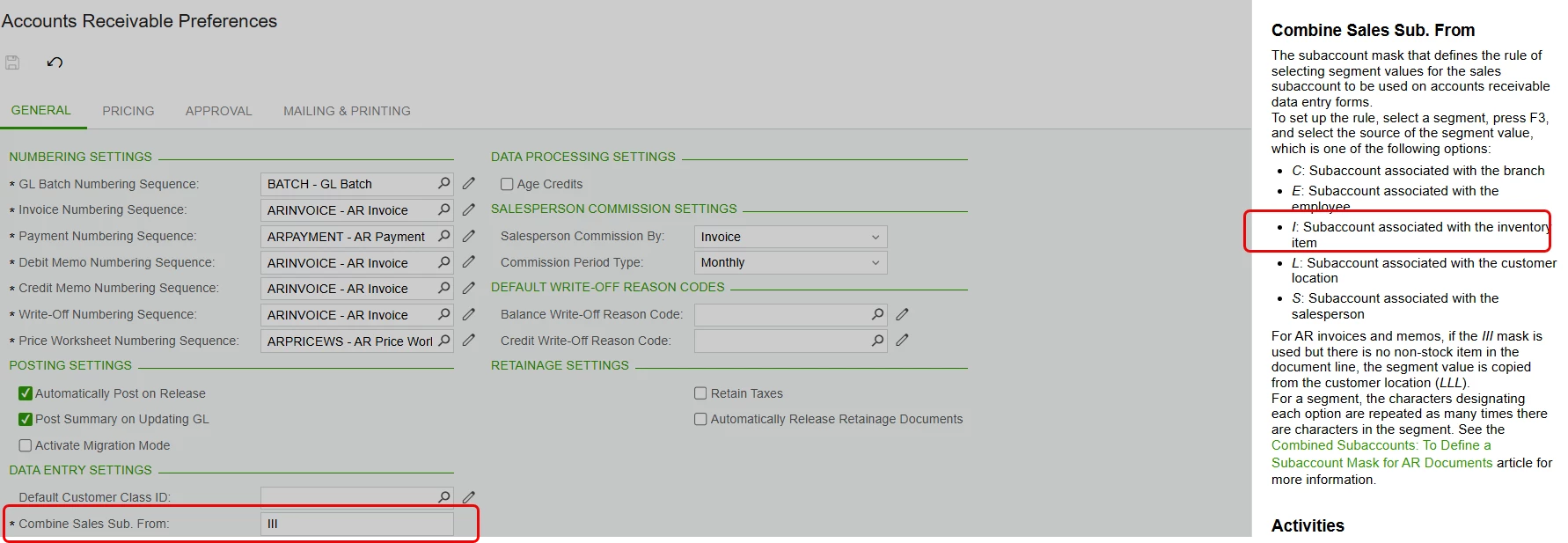
@asingh - Ah!  There it is.  The Combine Sales Sub. From field is set to “I” which is pulling from the Inventory.  As you mentioned above

When the salesperson id is entered on the invoice line, the subaccount it reverts to is the sales sub defined on the product card of the item.

I don’t know why the Salesperson field is triggering this change.  Regardless, I tested it out by setting to L (for however many segment characters you have, “LLLL-LLL” in your case) and it worked for me.  Test that out and let me know. 


11 replies

nickcerri32
Jr Varsity III
Forum|alt.badge.img+1
  • Jr Varsity III
  • November 18, 2025

@asingh - Have you found a solution for this?  I tried to replicate the issue in 25R1 and couldn’t recreate the results you were getting.  That said, here’s a few questions you might try to answer to get you in the proverbial ballpark:

  1. What do your Projects (PM101000) and AR (AR101000) Preferences screens look like?  Any field here that may be overriding the Task subaccount default?
  2. Are you doing anything special on the specific project (or corresponding template’s) Defaults tab?
  3. Finally, I’d try to find anywhere the segments 2000-000 and 3150-800 would be defaulted.  By the looks of it, I’d say those were associated with the corresponding Inventory Item.  

Forum|alt.badge.img
  • Author
  • Freshman I
  • November 20, 2025

@asingh - Have you found a solution for this?  I tried to replicate the issue in 25R1 and couldn’t recreate the results you were getting.  That said, here’s a few questions you might try to answer to get you in the proverbial ballpark:

  1. What do your Projects (PM101000) and AR (AR101000) Preferences screens look like?  Any field here that may be overriding the Task subaccount default?
  2. Are you doing anything special on the specific project (or corresponding template’s) Defaults tab?
  3. Finally, I’d try to find anywhere the segments 2000-000 and 3150-800 would be defaulted.  By the looks of it, I’d say those were associated with the corresponding Inventory Item.  

Hi ​@nickcerri32 thanks for reaching out. So after doing a bit of testing, I found that it was after a salesperson ID was entered on the line that the subaccount changed. If I leave the line with no salesperson, the invoice is processed and released correctly. Any ideas on this, please?

Thanks

Amit


nickcerri32
Jr Varsity III
Forum|alt.badge.img+1
  • Jr Varsity III
  • November 20, 2025

@asingh - Yep, that’ll do it.  Taking the subaccount out of the Sales Sub field for the Salesperson will likely resolve it.  I wouldn’t have thought the Salesperson Sub would have superseded the Task Sub.  Learn something new every day! 


Forum|alt.badge.img
  • Author
  • Freshman I
  • November 21, 2025

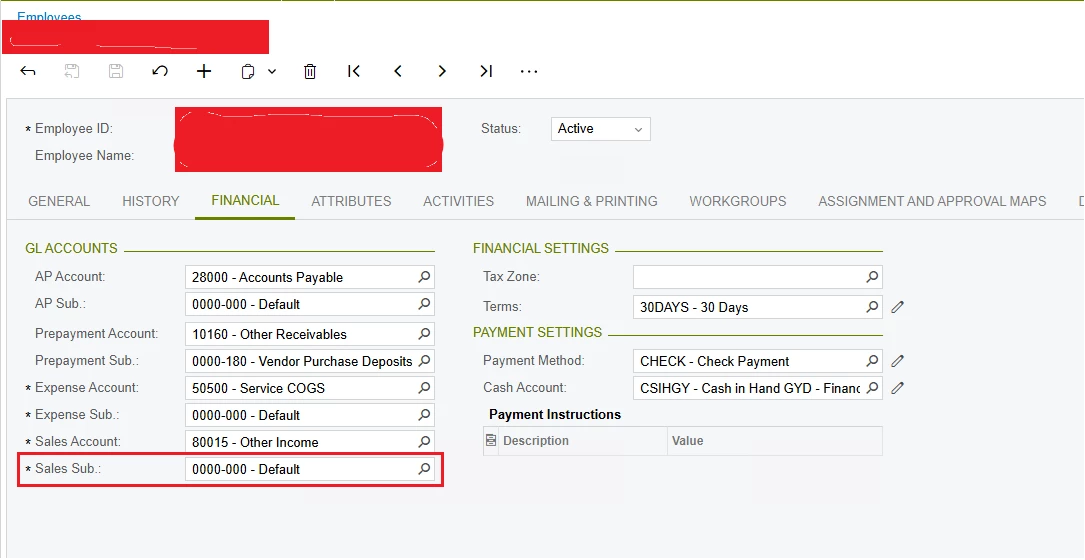
@nickcerri32 Apologies in advance if I sound a bit slow, but where would the sales sub field for the salesperson be located? I know there’s GL fields on the employee card but the sales sub is a required field and the value for the sales sub field is 0000-000 (see screenshot below). 


nickcerri32
Jr Varsity III
Forum|alt.badge.img+1
  • Jr Varsity III
  • November 21, 2025

@asingh - My bad!  The screen ID is AR205000.  I’m assuming that this field is populated in your case, but we’ll have another issue on our hands if it’s blank.


Forum|alt.badge.img
  • Author
  • Freshman I
  • November 21, 2025

@nickcerri32 Unfortunately, it is blank 💀


Forum|alt.badge.img
  • Author
  • Freshman I
  • November 21, 2025

@nickcerri32 for a bit more context: When the salesperson id is entered on the invoice line, the subaccount it reverts to is the sales sub defined on the product card of the item. For Example:

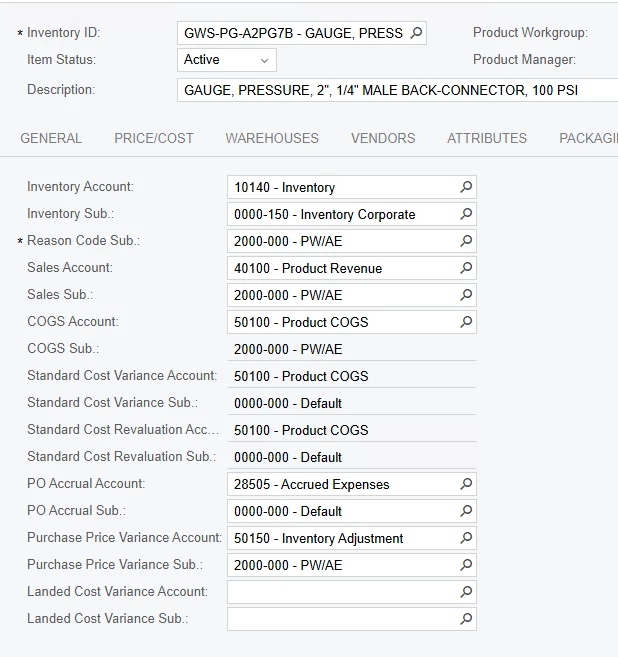
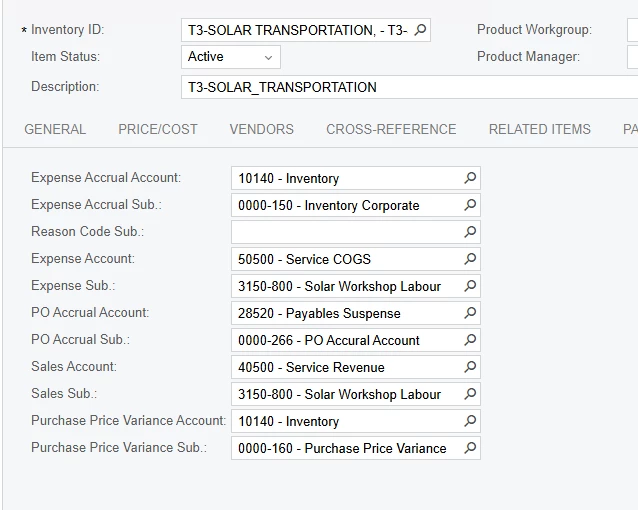
For the stock items, the subaccount defined on the product cards is 2000-000 and 3150-000 for the non-stock items
Accounts and subaccounts defined on stock item card
Accounts and subaccounts defined on non-stock item card


nickcerri32
Jr Varsity III
Forum|alt.badge.img+1
  • Jr Varsity III
  • November 21, 2025

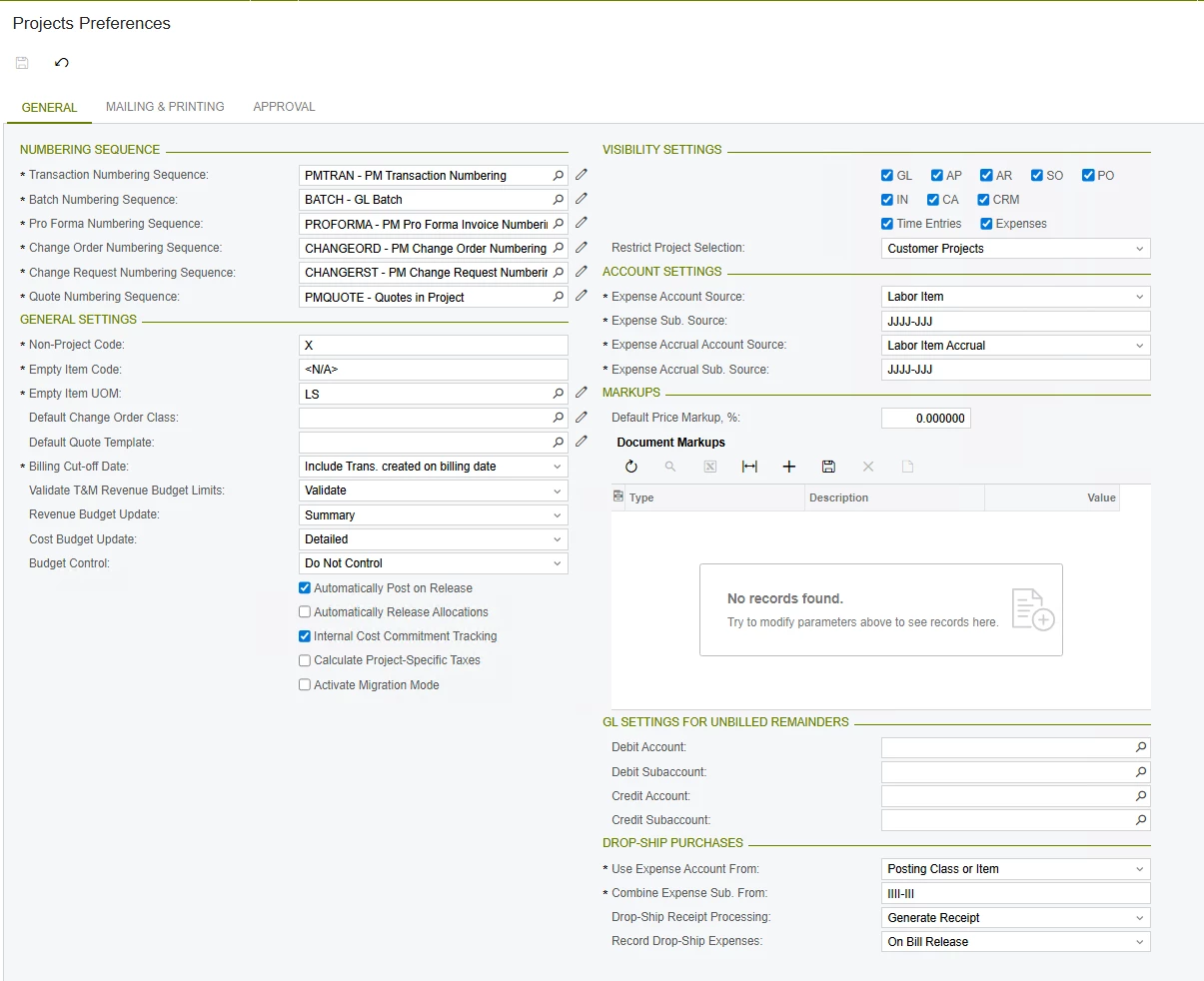
@asingh - To go back to my initial comments, can you send over screenshots of your AR Preferences and Project Preferences screens?


Forum|alt.badge.img
  • Author
  • Freshman I
  • November 21, 2025

@nickcerri32 No problem. Please see below:

AR
Projects


nickcerri32
Jr Varsity III
Forum|alt.badge.img+1
  • Jr Varsity III
  • Answer
  • November 21, 2025

@asingh - Ah!  There it is.  The Combine Sales Sub. From field is set to “I” which is pulling from the Inventory.  As you mentioned above

When the salesperson id is entered on the invoice line, the subaccount it reverts to is the sales sub defined on the product card of the item.

I don’t know why the Salesperson field is triggering this change.  Regardless, I tested it out by setting to L (for however many segment characters you have, “LLLL-LLL” in your case) and it worked for me.  Test that out and let me know. 


Forum|alt.badge.img
  • Author
  • Freshman I
  • November 21, 2025

@nickcerri32 Success! I changed the ‘Combine Sales Sub. From’ that was IIII-III to LLLL-LLL and it did change the subaccount from the project sub to the location sub which was 0000-000.

So, using what you mentioned earlier about the Salesperson sub, I added the project sub as the salesperson sub and changed the ‘Combine Sales Sub. From’ to SSSS-SSS and it worked! 

I will have the finance team go over it in the new week ahead, but its safe to say that a solution has been found.

Thank you for your patience and time dedicated to this issue, it’s greatly appreciated.