Answer

Is there a way to keep invoice attachments on AP bills and restrict access to the attachments?

  • October 13, 2021
  • 4 replies
  • 425 views

dgrayson10
Freshman I

Scenario: Occasionally there are invoices that contain confidential matters e.g. legal invoices. There is  read only security set for department type security roles on the Bills screen so users have visibility to the invoice details.  But this also gives them access to view attachments.

Is there a way to keep invoice attachments on AP bills and restrict access to the attachments?
Best answer by craig2

Hi there!

Prior to 2021 R1, Form and File access were tied together.  However, we got some additional functionality in this last upgrade.

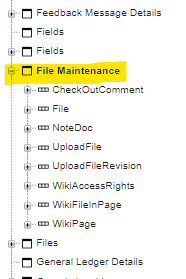
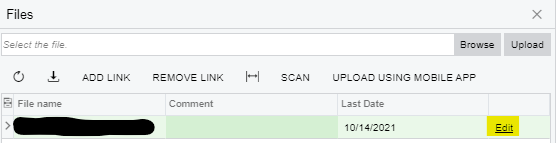
To restrict a specific file, navigate to it’s File Maintenance screen:


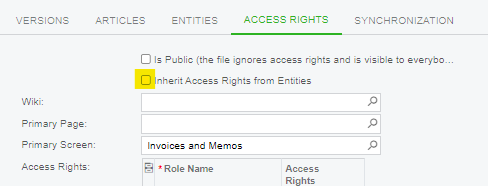
Go to the Access Rights tab, and untick the “Inherit Access Rights” box:


This last part is funky, JUST unticking the box doesn’t really do anything.  You then have to choose a Primary Screen with the Access Rights that you want the file to mimic.  To fully lock down the file, choose some “admin-only” type screen (I use All Emails).

If you do that, then any non-admin who looks in the Files of the document will see that it exists, and it’s File Name, but will receive an error when they try to open it.

Hopefully that helps!

4 replies

craig2
Pro I
Forum|alt.badge.img+3
  • Pro I
  • Answer
  • October 14, 2021

Hi there!

Prior to 2021 R1, Form and File access were tied together.  However, we got some additional functionality in this last upgrade.

To restrict a specific file, navigate to it’s File Maintenance screen:


Go to the Access Rights tab, and untick the “Inherit Access Rights” box:


This last part is funky, JUST unticking the box doesn’t really do anything.  You then have to choose a Primary Screen with the Access Rights that you want the file to mimic.  To fully lock down the file, choose some “admin-only” type screen (I use All Emails).

If you do that, then any non-admin who looks in the Files of the document will see that it exists, and it’s File Name, but will receive an error when they try to open it.

Hopefully that helps!


martingaxiola
Varsity I
Forum|alt.badge.img

Hola @craig2 ,


Thank you so much, i have tried this (with help from Josh in Chat Support), and it works awesome. Thank you!


craig2
Pro I
Forum|alt.badge.img+3
  • Pro I
  • March 27, 2023

Hi @martingaxiola ,

Doing the instructions above should prevent file access/download to an individual file in both the Files Action button, and the Files button in a GI.  I just tested both areas.


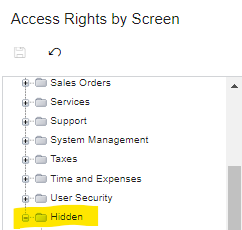
However, it may be worth also limiting access to the File Maintenance screen.  I have that screen set to admin-only access, via Access Rights by Screen.  It can found in the Hidden folder:


Hopefully that solves your issue, best of luck!


frankneo
Freshman II
Forum|alt.badge.img
  • Freshman II
  • June 2, 2025

It seems that individual files will be restricted.  But how can you restrict all attachments for a specific role.  Eg.  AP clerk will not be able to view all attachments in AP Bill?  It would to very time consuming to keep changing access on every file.