Answer

I Can't Create Budget in the Finance Module

  • October 3, 2025
  • 5 replies
  • 73 views

Forum|alt.badge.img

Hii, i wan to ask, why i can not to create a new budget in Acumatica? There is any step that i miss before cerate a budget in Finance Module. 
and also can we compile grant/project budget and department/program budget on this budget menu, so we can get the calculation between grant budget and department budget in this Budget Finance Modul?
Please help me to solve about this, i really appreciate😥


Best answer by PaulMainard55

@dinda56  - are there any additional details you can share with us to help us to provide you with further guidance?

There are a few basic steps that you need to follow:

  • Create a budget ledger and be sure to assign it to the applicable Companies
  • If you’re planing on creating budgets for each grant/project and/or department/program, have these been defined using subaccounts, or do they reside solely within the projects module?
    • If you’ve defined these using subaccounts, you will want to create Budget Articles to define the levels at which you want to provide budgets.  For example, if you have departmental OPEX budgets, your budget article will define the accounts and subaccounts that are applicable to each department’s budget.  Once you create the structure of the budget, you can create budgets for each department at that level.  The system will ulitmately roll all of the budgets up for you.  

Here’s a link to the wiki that discusses these steps for you to review.  Please let us know if you have any additional questions or if you have additional details you wish to share.

Implementing Budgets

5 replies

PaulMainard55
Captain I
Forum|alt.badge.img+2
  • Captain I
  • Answer
  • October 3, 2025

@dinda56  - are there any additional details you can share with us to help us to provide you with further guidance?

There are a few basic steps that you need to follow:

  • Create a budget ledger and be sure to assign it to the applicable Companies
  • If you’re planing on creating budgets for each grant/project and/or department/program, have these been defined using subaccounts, or do they reside solely within the projects module?
    • If you’ve defined these using subaccounts, you will want to create Budget Articles to define the levels at which you want to provide budgets.  For example, if you have departmental OPEX budgets, your budget article will define the accounts and subaccounts that are applicable to each department’s budget.  Once you create the structure of the budget, you can create budgets for each department at that level.  The system will ulitmately roll all of the budgets up for you.  

Here’s a link to the wiki that discusses these steps for you to review.  Please let us know if you have any additional questions or if you have additional details you wish to share.

Implementing Budgets


Forum|alt.badge.img
  • Author
  • Jr Varsity III
  • October 6, 2025

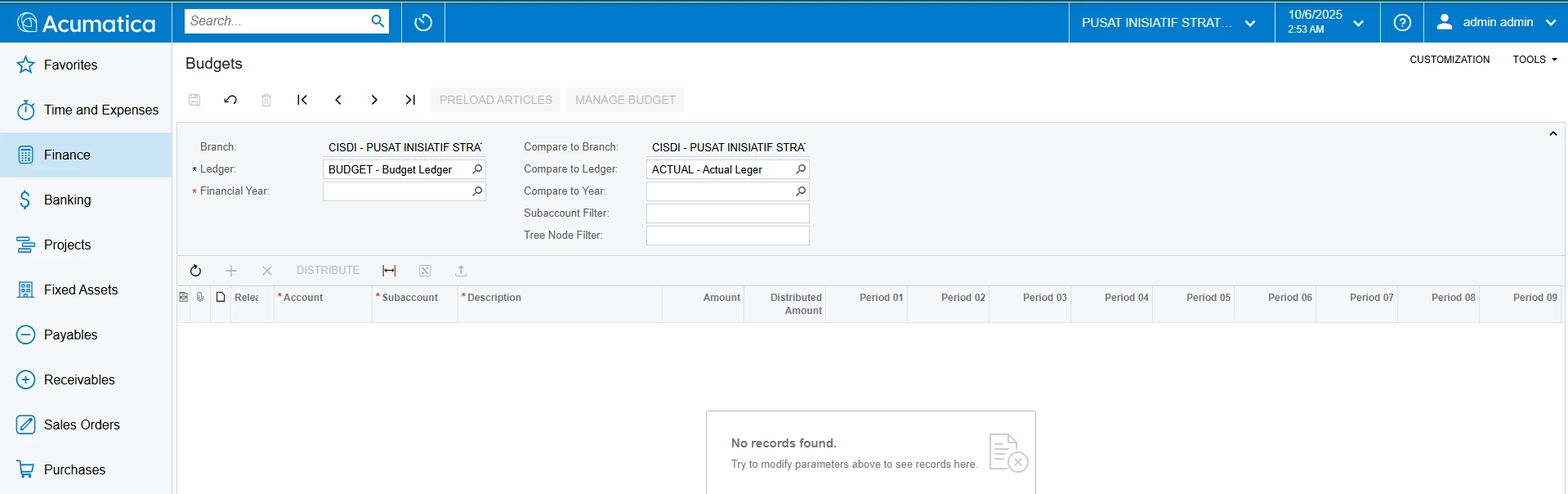
Hi ​@PaulMainard55 thank you for your respond and answers. This is the capture that i mention before about the budget in module finance that i can not entering the data. But i want to ask, the budget is used as a whole for the company right? but can we see a department budget in here too?
thank you😄


KushaniPerera88
Acumatica Employee
Forum|alt.badge.img+3

ricoybanez
Jr Varsity III
Forum|alt.badge.img+3
  • Jr Varsity III
  • October 7, 2025

@dinda56 

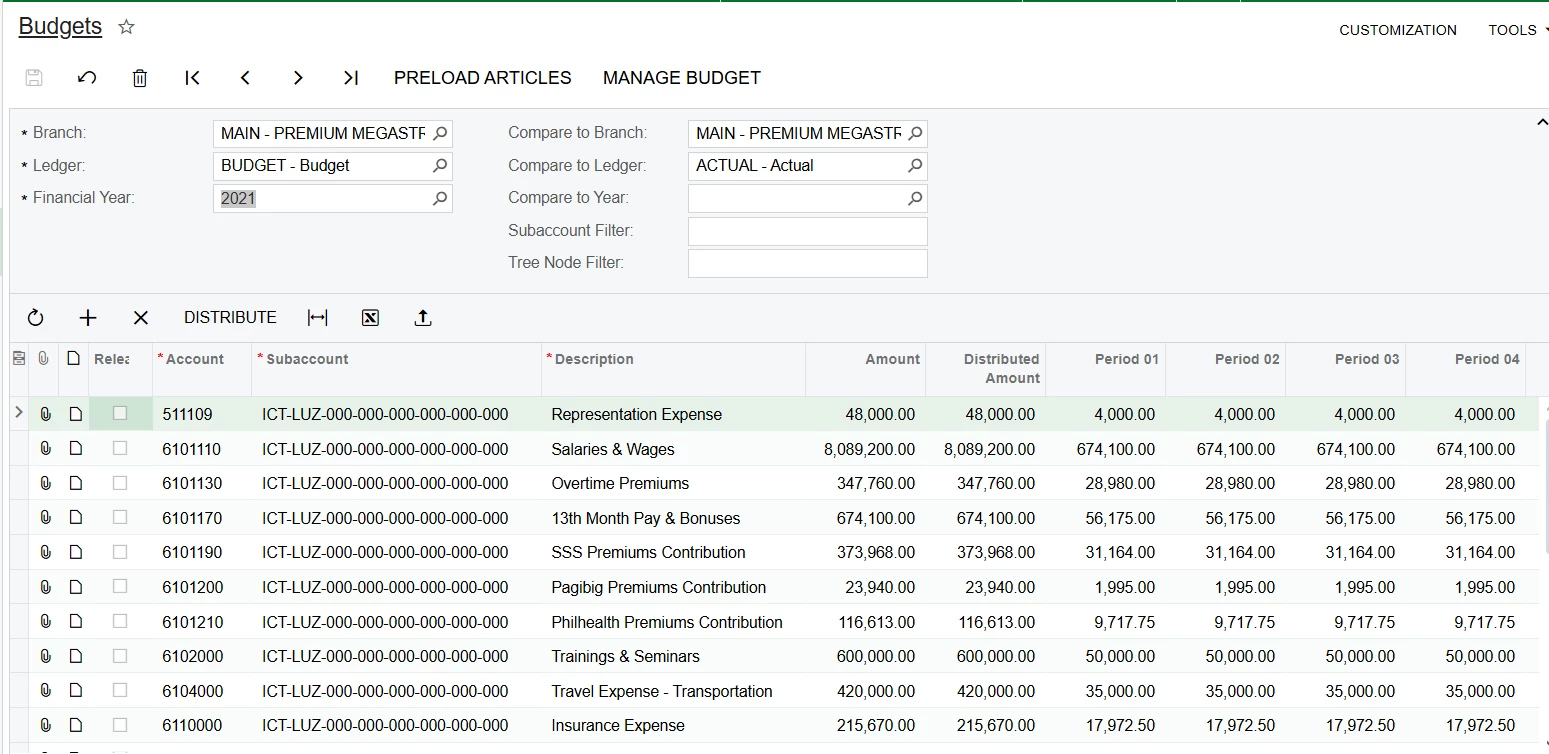
You can make a budget per department, to do this you must create a subaccount for each department, meaning the subaccount represents your Revenue / Cost Center (Department).

see below screenshot of the actual entry


Hope this helps.


PaulMainard55
Captain I
Forum|alt.badge.img+2

Hi ​@PaulMainard55 thank you for your respond and answers. This is the capture that i mention before about the budget in module finance that i can not entering the data. But i want to ask, the budget is used as a whole for the company right? but can we see a department budget in here too?
thank you😄


Hi ​@dinda56,


I’m just now seeing your response.  Based on the screenshot, it doesn’t look like you’ve selected a fiscal year for your budget, which is required before you can enter a budget.  Yes, you should be able to see budgets both at the corporate level as well as at the department level.  Once all of the required filters are entered, the system should allow you to edit and update your budgets.  

I hope the wiki articles that ​@KushaniPerera88 and provided were helpful.  I know that in some organizations, loading budgets into Acumatica is a “want-to-have”, but not always a “have-to-have”.  Regardless, your Acumatica Partner should be able to provide some guidance for you, but it’s not a problem every partner encounters on the regular, so expect a little trial and error (speaking for me personally 😊).

Good luck!