Answer

I can't access icons on Acumatica. It keeps spinning and never opening any page after login

  • January 7, 2024
  • 2 replies
  • 252 views

Please see the screenshot below of what we see when we try to login to Acumatica.
 
image.png
 
Please note that the browser in the screenshot above is not Chrome, but Mozilla Firefox. The same error shows up in both Chrome and Microsoft Edge.
 
Because of this issue, when we log in, we are unable to access any part of the system as the icon keeps rolling but never opens up a page.
 
See screenshot below;
 
image.png
 
We need this resolved immediately as it is impacting our year end closure processes.
 
Expecting your prompt response.
 
Thank you

Best answer by dcomerford

You screenshots are not visible but is your site hosted by Acumatica if so then you need to log a support call they will react quickly as it will be a website it down. If not then you will more than likely need to restart IIS on the application server.

2 replies

dcomerford
Captain II
Forum|alt.badge.img+15
  • Captain II
  • Answer
  • January 7, 2024

You screenshots are not visible but is your site hosted by Acumatica if so then you need to log a support call they will react quickly as it will be a website it down. If not then you will more than likely need to restart IIS on the application server.


Manikanta Dhulipudi
Captain II
Forum|alt.badge.img+15

Hi @lwilfred Report an Outage or Connectivity Issue


Using this form https://www.acumatica.com/report-outage-connectivity-issue/or reach out to Acumatica if you have access to raise a ticket

If you are handlings on premises please use below steps

below is the information to restart server and IIS.

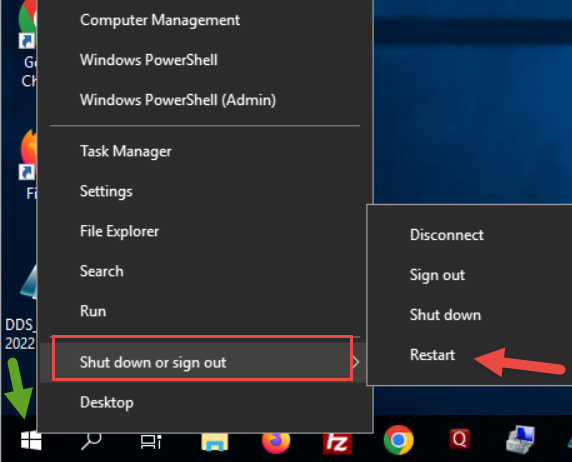
Login to the server

Right click on windows-->Select shutdown and sign out-->Click on Restart

Steps to restart IIS

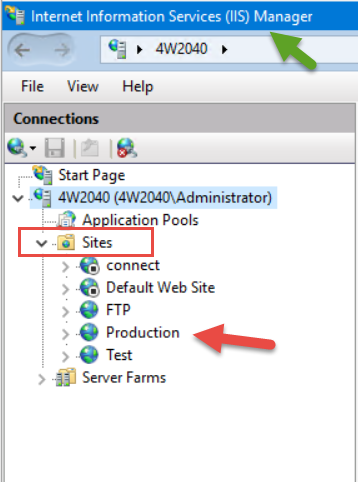
Open IIS Manager

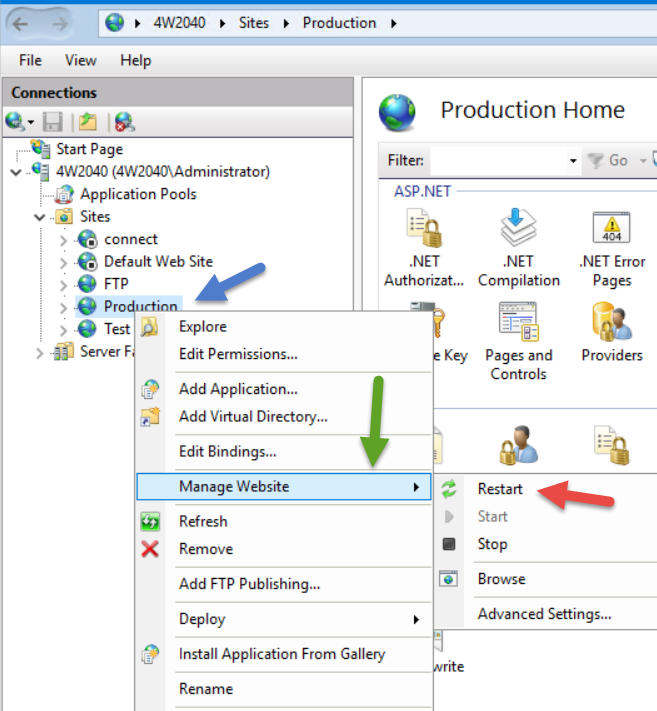
Navigate to sites-->Expand-->select the desired site-->Right click-->Click on Manage Website-->Click on Restart or (Stop and start the site)