

Answer

How to link PO to Project Transactions GI

  • March 15, 2024
  • 3 replies
  • 110 views

Forum|alt.badge.img

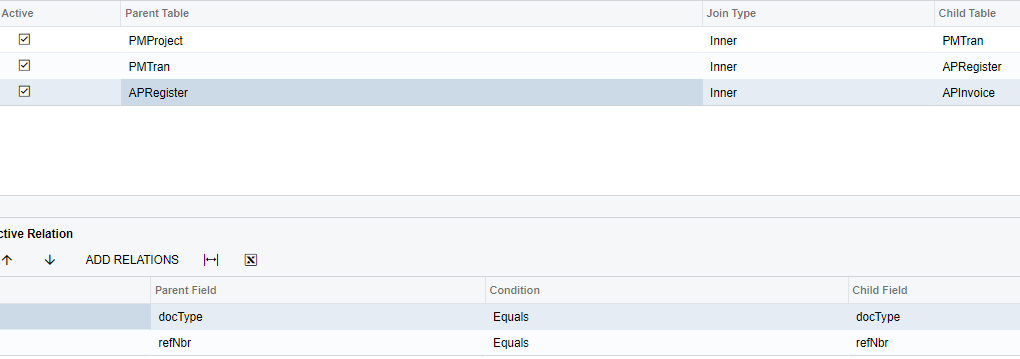
Hello - I am trying to create a Project Balance GI and link in the PO associated for each transaction line, but it seems to just create duplicate lines. Below are the tables I have joined now that seem to work. Does anyone know how I can also pull in PO without having it duplicate?



Best answer by ashleyb

Hi Benjamin,

Bryan’s suggestions were helpful, but I ended up adding the project codes to a detailed purchase orders GI instead,

Thank you,
Ashley

3 replies

bryanb39
Pro II
Forum|alt.badge.img+6
  • Pro II
  • March 16, 2024

If there's multiple POs associated with PMProject or ARRegister it's going to duplicate lines.  

In that case you need to group it and use Min or Max aggregates of fields you are pulling in.  

If you are also trying to get a sum as well as a min In this scenario, sometimes you can divide by a count.

If you need to use aggregates in a formula be sure to aggregate them by themselves in an earlier line first.  

These types of GIs can be quite frustrating and run slow.    

Until we can create Derived tables with GIs, it's just not an easy GI. 

Depending on the use case, an alternative may be to add a side panel to show related POs. 


BenjaminCrisman
Acumatica Employee
Forum|alt.badge.img+4
  • Acumatica Support Team
  • October 23, 2025

@ashleyb I realize this is very old but I wanted to follow up in case it was abandoned and never got completed, maybe it could still be helpful.

Did you end up getting a resolution for this?


Forum|alt.badge.img
  • Author
  • Varsity II
  • Answer
  • October 24, 2025

Hi Benjamin,

Bryan’s suggestions were helpful, but I ended up adding the project codes to a detailed purchase orders GI instead,

Thank you,
Ashley

