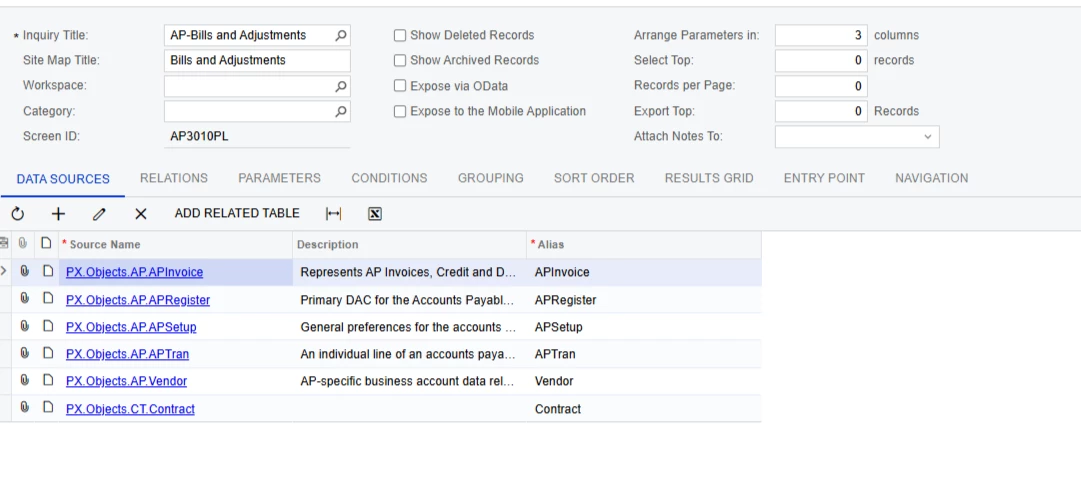
I’m currently working on a Bills and Adjustments Generic Inquiry where the client requires the Project ID to be included. The dataset only contains around 6,000 records, but the GI is taking quite a long time to load.
I’ve already tried applying groupings to improve performance, but the loading time is still quite slow. The main requirement from the client is to keep the Project ID visible in the inquiry.
Has anyone experienced a similar performance issue with the Bills and Adjustments GI when including Project fields? Are there any recommended approaches to optimise the query or improve the loading speed?
Any suggestions or best practices would be greatly appreciated. Thanks in advance!
Best answer by Laura03
Hello @zenith59 ,
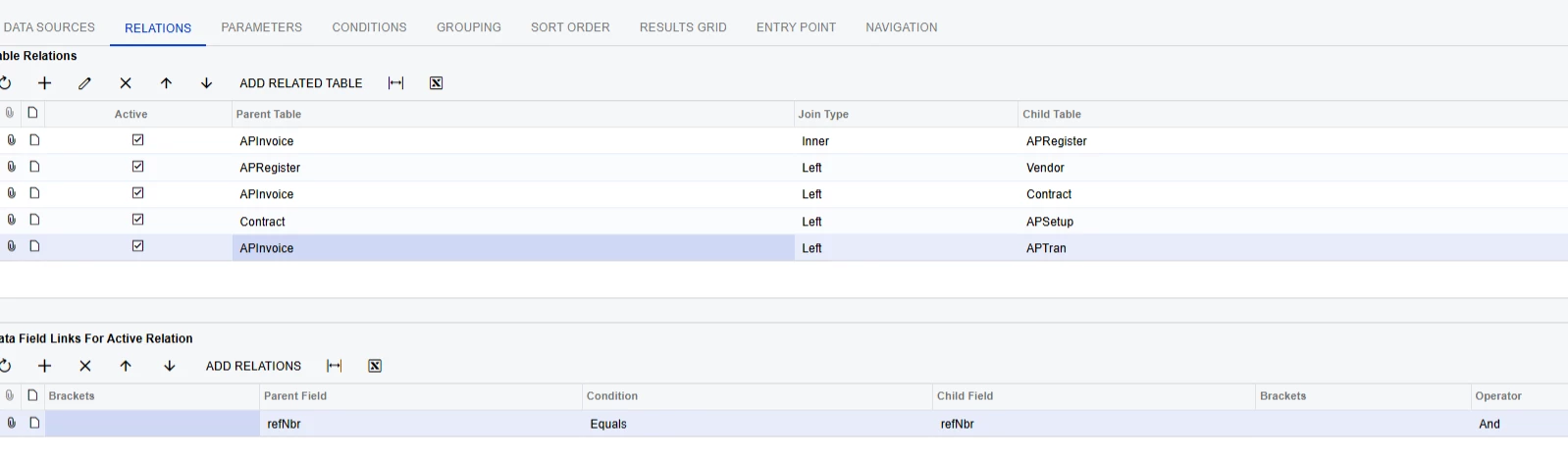
Joins are one of the suspects when an Inquiry takes too long to run. The joins do not look correct in your Generic Inquiry. APInvoice should be linked to APTran on both RefNbr and DocType.
I notice there are no Parameters in your Inquiry. Required Parameters like Start Date/End Date will require the customer to choose a range of Accounts Payable documents to include versus including every line of every AP Bill and Adjustment at the same time. Adding a Parameter with a date or period range, or a Vendor ID will cause the GI to return fewer records and therefore run faster.
You may also add a Condition to filter where Project ID is not Blank and/or Project ID is not X (Non-Project code from Project Preferences screen) to return only lines that have Project ID populated. Adding a filter for Project ID will cause the GI to return fewer records and therefore run faster.
Joins are one of the suspects when an Inquiry takes too long to run. The joins do not look correct in your Generic Inquiry. APInvoice should be linked to APTran on both RefNbr and DocType.
I notice there are no Parameters in your Inquiry. Required Parameters like Start Date/End Date will require the customer to choose a range of Accounts Payable documents to include versus including every line of every AP Bill and Adjustment at the same time. Adding a Parameter with a date or period range, or a Vendor ID will cause the GI to return fewer records and therefore run faster.
You may also add a Condition to filter where Project ID is not Blank and/or Project ID is not X (Non-Project code from Project Preferences screen) to return only lines that have Project ID populated. Adding a filter for Project ID will cause the GI to return fewer records and therefore run faster.