Answer

How to create Invoice in Screen SO303000 with inventory id (without SO) but don't want to generates an inventory issue

  • August 2, 2023
  • 5 replies
  • 162 views

Dear All,

please advise me  for this case:

I creates an Invoice on screen SO303000 without SO/Shipment. 

This SO also chooses inventory id

But I don’t want to generate an inventory issue.


Thanks alot!


Best answer by Laura03

Hello,

It’s easy to send inventory items (free item) without charging the customer, but it’s not easy to send STOCK items without reducing inventory.

It may help us to understand the reasons you need to send an invoice or inventory without reducing stock. Can you provide more detail?

Here are some ideas that may help you.

  1. entering the Invoice in AR module with Inventory ID + description in the description field of the invoice, or
  1. using Non-Stock items to represent the inventory items on an invoice.

Laura

5 replies

Laura03
Captain II
Forum|alt.badge.img+19
  • Captain II
  • Answer
  • August 2, 2023

Hello,

It’s easy to send inventory items (free item) without charging the customer, but it’s not easy to send STOCK items without reducing inventory.

It may help us to understand the reasons you need to send an invoice or inventory without reducing stock. Can you provide more detail?

Here are some ideas that may help you.

  1. entering the Invoice in AR module with Inventory ID + description in the description field of the invoice, or
  1. using Non-Stock items to represent the inventory items on an invoice.

Laura


kyoung14
Varsity I
Forum|alt.badge.img
  • Varsity I
  • August 2, 2023

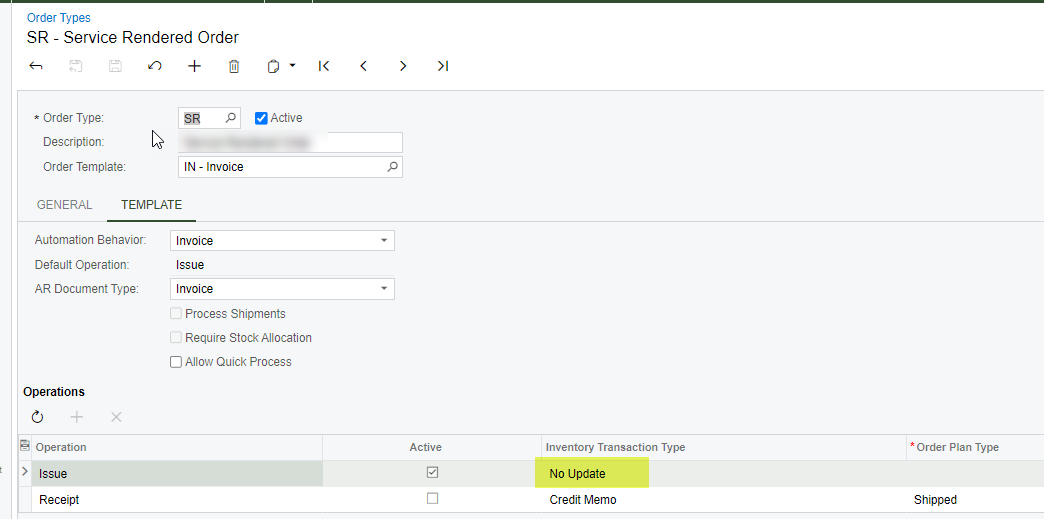
I handle this exact scenario with this setting on the order type.  Sales orders are for STOCK items but there is no inventory decrease.  inventory gets decremented via issues directly to the Project in our case through separate process.  


  • Author
  • Freshman I
  • August 14, 2023

Thank you so much for all your advise


  • Author
  • Freshman I
  • August 31, 2023

Thank you so much for both solutions


kyoung14
Varsity I
Forum|alt.badge.img
  • Varsity I
  • December 21, 2023

Update on this.  If you use my Order Type config approach as indicated above, note that orders of that ‘type’ will not be included in some of the standard Sales Order Details reports.  Reason being that sales orders lines of that type get created with an InvtMult of 0.  The standard reports filter for SOLine.InvtMult <>0.  Depending on your need you can change that in the report so just a heads-up.  We had created a bunch of other sales related GI’s or reports that didn’t do this but recently the customer tried the standard reports and wondered why they didn’t match the custom reports.