Answer

How to bring in Disposed assets for current year from legacy system

  • May 1, 2025
  • 8 replies
  • 126 views

claudematherne24
Varsity I
Forum|alt.badge.img

I’m working on some testing of the fixed asset module and have come across a scenario that I can’t figure out.

We have a handful of assets that we disposed this year and are looking to bring them into Acumatica with its correct disposal information.  When running my import scenario, it does not allow me to modify the disposal date, disposal method and disposal amount.  I have already done GL transactions directly for the disposal of these assets, so I do not want to post again.


Has anyone does this before?

Best answer by claudematherne24

I went the path of creating a non posting book and was able to get them in with the expected results

8 replies

claudematherne24
Varsity I
Forum|alt.badge.img

The main goal/intent, is that when we run the disposal report for the year, these assets show up.


nhatnghetinh
Captain II
Forum|alt.badge.img+11

Hi ​@claudematherne24 

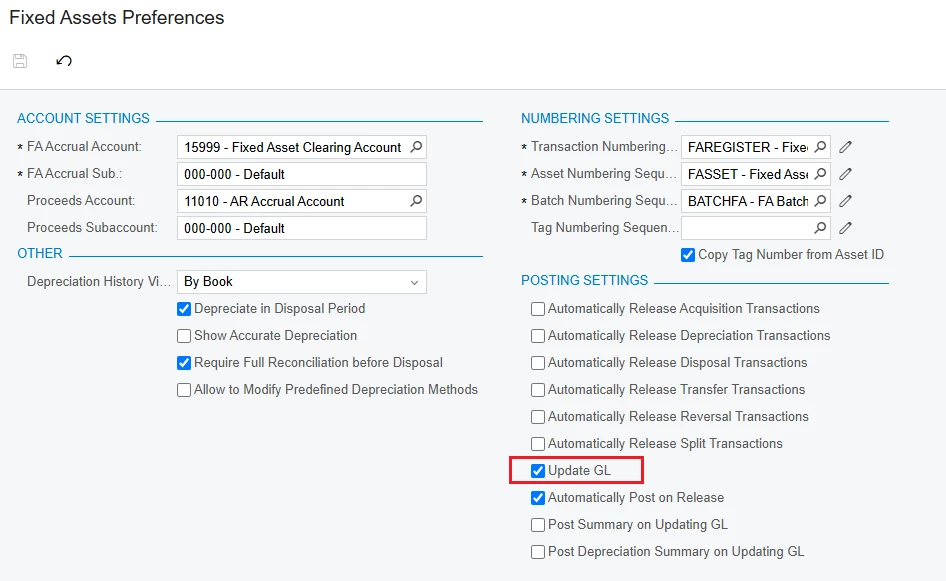
As you said " I have already done GL transactions directly for the disposal of these assets, so I do not want to post again." > Try unchecking "Update GL" in the "Fixed Assets Preferences" screen > after you are done with these assets, check "Update GL" as before.


Another way you can try. You import the Fixed Assets in "Fully Depreciated" status > Then you "Dispose" the Fixed Assets on Acumatica.


Best Regards,

NNT


claudematherne24
Varsity I
Forum|alt.badge.img

turning off Update GL wasn’t solving for it.   I’ll try forcing the status and bringing it in fully depreciated.  Another thing I am trying is brining in these handful of assets under a non posting Book.


claudematherne24
Varsity I
Forum|alt.badge.img

I went the path of creating a non posting book and was able to get them in with the expected results


Forum|alt.badge.img
  • Jr Varsity III
  • August 20, 2025

I went the path of creating a non posting book and was able to get them in with the expected results

Hi ​@claudematherne24

Did you import them in the non-posting book as disposed, or did you have to do that after importing?


Thanks,


claudematherne24
Varsity I
Forum|alt.badge.img

@tonym68 I had to dispose them after bringing them in.  I believe i could not get the status and info to populate on the import.  It also showed the paper trail of disposing the asset without hitting the GL.


Forum|alt.badge.img
  • Jr Varsity III
  • September 10, 2025

@tonym68 I had to dispose them after bringing them in.  I believe i could not get the status and info to populate on the import.  It also showed the paper trail of disposing the asset without hitting the GL.

I appreciate the response. Last question, ​@claudematherne24 , were you able to get the disposals from multiple books with standard reports and did you bring them into the non-posting book as fully depreciated?


Regards,


claudematherne24
Varsity I
Forum|alt.badge.img

@tonym68 the standard reports run by the book, we are just running multiple reports.


 We brought in the assets at their current value, then disposed while finishing the depreciation up to the disposal date. This gave us the full run of the unit, but not posting to the GL.