Answer

How to apply a prepayment to an invoice.
  • February 26, 2024
  • 4 replies
  • 933 views

How do I apply a Prepayment to a vendor invoice.

Best answer by Manikanta Dhulipudi

Hi @Sterry Check this 


4 replies

Manikanta Dhulipudi
Captain II
Forum|alt.badge.img+15

Hi @Sterry Check this 


Laura03
Captain II
Forum|alt.badge.img+19
  • Captain II
  • February 26, 2024

Hello @Sterry ,

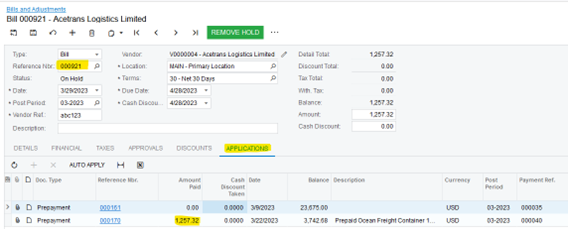
When you enter the vendor’s invoice in AP Bills & Adjustments screen, use the Applications tab to apply prepayments. Open Prepayments will automatically appear on the Applications tab of Bills - Just populate Amount Paid before releasing the AP Bill.

Apply Prepayment at time of Bill Entry

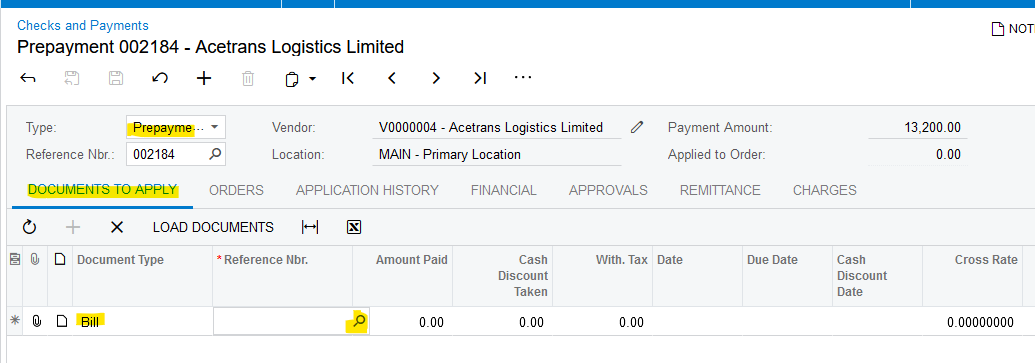
If the AP Bill has already been released without linking the Prepayment on the Applications tab, then the Prepayment may be applied after-the-fact using AP Checks & Payments screen:

Apply Prepayment after Bill has been released

Laura


KushaniPerera88
Acumatica Employee
Forum|alt.badge.img+3

Hi @Sterry 
 

Additionally, to what Laura mentioned you can also refer these articles in order get more information. 

Processing Prepayments for a Bill - https://help.acumatica.com/(W(4))/Help?ScreenId=ShowWiki&pageid=16619f1b-50d6-4170-924a-d754ea8d88f8


This Link directs you to different articles related to Prepayments for a bill  


  • Freshman I
  • October 20, 2025

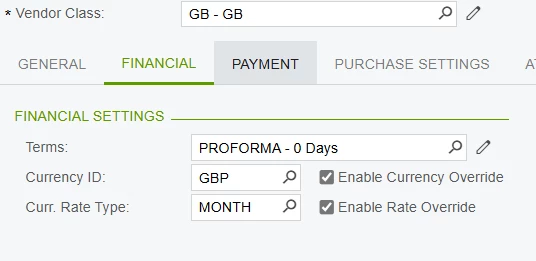
When processing a prepayment for a Vendor, do we need to have the vendor set to a proforma supplier on the Financial tab?