Answer

How do we add Entry Types to the Receivable Payment screen?

  • February 22, 2023
  • 3 replies
  • 231 views

Forum|alt.badge.img+1

Is there a trick to getting entry types to show up on the Receivable Payments screen, Charges tab? We are considering using that to record wire fees.

On the Entry Types screen, I checked the Deduct from Payment box, but the entry type does not show as an option on the Payments screen. Is there another step I should take? We are on 2022 R1. Thank you.



Best answer by mblassingame35

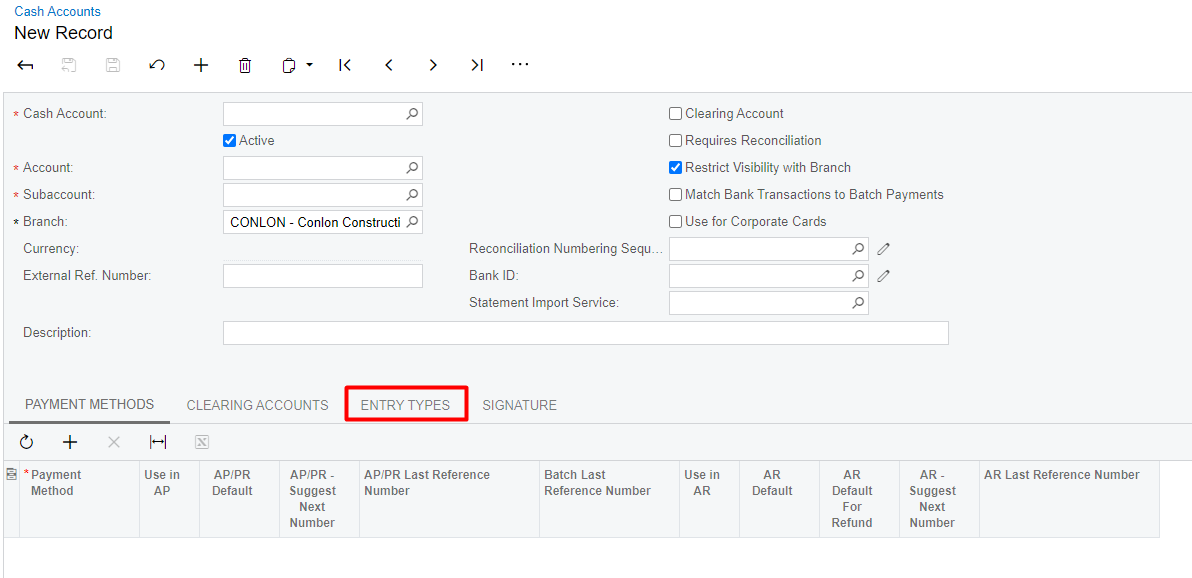
You have to assign it to the Cash Account on the Entry Types tab. 


3 replies

mblassingame35
Semi-Pro II
Forum|alt.badge.img+3
  • Semi-Pro II
  • Answer
  • February 22, 2023

You have to assign it to the Cash Account on the Entry Types tab. 


Forum|alt.badge.img+1
  • Author
  • Varsity III
  • February 22, 2023

Thank you, Melissa. Such an easy solution I can’t believe I missed it.


Forum|alt.badge.img+2
  • Captain II
  • October 31, 2025

Is there a trick to getting a “Receipt” entry type to become available on an AR Payment? 


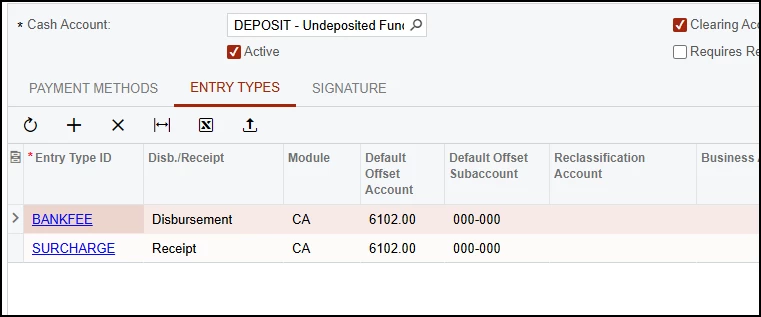
I’ve added the following Entry Types to our clearing cash account:


But when I got to enter an AR Payment, only the BANKFEE Disbursement entry types show up but not the SURCHARGE receipt type (In the example shown, if I change SURRCHAGE to Disbursement it becomes available on the AR Payment)


In another post - it’s shown that a Receipt type entry could be used and is displayed as a negative Finance Charge in the header