Question

Foreign Currency Payments in the Real World

  • April 15, 2025
  • 9 replies
  • 183 views

TimRodman
Pro I
Forum|alt.badge.img+1

Is anyone transacting foreign currency payments in the real world in Acumatica?

If so, I’m curious how you’re handling the difference between the rate on the AP Payment record in Acumatica and the rate that your payment provider uses, assuming that you process the payment in Acumatica before processing it with your payment provider.


Here’s an example:

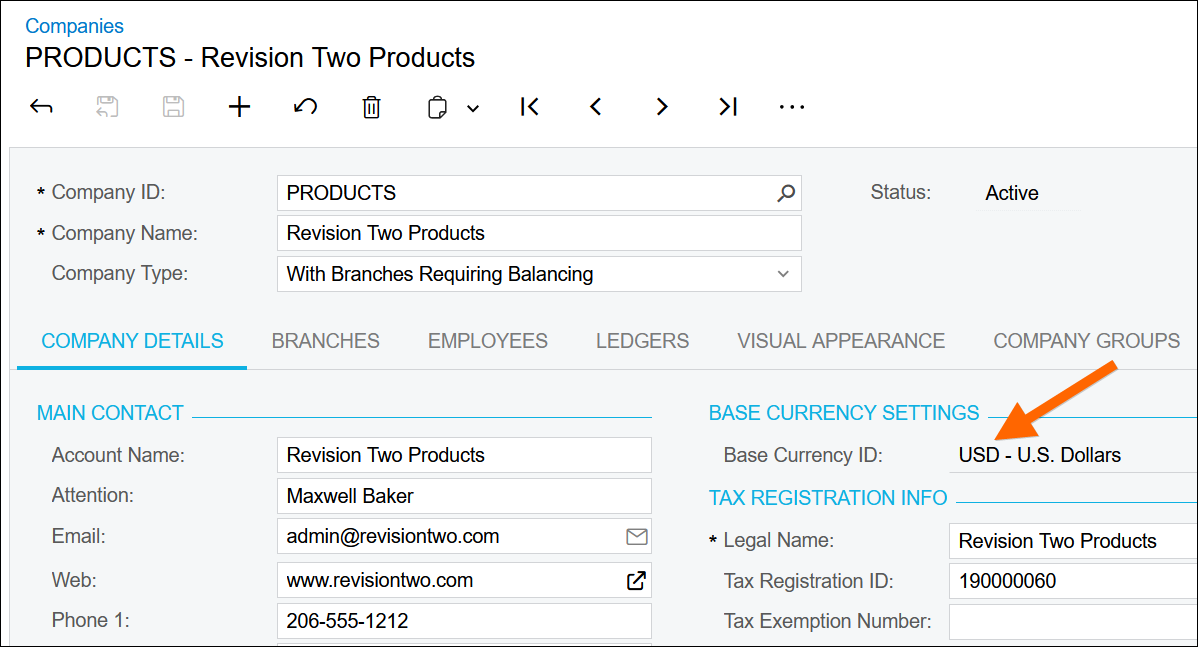
1. The Base Currency ID on the Companies (CS101500) screen is USD


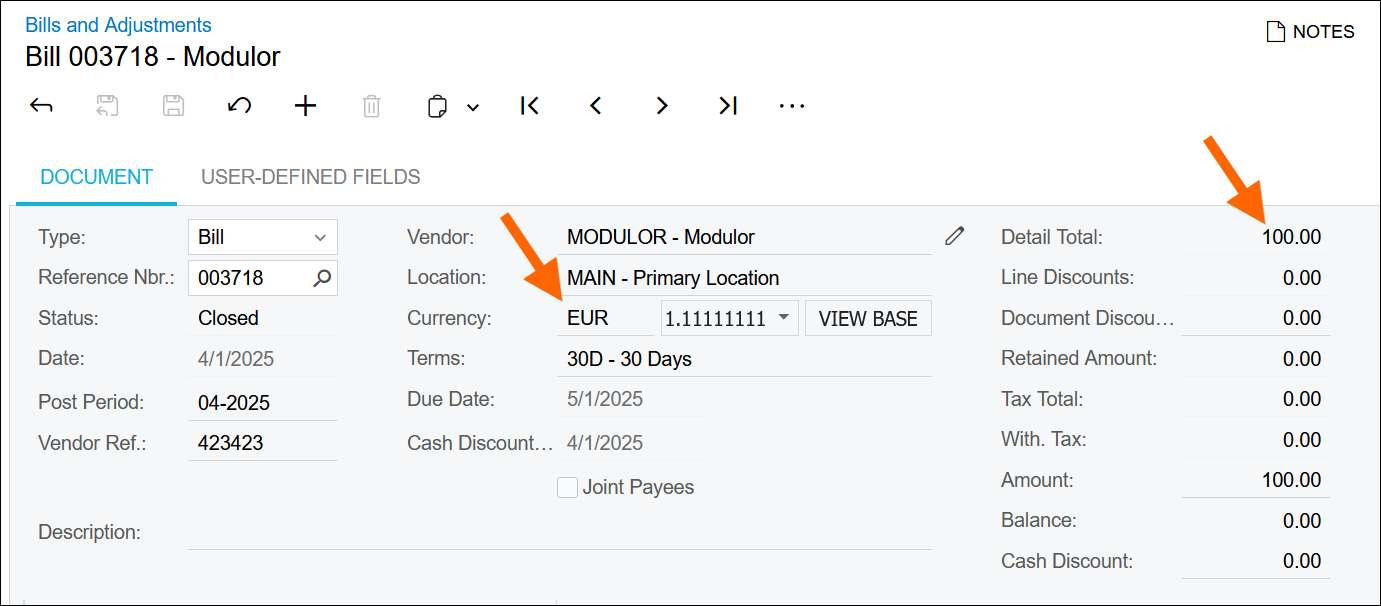
2. Enter an AP Bill in the Bills and Adjustments (AP301000) screen on April 01, 2025 for 100 EUR at a rate of 1.11111111


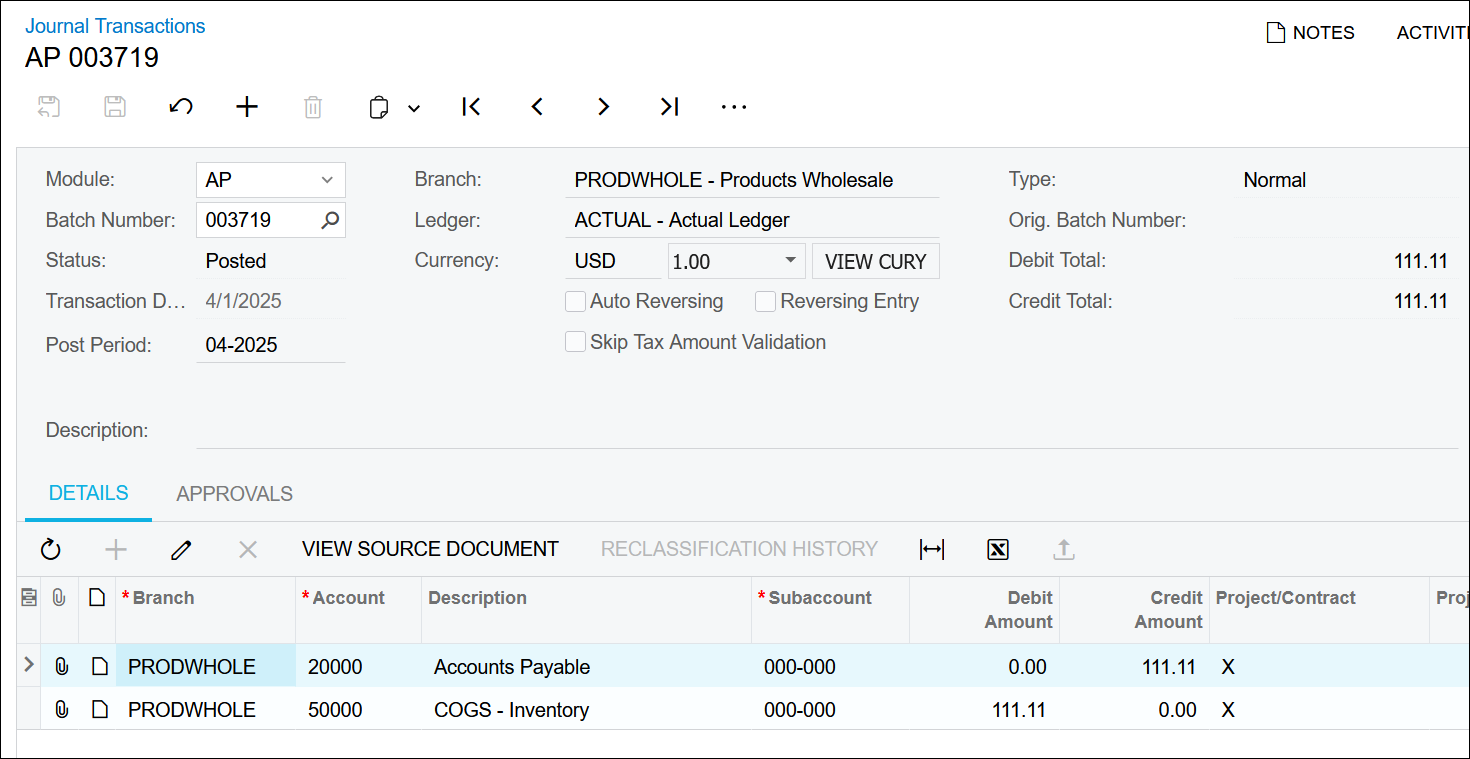
3. Here’s the journal entry that gets created when releasing the AP Bill showing USD of 111.11


4. Enter an AP Payment in the Checks and Payments (AP302000) screen on April 14, 2025 for 100 EUR at a rate of 1.12733217
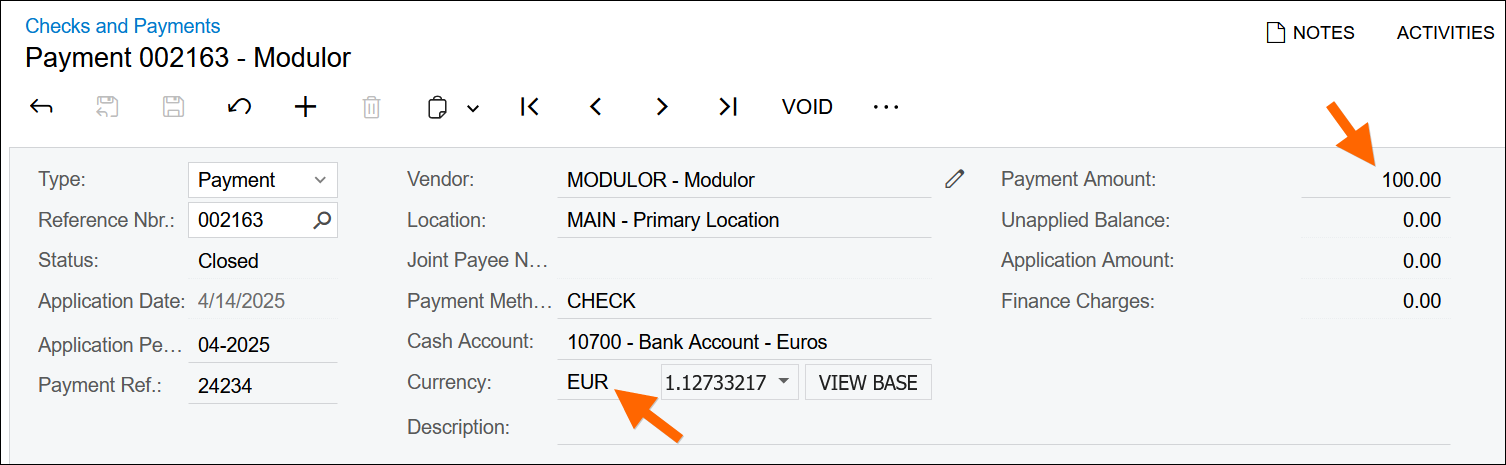


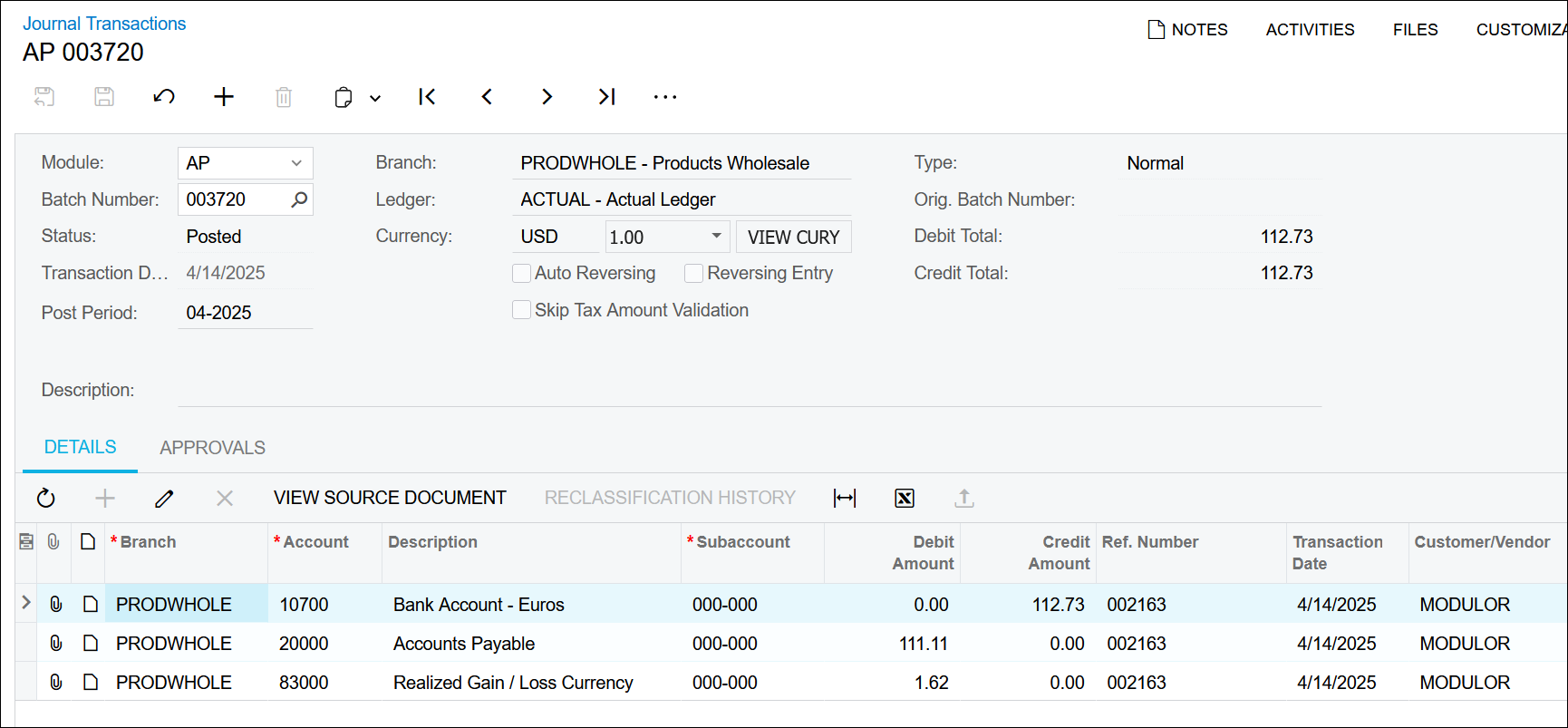
5. Here’s the journal entry that gets created when releasing the AP Payment
The cash gets pulled out of the 10700 account for 112.73 USD because of the 1.12733217 rate on the payment:
100 EUR * 1.12733217 = 112.73 USD
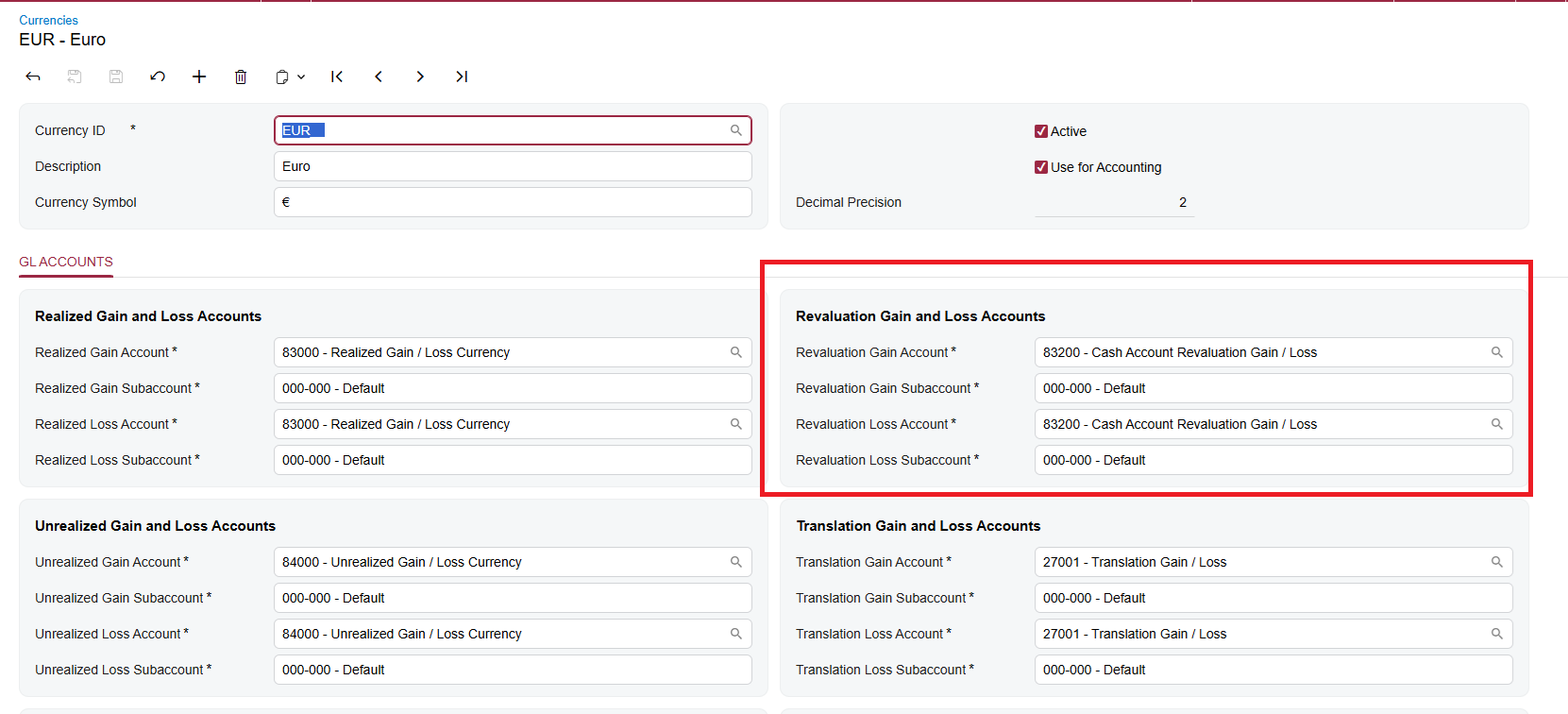
The 20000 account gets relieved for 111.11 USD since that’s the amount that went into the account and the difference of 1.62 USD gets booked to 83000 which is the account specified on the GL ACCOUNTS tab of the Currencies (CM202000) screen:


Now, the issue is, I want to process the payment in Acumatica first since Acumatica is the system that’s authorizing the transaction to happen with the payment provider.

But, whereas the rate in Acumatica fluctuates by the day, the rate with the payment provider fluctuates by the minute.

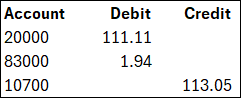
So, in the example above, the rate with the payment provider might be something more like 1.13050642 which would mean that cash should have been credited for

100 USD * 1.13050642 = 113.05 USD

Meaning the journal entry should have been:


But our entry was this:
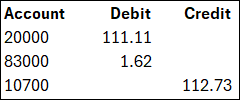


So we need to make a correcting entry of the following:
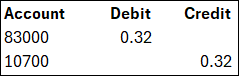


But that’s kind of clunky having to manually create a correcting entry.

Is this how people are doing it in the real world in Acumatica or is there a better way?

9 replies

Eric Ratté
Jr Varsity I
Forum|alt.badge.img+1
  • Jr Varsity I
  • April 15, 2025

Hi,

The adjustment you are referring to is only in the base currency and does not affect the value of the bank account in Euro.

At the end of the month, you typically have to revaluate the foreign bank account in the base currency using the Revaluate GL accounts screen.

By doing so, the end of month value of the base currency will be adjusted to present more accurate financial statements.

If the payment of the Bill in Euro has been made in USD, then, you would have to do a cash adjustment for the difference.  


TimRodman
Pro I
Forum|alt.badge.img+1
  • Author
  • Pro I
  • April 16, 2025

Thanks for the rely ​@Eric Ratté 

I don’t think that I can rely on the Revaluate GL Accounts (DB000031) screen process at the end of the month to fix it because, as I understand it (and I’m an isolated American so I don’t know much about this 😀), the end of month process would hit an Unrealized Gain Account in the General Ledger while the process that I’m talking about should hit a Realized Gain Account in the General Ledger.


meganfriesen37
Captain II
Forum|alt.badge.img+12

Hi Tim - for your scenario, if I have this correctly, you have a EUR bill, but your bank account that you’re paying it out of is in USD (or you’re sending USD to a payment processor to pay in EUR) so the issue is in the Cross Rate that’s being used on the payment not matching up.  If there was a way to generate the payment file to the payment processor without releasing it so that you could import/update the exchange rate directly would solve the problem I think?


Eric Ratté
Jr Varsity I
Forum|alt.badge.img+1
  • Jr Varsity I
  • April 16, 2025

Revaluate AR and AP go to unrealized and the end of month entries are reversed automatically because unrealized. While the Revaluate GL accounts can go to realized as per the configuration is different and these entries are not reversed.


TimRodman
Pro I
Forum|alt.badge.img+1
  • Author
  • Pro I
  • April 16, 2025

Hi Tim - for your scenario, if I have this correctly, you have a EUR bill, but your bank account that you’re paying it out of is in USD (or you’re sending USD to a payment processor to pay in EUR) so the issue is in the Cross Rate that’s being used on the payment not matching up.  If there was a way to generate the payment file to the payment processor without releasing it so that you could import/update the exchange rate directly would solve the problem I think?

Thanks for chiming in! Ya, if I didn’t release it, then I could come back and update the exchange rate on the Payment in Acumatica with the exchange rate that’s dictated by the Payment Processor before releasing the Payment in Acumatica.

But that feels funny to me from an internal controls perspective because there’s no solid audit trail. I could even delete the Payment in Acumatica after processing it with the payment processor. I guess I’m hunting for some authorization mechanism in Acumatica that can’t be modified. Maybe it’s a custom status on the Payment Record called Pending Processing which doesn’t allow the Acumatica Payment record to be deleted and the only thing that can be modified is the exchange rate.


meganfriesen37
Captain II
Forum|alt.badge.img+12

@TimRodman I agree on the lack of audit trail that the solution provides.  I’m not a customization expert, but there’s probably a way to somehow feed the rate back in automatically, but not sure how.  Unless you know the exchange rate in advance I’m not sure how you’d do it.


Chris Hackett
Community Manager
Forum|alt.badge.img
  • Acumatica Community Manager
  • July 2, 2025

Hi ​@TimRodman were you able to find a solution? Thank you!


meganfriesen37
Captain II
Forum|alt.badge.img+12

@TimRodman I recently had this come up with a client with a similar issue (sending a USD wire payment out of a CAD bank account).  They noticed the issue as they were reconciling their first month in Acumatica.  The current (manual) process is we set up 2 Cash Entry Types (one receipt/one disbursement) for the realized fx gain/loss so that they can add these variances to the payments at the end of the month when they’re doing the bank reconciliation as we haven’t found a better way to handle this scenario.  I don’t love it because the gain/loss isn’t tied to the specific payment/vendor but it gets the expense to the right place and they can reconcile their bank account.  They don’t have a ton of these per month so it’s not a huge burden right now.  The other thing we’ve discussed with them is just leaving these payments “on hold” until the bank statement comes back so they can update the cross rate.


TimRodman
Pro I
Forum|alt.badge.img+1
  • Author
  • Pro I
  • July 4, 2025

@Chris Hackett ​@meganfriesen37 I haven’t found a great solution. I like Megan’s “on hold” solution best because then you can force the exchange rate to match. I haven’t done it, but I suspect you could do something pretty simple with the Workflow Engine by introducing a Status between On Hold and Released called something like Approved.


Then, if something is in an Approved status, you wouldn’t be able to put it back On Hold. You could only change the Exchange Rate and Release it.