Solved

Fixed Asset GL account correction

  • January 18, 2024
  • 5 replies
  • 433 views

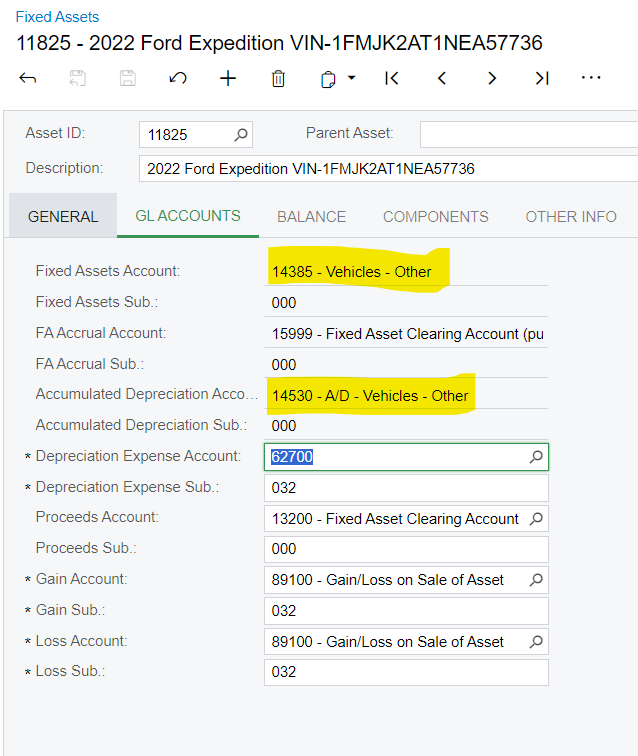
Need to know how to correct Fixed Assets Accounts on the GL Accounts section that is greyed out.  The accounts should have been 14380 - Vehicles - Automobiles instead of 14385 - Vehicles - Other and Accumulated Depreciation Account should have been 14525 - A/D - Vehicles - Automobiles.  I tried changing the Asset Class on the General tab and it said it would update GL accounts but did not update those above.  Vehicle was placed in service on 11/3/23 and has been depreciated for two months.
 

Best answer by Eric Ratté

Hi,

Here are the steps that I recommend.

  1. Create a new fixed assets class by copying the current fixed assets class.
  2. Transfer the fixed assets to that new class. You can do this by using the Transfer Fixed Assets processing screen.
  3. Optionally, you can transfer the fixed assets to the previous class using the same screen.

The fixed assets transfer will create fixed assets transactions to affect the subledger that will then created corresponding GL batches to affect the new accounts on the GL.


To trigger these transactions, you need a new fixed assets class because you cannot transfer from class A to class A. The system doesn’t detect any change even if the underlying GL accounts have been changed in the class.

5 replies

Eric Ratté
Jr Varsity I
Forum|alt.badge.img+1
  • Jr Varsity I
  • Answer
  • January 18, 2024

Hi,

Here are the steps that I recommend.

  1. Create a new fixed assets class by copying the current fixed assets class.
  2. Transfer the fixed assets to that new class. You can do this by using the Transfer Fixed Assets processing screen.
  3. Optionally, you can transfer the fixed assets to the previous class using the same screen.

The fixed assets transfer will create fixed assets transactions to affect the subledger that will then created corresponding GL batches to affect the new accounts on the GL.


To trigger these transactions, you need a new fixed assets class because you cannot transfer from class A to class A. The system doesn’t detect any change even if the underlying GL accounts have been changed in the class.


  • Author
  • Freshman II
  • January 18, 2024

If I use a 1/1/2024 transfer date, will it retroactively correct the depreciation back to November?  I would prefer it not to since we have already corrected the GL side with journal entries.


Eric Ratté
Jr Varsity I
Forum|alt.badge.img+1
  • Jr Varsity I
  • January 18, 2024

No, the entries will be made on 01/01/2024.


  • Author
  • Freshman II
  • January 19, 2024

Thank you, sir.  Much appreciated.


Forum|alt.badge.img+1

Good day I have a different issue but also related to Transfer of assets.

We discovered that some assets in COMPEQUIP class were allocated to incorrect GL accounts. I made a correction to these assets with an import scenario. This created transfers from GL 1111 to GL 2222, which seems to have resulted in the Fully Depreciated Assets having the entire depreciation reversed and the NBV of the asset now equal to the Acquisition Cost. I have reversed the GL entries but I need to correct the FA.

I have tried to process a Depreciation+ adjustment but I am getting mixed errors around the transaction period, e.g. using currect period : 

Incorrect value. The value to be entered must be less than 07-2019.

Using period 06-2019:

Incorrect value. The value to be entered must be greater than or equal to 07-2019.

In-Service Date 07-2019 completion date 07-2022. I have tried both dates.

I also tried creating another class, as suggested above, but the transfer does not generate an entry as the GL accounts are the same for both classes.

Do you have another suggestion as to how I can correct the Accum. Depreciation and the NBV of these assets please?

TIA

Barbara