

Answer

Financials module Error message when importing AR Invoice file via Import by Scenario - 'Cash Account' cannot be found in the system. Please verify whether you have proper access rights to this object.

  • November 21, 2025
  • 6 replies
  • 39 views

These errors started appearing last week out of the blue, as far as I can tell. I have been importing the files using the same process as usual. We are fairly new users (implemented Sep 2025) so this is the first troubleshooting I’ve had to do. I’m generally a pretty savvy user but this makes no sense to me. Has anyone else seen this error?

Best answer by Laura03

Hello,

Is it possible that “Restrict Visibility within Branch” was checked ON for the Bank Account, while the AR Invoices or the Customers have a default Cash Account that belongs to another branch?  
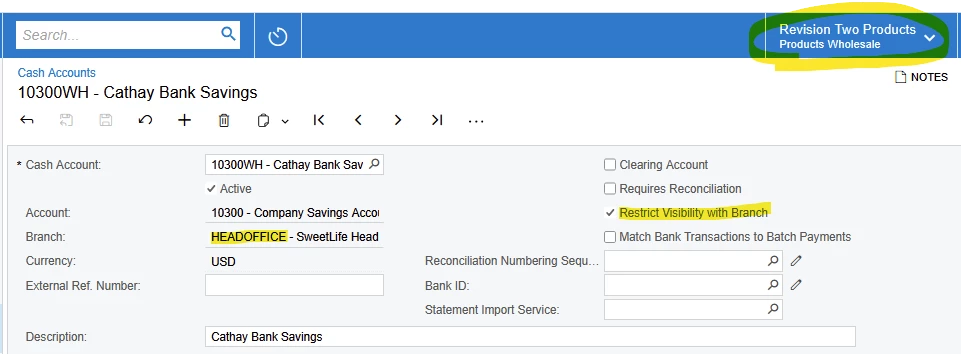
Restrict Visibility hides this Bank acct from other branches

Please try importing from a branch that matches both the branch on the invoices and the branch on the Bank Account.

I hope this helps.


Laura

6 replies

hkabiri
Acumatica Moderator
Forum|alt.badge.img+8
  • Acumatica Support Team
  • November 21, 2025

@cwray  Can you please check if you can manually create same invoice with same info from the import?

Was there any recent changes on branch access, cash accounts?


  • Author
  • Freshman I
  • November 21, 2025

Yes, we can manually create the same invoices with the same info. One thing is that I’m not sure what Cash Account the error is referring to??? Possibly an Undeposited Funds GL account but there are no cash accounts in the import, just AR and revenue GL accounts.


  • Author
  • Freshman I
  • November 21, 2025

No changes to branch or cash account access as far as I know. I’m the System Administrator so I should have comprehensive access in any case. Also, thank you for the reply!


mohammadnawaz51
Jr Varsity I
Forum|alt.badge.img+4

@cwray These Imports may run from ADMIN ACCOUNT, Can you login to “ Admin”
 user and check if you are able to create a invoice manually.


Laura03
Captain II
Forum|alt.badge.img+19
  • Captain II
  • Answer
  • November 24, 2025

Hello,

Is it possible that “Restrict Visibility within Branch” was checked ON for the Bank Account, while the AR Invoices or the Customers have a default Cash Account that belongs to another branch?  

Restrict Visibility hides this Bank acct from other branches

Please try importing from a branch that matches both the branch on the invoices and the branch on the Bank Account.

I hope this helps.


Laura


  • Author
  • Freshman I
  • November 24, 2025

Thank you, Laura! I was able to uncheck Restrict visability with Branch and that did it. I don’t know why this was checked since all branches share the same bank accounts.


