Answer

Expense Claim Approval Map - Multi user approval

  • November 28, 2025
  • 5 replies
  • 52 views

Forum|alt.badge.img

Hello All

I am trying to create an approval map for expense claims that will require multi user approval.

The flows are as below:

  1. Aprrovals for $20,000 limit - I have a workgroup assgined to this as it only requires one approver.
  2. Approvals for $20,000 - $50,000 limit - there is also a workgroup assigned to this as well as only one approver is required.
  3. Approvals greater than $50,000 - this is where the multi user approval is required. There are five (5) users who can approve these claims, however, they require a combination of any pair to approve i.e.: (user 1 and user 2), (user 1 and user 3), (user 1 and user 4), (user 1 and user 5), (user 2 and user 3), (user 2 and user 4), (user 2 and user 5), (user 3 and user 4), (user 3 and user 5), (user 4 and 5) at any time.

I’m trying to figure out how I can get this to work. On my approval map, I set up the pairs as various options but that didn’t work as only the first pair was able to have the multi user approval and the rest just approved with one user only.

Any ideas or advice will be greatly appreciated.
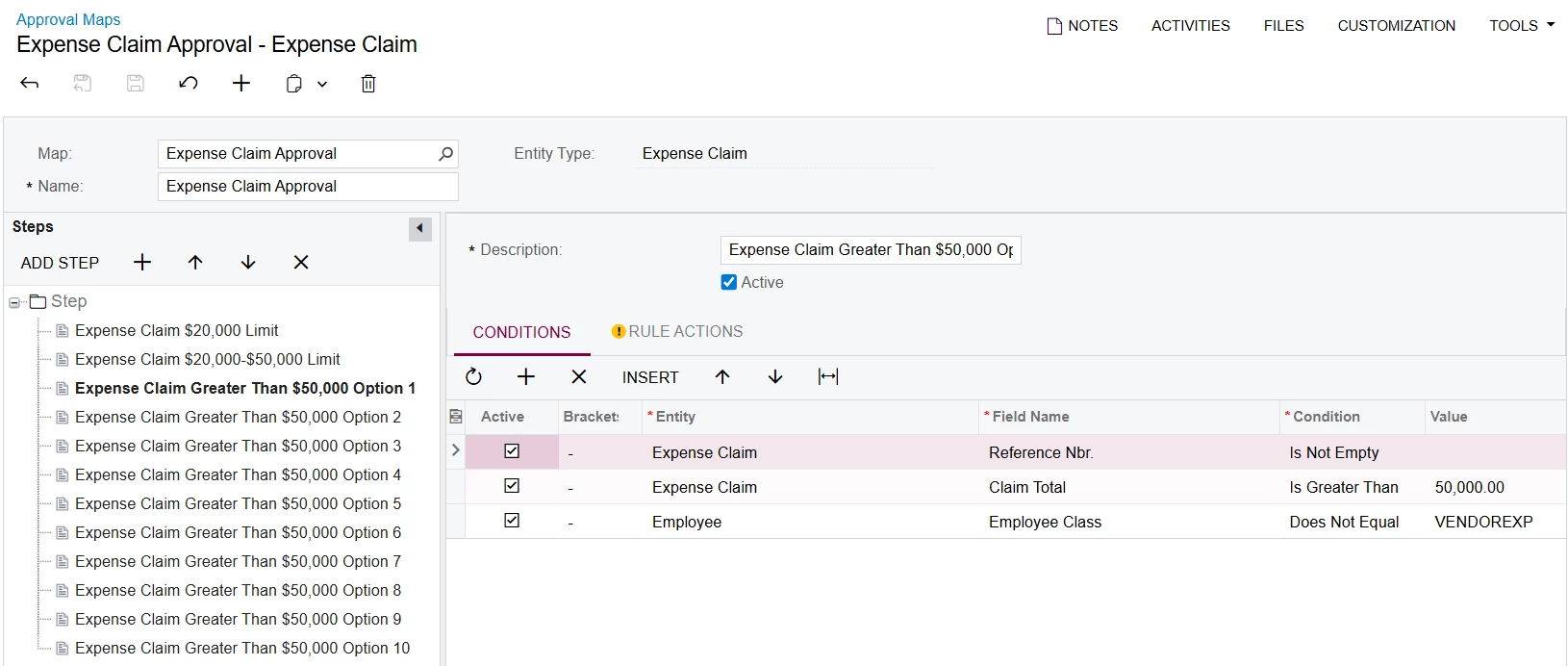
Approval map with multi user options

Thanks

Amit

Best answer by Laura03

Hello,

I recommend setting up three Steps. 

  1. Up to $20,000
  2. $20,000-$50,000
  3. Over $50,000 

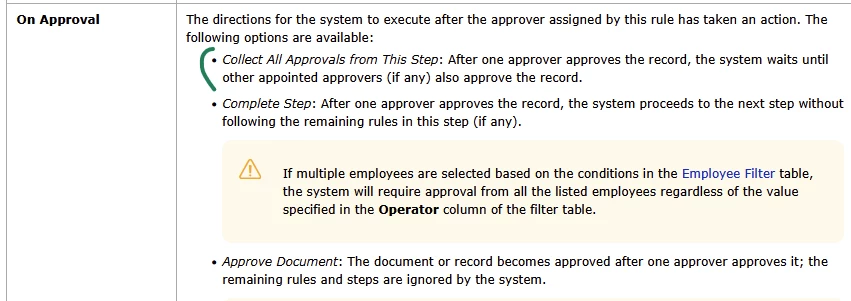
Use On Approval field on Rule Actions tab to control whether the Expense claim is approved in the first step and Finished - or approved in the first step and goes on for second approval .

Example:

Level 1

  1. Under $20,000 option:  Approver X , On Approval = Approve Document. (Document is approved in one step.)

Level 2

  1. $20,000 to $50,000 option:  Approver Y , On Approval = Approve Document. (Document is approved in one step.)  
  1. Up to $50,000 option:  Approver = Workgroup with multiple people, On Approval = Complete Step. (After Approver Y approves, Document advances to Level 3.)

Level 3

Over $50,000:   Approver = Workgroup with multiple people, On Approval = Approve document.


Please practice in your test tenant then export to your production tenant.

Laura

5 replies

Laura03
Captain II
Forum|alt.badge.img+19
  • Captain II
  • Answer
  • December 1, 2025

Hello,

I recommend setting up three Steps. 

  1. Up to $20,000
  2. $20,000-$50,000
  3. Over $50,000 

Use On Approval field on Rule Actions tab to control whether the Expense claim is approved in the first step and Finished - or approved in the first step and goes on for second approval .

Example:

Level 1

  1. Under $20,000 option:  Approver X , On Approval = Approve Document. (Document is approved in one step.)

Level 2

  1. $20,000 to $50,000 option:  Approver Y , On Approval = Approve Document. (Document is approved in one step.)  
  1. Up to $50,000 option:  Approver = Workgroup with multiple people, On Approval = Complete Step. (After Approver Y approves, Document advances to Level 3.)

Level 3

Over $50,000:   Approver = Workgroup with multiple people, On Approval = Approve document.


Please practice in your test tenant then export to your production tenant.

Laura


Forum|alt.badge.img
  • Author
  • Freshman I
  • December 1, 2025

Hi ​@Laura03, thank you for responding. This can work for what I’m trying to achieve.

Thanks

Amit


Forum|alt.badge.img
  • Author
  • Freshman I
  • December 4, 2025

Hi ​@Laura03 thanks again for your suggestion which worked fine for the need at the time.

However, there’s been a change in process for the approvals over $50,000.

There are now three (3) set users who can grant these approvals and they would like a combnination of any of these users (User 1 and User 2, User 1 and User 3 or User 2 and User 3) to approve documents at any time.

The approach with completing the step and then moving to the second approval cannot work for them because if the user for the first step is unavailable, the second approval cannot proceed.

Do you have any insights or ideas on how this may be resolved, please?

Thanks

Amit


Laura03
Captain II
Forum|alt.badge.img+19
  • Captain II
  • December 4, 2025

Hello,

I don’t think there is a way with native Acumatica features, to approve a document when two out of three users in a group have granted approval.  You may like to investigate whether customization could achieve your requirements.

Laura


Forum|alt.badge.img
  • Author
  • Freshman I
  • December 4, 2025

Hi ​@Laura03, I figured it may have to be something along that line. Thanks again for taking the time to respond.

Thanks

Amit