Answer

Email invoice attachment

  • February 11, 2025
  • 11 replies
  • 470 views

dsimmerly
Pro I
Forum|alt.badge.img+1

What are the options to have invoice attachments automatically attached to email when sending invoice (version 24R1)?

(apologies if this is a dup)



Best answer by ranjithduraisamy72

@dsimmerly Please find the existing community post, as it seems this particular function is still under consideration.

https://community.acumatica.com/ideas/when%2Demailing%2Dan%2Dinvoice%2Dautomatically%2Dattach%2Dall%2Dattached%2Dfiles%2D2223

11 replies

Manikanta Dhulipudi
Captain II
Forum|alt.badge.img+15

@dsimmerly You mean any files in the invoices are attached to email?


Using Business event we can attach the invoice report in the email automatically.


dsimmerly
Pro I
Forum|alt.badge.img+1
  • Author
  • Pro I
  • February 11, 2025

@Manikanta Dhulipudi Invoices have non ACM documents attached.  These attachments need to be sent along with the Invoice document via email 


Forum|alt.badge.img+2

@dsimmerly 

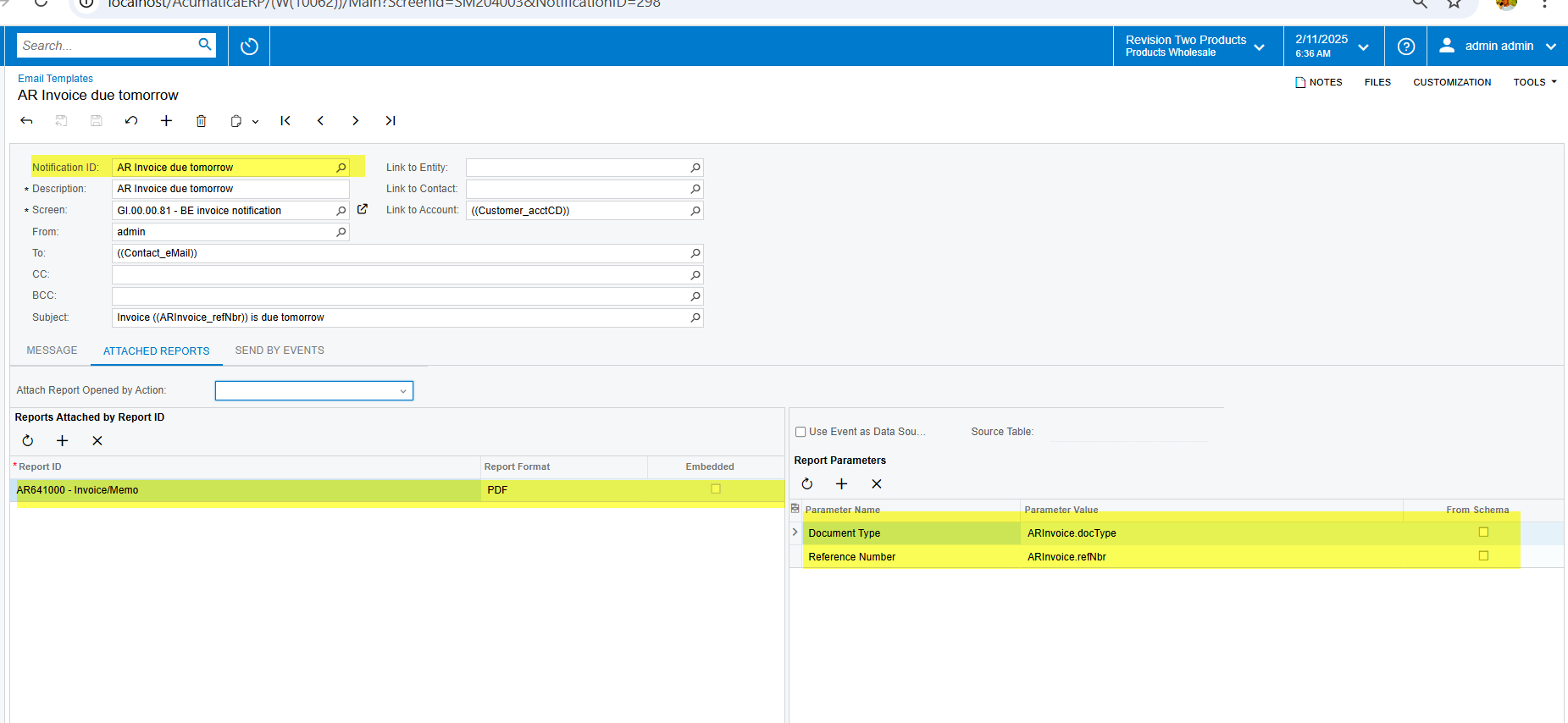
In the email template screen, there is a tab called "Attach Reports." Using this configuration, you can automate report attachments when sending invoice emails. Please refer to the screenshots for guidance:

  • Left Panel: Select the report and specify the attachment format.
  • Right Panel: Define the parameters to match the report with the screen.


dsimmerly
Pro I
Forum|alt.badge.img+1
  • Author
  • Pro I
  • February 11, 2025

@ranjithduraisamy72 The attachments that need to sent with the invoice are not ACM reports they are pdf and jpg files related to the invoice and saved as attachments to the invoice 


Forum|alt.badge.img+2

@dsimmerly Please find the existing community post, as it seems this particular function is still under consideration.

https://community.acumatica.com/ideas/when%2Demailing%2Dan%2Dinvoice%2Dautomatically%2Dattach%2Dall%2Dattached%2Dfiles%2D2223


Forum|alt.badge.img+5
  • Jr Varsity I
  • February 11, 2025

Hi ​@dsimmerly 

For automatically attaching invoices to emails in Acumatica 24R1, you have several configuration options:

1.Through AR Preferences (AR101000):

Under "Print and Email Settings" section, enable "Print Invoice"

Also enable "Attach Files to Email" if you want files from the Files tab included

2.Via Report Assignments (SM202510):

You can set either the default AR641000 invoice report or your custom report

This will be used automatically when emails are sent


3.Using Notification Templates (SM204003):

Create/modify an invoice notification template

Configure specific reports to attach under the Message tab

Useful when you need multiple report attachments


4.Customer-specific settings in Customer (AR303000):

Override default settings for individual customers

Customize which documents get attached for specific customers


These settings work for both manual sending and batch processing through Process AR Documents (AR503000).

Hope this helps.


Forum|alt.badge.img
  • Varsity II
  • July 10, 2025

Hi ​@Ankita Tayana - I am in 24R1 but do not see “Print and Email Settings” on the AR101000 screen? Nor do I see “Attach Files to Email”.. could it be we are on the wrong build? And just to confirm, if I were to enable this, this would send out any pdf attachment we’ve saved under the Files section on the invoice screen, correct? And would this also work when sending emails/invoices out in mass using the “Print Invoices and Memos” screen?


  • Jr Varsity II
  • August 12, 2025

Did anyone ever find if these buttons existed?  We are on the construction version and could not find them in any of the preferences. 


Forum|alt.badge.img
  • Varsity II
  • August 14, 2025

Hi ​@mdavolt - yes, I opened a case with Acumatica and they confirmed they do not exist and sending all attachments is not an option yet.


  • Jr Varsity II
  • August 14, 2025

Thank you - We  reached out to our  Business Partner do a customization for this.  Just wanted to make sure we weren't missing something.  Additionally we are going to have them give us the ability to print  multiple PDF’s of AP invoices for T&M support.  Both of these functions, i was surprised weren’t available when lower end products address this.  The good news is the product is very flexible and can be customized to meet these needs.    Apprecie your reply Ashley   Have a great rest of the week.  


  • Freshman I
  • November 17, 2025

{BaseUrl}/AcumaticaERP/entity/DefaultAP/29.200.001/Bill/000038/files/TestFile.pdf

not able to delete and edit bill attachment