I am trying to create email template from Dunning Letter emails.
Before automating, i need to make sure my version of MYOB Acumatica can actually do what I need. (2024.1)
I have tried many channels - I just cant get the email to populate the email address, and the fields it needs to extract from to inform customer that their invoices are passed due.
Any help here that isn't ChatGPT would be great thanks
Best answer by nickcerri32
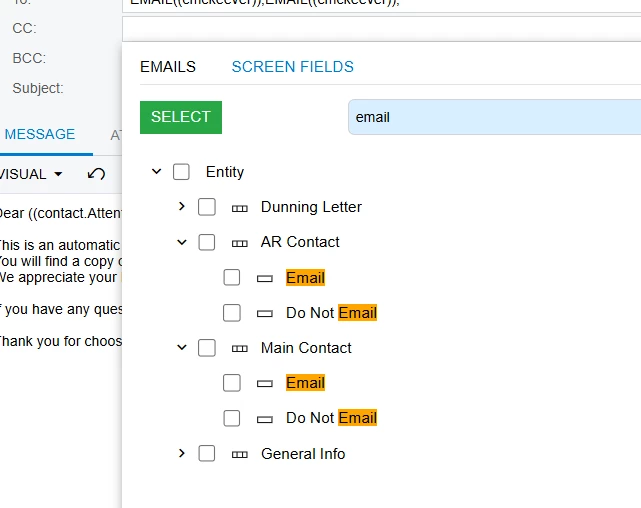
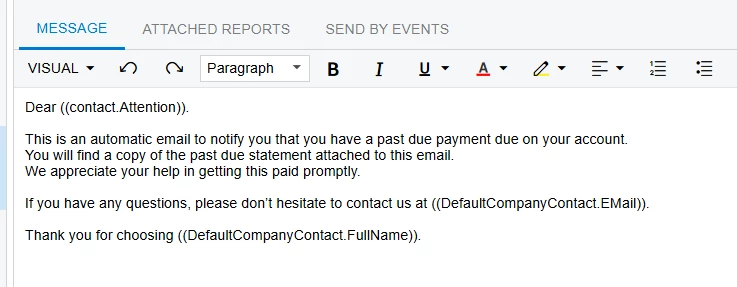
@davidmillstui - are you referring to the DunningLetterNotification email template? If so, can you provide a bit more information about what fields you can’t get to populate? As I look at the template, based on your first message, this is what I’m seeing:
Email address - The Screen Fields allow you to select the AR Contact Email and Main Contact email
Fields it needs to extract from - which fields? The out of the box Body says the following, but obviously this can be modified. Do you have a screenshot you can provide?
@davidmillstui - Dunning Letters are handled in their own unique way in Acumatica as their is a standard form (AR661000) that you first Prepare (AR521000) them and them Print/Release (AR522000). You can edit the AR661000 report as needed, and you can apply automation schedules to the Prepare and Print/Release screens.
@davidmillstui - are you referring to the DunningLetterNotification email template? If so, can you provide a bit more information about what fields you can’t get to populate? As I look at the template, based on your first message, this is what I’m seeing:
Email address - The Screen Fields allow you to select the AR Contact Email and Main Contact email
Fields it needs to extract from - which fields? The out of the box Body says the following, but obviously this can be modified. Do you have a screenshot you can provide?