Answer

Display PTD and YTD values on same report

  • October 8, 2025
  • 4 replies
  • 54 views

Forum|alt.badge.img

Good day Community

I have created an ARM report which has PTD and YTD values on the same report but for some reason it is only displaying YTD in all columns and I can’t see the problem.

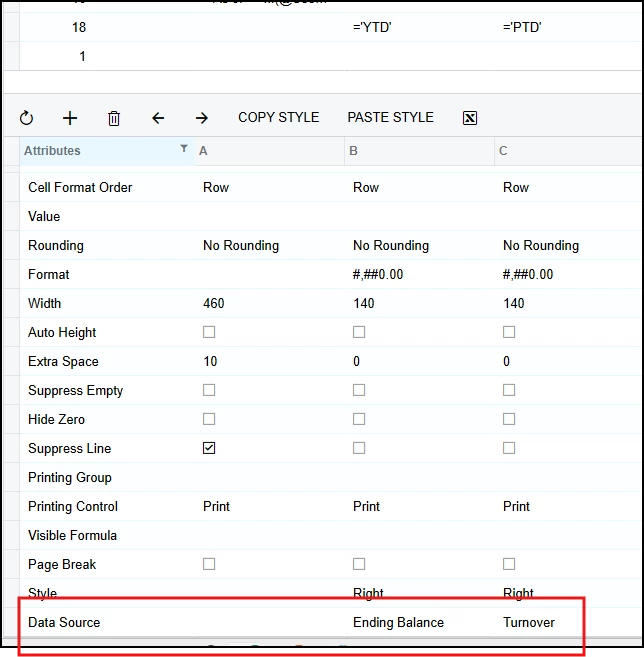
PTD has Turnover as the Amount Type in the Data Source and YTD has Ending Balance, yet the amounts displayed are the same. Obviously the Subaccount is the same.

Can someone please advise what I have missed

Many thanks in advnce.
Best answer by kyle90

Hey ​@BarbaraPietersen23 - Just seeing I never responded to your last comment. Hopefully you’ve sorted this out by now


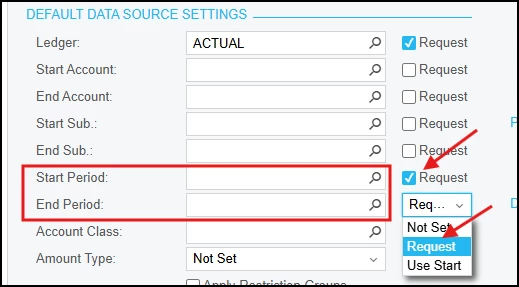
We use  PTD and YTD in lots of reports. We typically set Start Date as request but I believe you will  also need to specify an end date (either set as request or use start date) to get a turnover. If you’re looking for multiple months, I would request the period for both


On the column sets you’ll want both columns types to be set as “GL” 

 - for YTD you’d set the Amount Type from the Data Source as Ending Balance

 - for the PTD you’d set it as Turnover


With both Start and End date set as request, you should be able to produce a 2 month report. I really like the ability to look at a trailing 12-months in the PTD column with this set up too


4 replies

Forum|alt.badge.img+2
  • Captain II
  • October 8, 2025

What are your settings for Start and End date on the report definitions? 


Forum|alt.badge.img

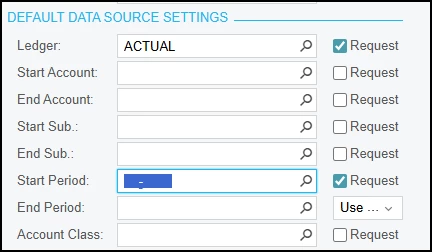
Thanks for your response. The start date only is requested. In this instance it is 02-2026, so I am expecting results for month 2 and year to date for 2 months.


Chris Hackett
Community Manager
Forum|alt.badge.img
  • Acumatica Community Manager
  • November 6, 2025

Hi ​@BarbaraPietersen23 thank you for your respond and answers. 


Forum|alt.badge.img+2
  • Captain II
  • Answer
  • November 6, 2025

Hey ​@BarbaraPietersen23 - Just seeing I never responded to your last comment. Hopefully you’ve sorted this out by now


We use  PTD and YTD in lots of reports. We typically set Start Date as request but I believe you will  also need to specify an end date (either set as request or use start date) to get a turnover. If you’re looking for multiple months, I would request the period for both


On the column sets you’ll want both columns types to be set as “GL” 

 - for YTD you’d set the Amount Type from the Data Source as Ending Balance

 - for the PTD you’d set it as Turnover


With both Start and End date set as request, you should be able to produce a 2 month report. I really like the ability to look at a trailing 12-months in the PTD column with this set up too