

Question

Discrepency in The T5018 e-file report does not display payment details.

  • July 1, 2025
  • 1 reply
  • 39 views

Forum|alt.badge.img

Hi Team,

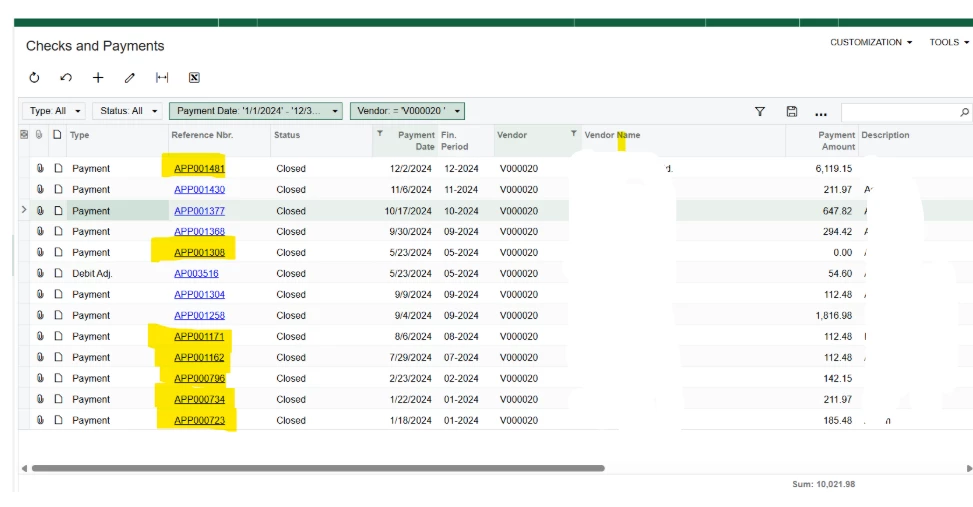
For xxxx Customer. The total payment was $10,021.98 but T5018 reports shows only $6883.56

 As shown in the screenshot below, the highlighted Ref. Nbr. appears correctly in the T5018 Report Details; however, the remaining payments are not being displayed. Could you please advise on the root cause of this issue?



1 reply

saifalisabri
Jr Varsity II
Forum|alt.badge.img
  • Jr Varsity II
  • July 2, 2025

Discrepancy in T5018 e-File Report – Missing Payment Records

Upon reviewing your screenshot and the associated records, the issue appears to stem from certain payments (as highlighted in yellow) not being included in the T5018 e-File Report, even though they are correctly posted and closed in the Checks and Payments screen for vendor V000020. The total payment amount in the system is $10,021.98, while the T5018 report is only reflecting $6,883.56.

Potential Causes & Recommendations:

  1. Missing 1099 Box on Payment or Vendor Setup:
    • Ensure the vendor is marked as a 1099 vendor.
    • Verify that each payment or bill has the 1099 Box properly set. Payments without a 1099 box assignment will not be pulled into the T5018 report.
  2. Payment Linked to Non-Reportable Documents:
    • Some of the payments might be applied to bills or credit memos that are not configured for T5018 reporting. Verify whether the original documents tied to these payments are marked correctly for T5018.
  3. Financial Period vs. T5018 Reporting Year:
    • Confirm that the payment dates fall within the reporting year set in the T5018 generation parameters. For example, if a payment is in December but the report is set for a January–November range, it will be excluded.
  4. Manual Adjustments or Void Status:
    • Verify if any of these payments were voided or manually adjusted post-closure, which may disqualify them from appearing in the T5018 report.
  5. Report Filters:
    • Recheck the T5018 report filters (e.g., date ranges, vendor ID). Ensure no additional filters are excluding certain reference numbers.
  6. Customization Impact:
    • If any customization has been applied to your T5018 logic or vendor payment screens, they might have unintentionally excluded certain payment types.
 

Recommended Next Steps:

  • Review vendor setup and confirm T5018 eligibility.
  • Audit the bills or invoices linked to the missing payments and check their 1099 box configuration.
  • Re-run the report with a broader date range and verify if excluded payments appear.