Solved

Default Customer Print Statement Settings

  • Jan 22, 2022 1:45 AM UTC
  • 2 replies
  • 171 views
  • Translate All

Is there a way to change “All Customers” statement settings to (Print Statements)?

Best answer by MelissaB

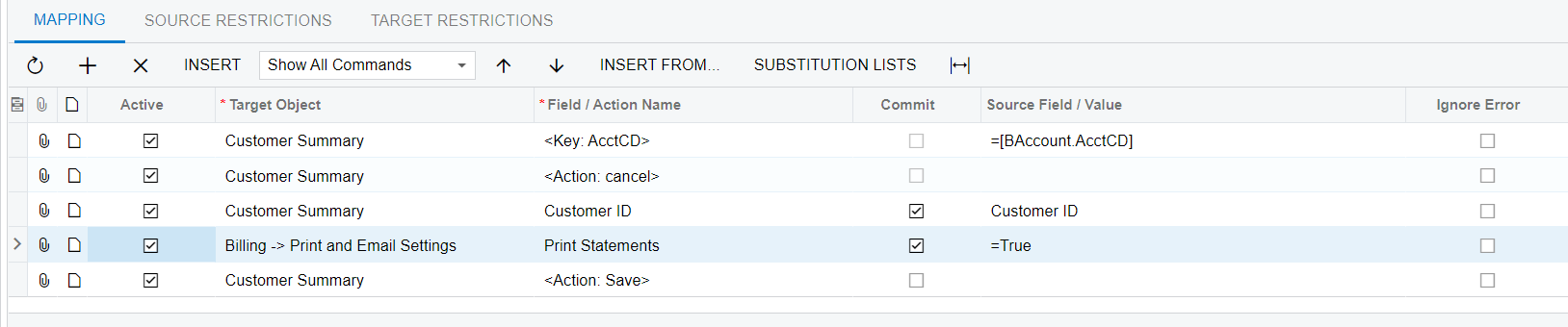
You could use an Import Scenario to update them. You could export out your Customer list and then on your Import Scenario you would look to the Customer Id and the box to Print Statements. An example is below.
 

View original

2 replies

  • Jr Varsity III
  • Answer
  • Jan 24, 2022 2:08 PM UTC

You could use an Import Scenario to update them. You could export out your Customer list and then on your Import Scenario you would look to the Customer Id and the box to Print Statements. An example is below.

 

Translate

Naveen Boga
Captain II
Forum|alt.badge.img+20
  • Captain II
  • Jan 24, 2022 5:51 PM UTC

Hi, @scottz38  I would suggest the below approaches and hope that helps!

Approach 1: Since you wanted to update all the customers, you publish the below script. It is a very quick process.

Script:  Update Customer set PrintStatements= 1 where CompanyID=2

Approach 2: We can go with Import Scenario suggested by @MelissaB  


Translate