Answer

dashboard - year over year sales

  • February 16, 2023
  • 6 replies
  • 635 views

I am trying to create a GI to show this years sales data compared to LY sales. Any ideas how to get started with this? I have pulled the data since @yearstart and for where docdate >= @yearstart-1 and docdate<= @yearstart-1. How can I show those on the same line graph?


Best answer by aaghaei

Whatever you want to show on axises will need to be in one column. So in your case you will need 2 columns in your result grid (of course you can have more columns but for sake of DB I mean). One column is going to be Year and another one Amount or Quantity. The qry or amt is straight forward. For the year column you will need to use a formula that extracts the fiscal year based on a fixed value comparison or a cutoff month parameter. Possibly the easiest way is to get the left 4 digit of TranPeriod or FinPeriod. Something like =Left(DAC.TranPeriodID, 4) or get year from DocDate something like =Year(DAC.DocDate)

In DB then you will use this formulated column let say you call it Year, as axis and Amount as value and you can have a comparison column chart

6 replies

aaghaei
Captain II
Forum|alt.badge.img+10
  • Captain II
  • Answer
  • February 17, 2023

Whatever you want to show on axises will need to be in one column. So in your case you will need 2 columns in your result grid (of course you can have more columns but for sake of DB I mean). One column is going to be Year and another one Amount or Quantity. The qry or amt is straight forward. For the year column you will need to use a formula that extracts the fiscal year based on a fixed value comparison or a cutoff month parameter. Possibly the easiest way is to get the left 4 digit of TranPeriod or FinPeriod. Something like =Left(DAC.TranPeriodID, 4) or get year from DocDate something like =Year(DAC.DocDate)

In DB then you will use this formulated column let say you call it Year, as axis and Amount as value and you can have a comparison column chart


Doug Johnson
Acumatica Moderator
Forum|alt.badge.img+4
  • Acumatica VP, Product Management
  • February 17, 2023

@jsparks62 User @aaghaei described the solution. I had to do something like this a while ago using Sales Orders so I thought I would share some screen shots.
 

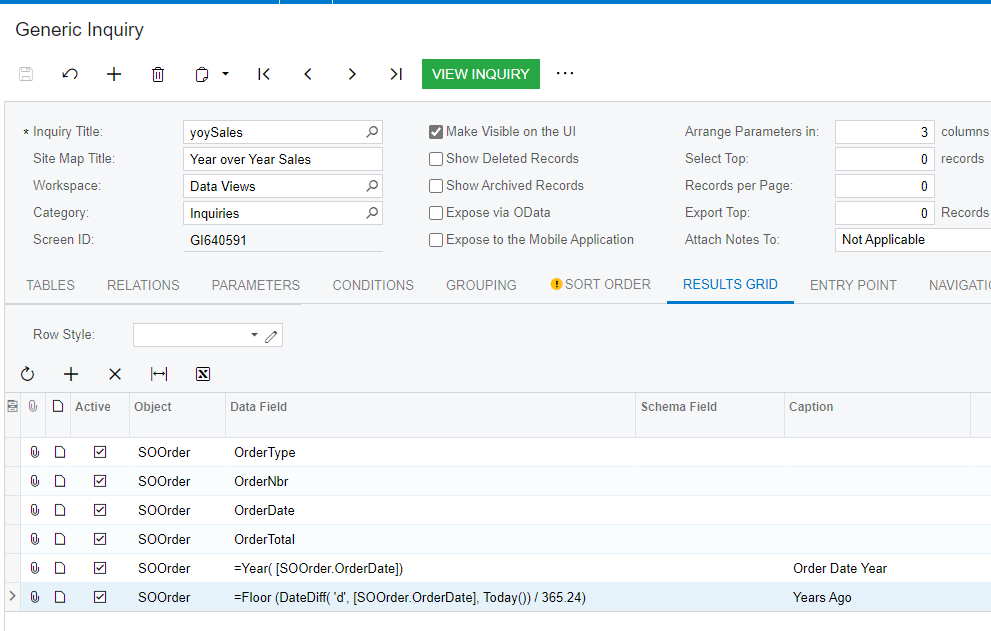
Inquiry Results Grid (last line is if you want trailing twelve months)

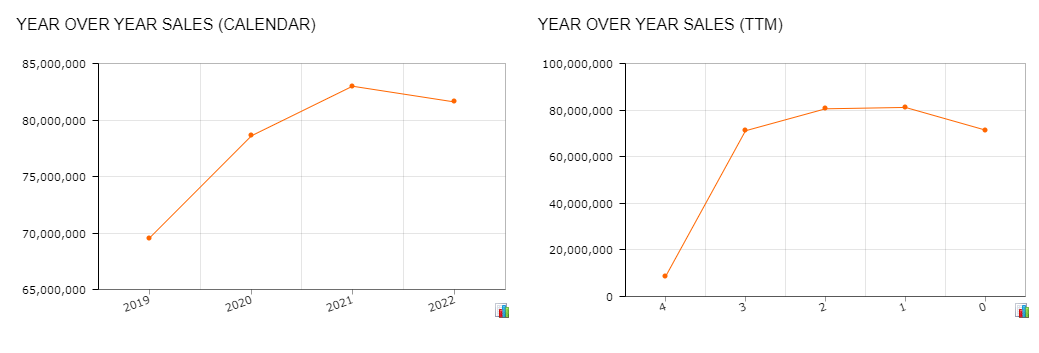
Resulting Dashboards

Data Conditions select Order Dates between @YearStart-4 and @YearStart (favors Calendar) select Order Dates between =DateAdd(Today(), ‘y’, -4) and Today() if you are using Trailing 12 Months 


  • October 3, 2025

@Doug Johnson could you send me the XML file and have you done one for AR invoice. Sales to date for this year vs last year by branch and total for all branches? 


Forum|alt.badge.img
  • Freshman I
  • October 28, 2025

@SunnyM, I am looking for a similar widget. Please let me know if you come across anything which helps with YTD vs PYTD sales. 


bwhite49
Captain II
Forum|alt.badge.img+10
  • Captain II
  • October 28, 2025

@SunnyM, I am looking for a similar widget. Please let me know if you come across anything which helps with YTD vs PYTD sales. 

See this thread. You need to duplicate your rows to represent each period or category. The easiest way to do that is through an attribute.  Dashboard: Sales to date vs last year | Community


Forum|alt.badge.img
  • Freshman I
  • October 28, 2025

Thank you ​@bwhite49! I will have a look at it.