Answer

Create Refund check for AR customer

  • July 10, 2024
  • 6 replies
  • 857 views

Forum|alt.badge.img

Good morning,

I know this has been discussed on other forums in the past and hopefully there is a resolution at this point...however I am just seeing if there is a more sufficient/quicker method to use to get refund checks for AR customers?

My company is still fairly new to Acumatica, so bare with me if my step by step process is either confusing or cumbersome. 

Please advise! :)


Right now, I currently do:

  1. Verify customer orders are complete and credit is available
  2. Extend customer as an AP vendor through AR customer maintenance screen
  3. Create a Cash Purchase in AP to reflect check I’ll be cutting (apply towards corresponding Refund check GL Account)
  4. Prepare/Print Checks
  5. Release Printed Checks
  6. Create a Debit Memo/Credit Write off in AR to offset credit available (apply towards corresponding Refund check GL account)

Best answer by Laura03

Hello @rfrantz ,

You are correctly describing the steps needed to issue a cash refund to a customer.  Please vote for improvements here:


There are some mentions of a customization package from GitHub - it’s not clear whether the customization package is compatible with current versions of Acumatica.

Laura

6 replies

Laura03
Captain II
Forum|alt.badge.img+19
  • Captain II
  • Answer
  • July 10, 2024

Hello @rfrantz ,

You are correctly describing the steps needed to issue a cash refund to a customer.  Please vote for improvements here:


There are some mentions of a customization package from GitHub - it’s not clear whether the customization package is compatible with current versions of Acumatica.

Laura


Forum|alt.badge.img
  • Author
  • Freshman I
  • July 10, 2024

Actually looks like I am already on board for that vote!!! hahahah

Thank you for the response, Laura!!


Forum|alt.badge.img
  • Varsity I
  • April 15, 2025

Can someone elaborate more on these steps that are needed to issue checks for customer refunds? Steps 3 and 6 are the ones I am stuck on. Thanks!


BDPJosh
Freshman I
  • Freshman I
  • April 24, 2025

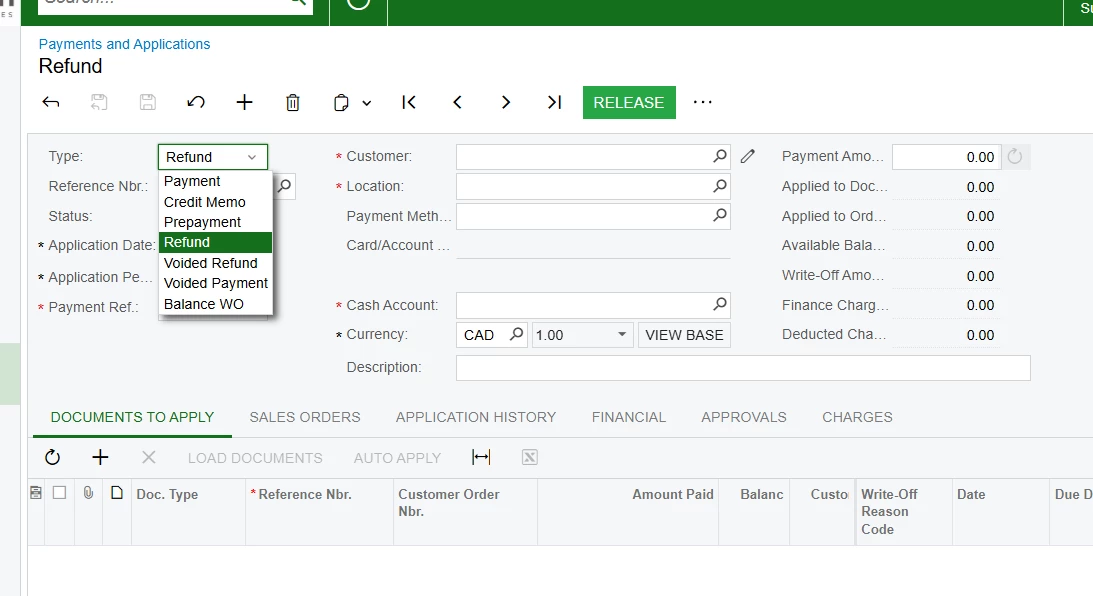
Does selecting “Refund” make the same entry as described in step 6?


  • Freshman I
  • April 24, 2025

I have just been using Refund under AR. For Doc. Type, it can be a credit note or prepayment 


Forum|alt.badge.img
  • Varsity I
  • April 28, 2025

I have just been using Refund under AR. For Doc. Type, it can be a credit note or prepayment 


But that doesn’t actually make a check appear in the prepare payments screen.