Question

Changing subacount segments

  • November 20, 2025
  • 3 replies
  • 66 views

Freeman Helmuth
Semi-Pro I
Forum|alt.badge.img

We find ourselves in a position where the subaccount structure that we have is very unhandy to modify or extend. Yes it can be done but it’s cumbersome and will make reporting look very messy as subaccounts will overflow all standard text fields.

Acumatica has virtually 0 flexibility to change anything with an existing subaccount structure. How do companies that are growing, adding new regions, new business divisions etc do this? A 20MM business does not have the same reporting needs as a 50MM/100MM/300MM business.

You can’t plan the future perfectly and it feels like there’s no flexibility in Acumatica’s subaccount structure for this change and growth. Does any one have suggestions for how to handle this?

Specifically: There are two entire segments of our subaccount structure that I would like to eliminate, and insert another segment between two existing ones.

Coming from QB, we fundamentally misunderstood the term “subaccounts” to mean something similar to what QB means. I wish Acumatica didn’t use that term. “Segments” is the term Netsuite/Oracle etc use and it’s much clearer.

The only clean option that I’m aware of at the moment is a complete ERP re-implementation which is kind of the nuclear option. This is a big enough issue for the future that I’m considering it(how hard can it be to export and reimport all data in the same format I wonder….?) but there is a lot lost doing that. Notes, attachments, transaction history etc. Not to mention the cost, just for the sake of reporting.


I vaguely remember someone somewhere mentioning that if you could come up with a way to recalculate the subaccount mask for every transaction in the system you could possibly make subaccount changes, but I can’t find that post.


3 replies

Forum|alt.badge.img
  • Jr Varsity I
  • April 22, 2026

@Freeman Helmuth correct me if i am wrong: 

What you’re trying to do (remove segments + insert a new one in the middle) isn’t realistically achievable in a live system without either breaking data integrity or doing a full reimplementation. Even the idea of recalculating subaccounts across all historical transactions is technically possible but extremely high risk and not something most partners would support.

  1. Freeze the current structure
    Leave all historical data as-is to preserve audit integrity.
  2. Introduce a new reporting dimension instead of a new segment
    Capture the new requirement (region/division/etc.) using:
    • Project/Task
    • Branch or Company (if applicable)
    • Attributes or a custom field
  3. Shift reporting out of subaccounts
    Use Generic Inquiries, ARM reports, or external BI (e.g., Power BI) to combine:
    • Existing subaccount segments
    • New reporting dimension
  4. Phase out unused segments going forward
    You can’t delete them, but you can stop relying on them in new transactions.
  5. Optional: clean break going forward
    If things are too messy, create new GL accounts/subaccounts with a simplified structure and start fresh from a cutover date. Historical data stays untouched.

jamesocurran85
Freshman I

The “Subaccounts” language can mislead us.  When we remove segments or add segment, we are really renumbering our GL Chart of Accounts, in effect.  The best practice is to treat those kind of subaccount changes in that manner to follow GAAP guidance.


Freeman Helmuth
Semi-Pro I
Forum|alt.badge.img

@nasir ‘s suggestions are unfortunately the only options at this point and none of them are good. Acumatica needs a better way of entering and viewing subaccount segments as individual dimension components instead of as a single combined component.

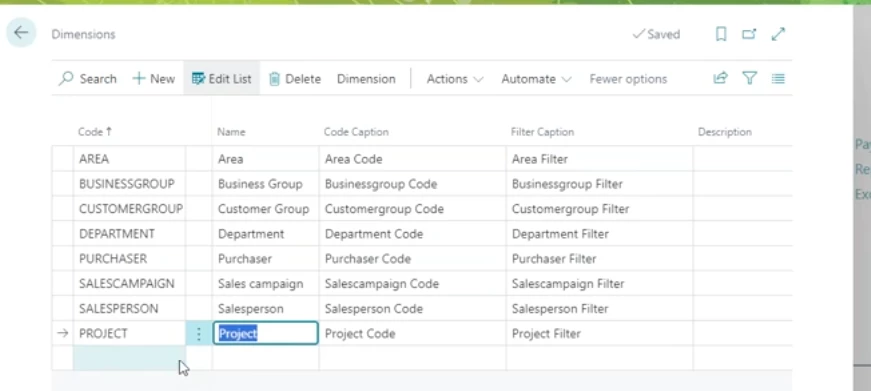
Dynamics 365 does this nicely and I think Acumatica could implement this with only UI changes and no actual data change:

Dimensions are set up individually, similar to Acumatica’s segments:


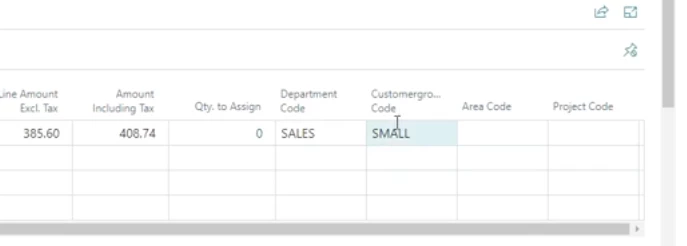
Then each dimension has it’s own column on entry grids. This allows you to disable/hide dimensions that are no longer needed but yet retain the historical data.


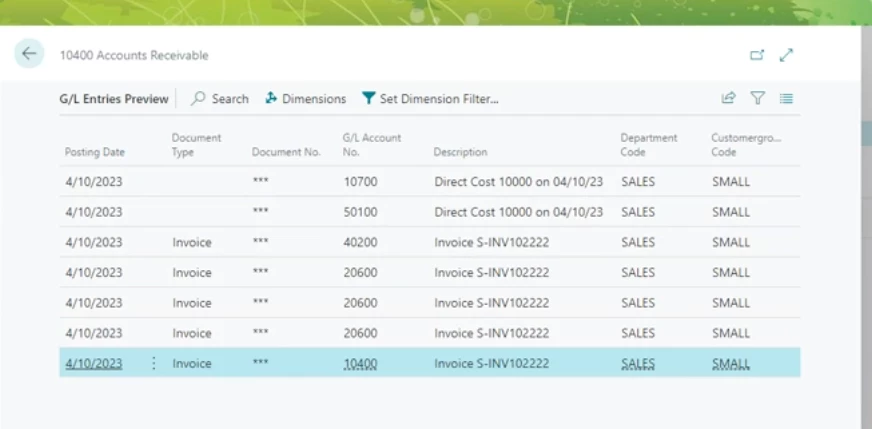
And on GL reports you can see the dimensions for each transaction as a column. This would also make sorting and filtering for a specific value much much easier(it’s hard now, you have to use an advanced filter with multiple combinations of and/or).