Answer

Changed Valuation Method from Average to Standard

  • April 4, 2023
  • 6 replies
  • 437 views

Forum|alt.badge.img

We recently migrated all our SKUs from average to standard costing due to average costs getting all mixed up. We did this by issuing out all of the inventory, updating costing to standard and entering a receipt back in.


I am running the inventory valuation report but continuing to see the inventory valued at average cost rather than the new standard cost of the SKU for many items.


One example is the following SKU:

L175:

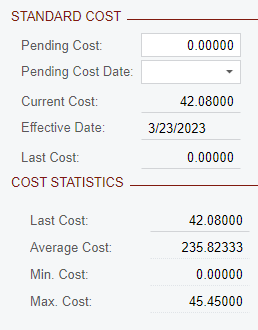
Standard Cost - $42

QTY on Hand - 425

Expected Cost - $17,850


Cost per Valuation Report

Average Cost - $235

QTY on Hand - 425

Cost on Inventory Valuation Report - $99,875


This appears to be an issue for all SKUs with an INCost ValMethod of “A”.
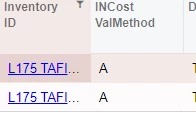
Any reason why this INCost ValMethod would remain as average despite the SKU having been changed to Standard Cost?


Best answer by Lhouldsworth

@jwarren The update standard cost process should create an inventory adjustment that revalues your on hand inventory. 


Try putting $42.08 in the pending cost field but pushing the effective date further back in time and then run the update standard cost function again. Then check inventory adjustments to see if one gets created. 


If that doesn't work then I’d put in a case with Acumatica.

6 replies

Forum|alt.badge.img

Did you run the update standard cost process? Are you looking at the out of the box inventory valuation report or is it a custom GI?


Forum|alt.badge.img
  • Author
  • Semi-Pro I
  • April 4, 2023

Yes the items have been updated through standard cost process. This is out of the box valuation report.


Here’s the SKU:


Chris Hackett
Community Manager
Forum|alt.badge.img
  • Acumatica Community Manager
  • May 17, 2023

Hi @jwarren were you able to find a solution? Thank you!


Forum|alt.badge.img+5
  • Semi-Pro III
  • May 17, 2023

@jwarren Can you elaborate on what you mean by “average costs getting all messed up”?


Forum|alt.badge.img
  • Varsity I
  • Answer
  • May 17, 2023

@jwarren The update standard cost process should create an inventory adjustment that revalues your on hand inventory. 


Try putting $42.08 in the pending cost field but pushing the effective date further back in time and then run the update standard cost function again. Then check inventory adjustments to see if one gets created. 


If that doesn't work then I’d put in a case with Acumatica.


  • Freshman I
  • October 10, 2025

@jwarren .. I am curious to know how it worked for you guys changing valuation method from average cost to standard cost assuming there were already existing transactions to all inventory items for a few years. Other than just the issue mentioned in here.

would you recommend this change, if it is needed?

Or is better to just create a whole new Inventory IDs with standard cost valuation method and start its own inventory record, transferring the old item qty to the new item qty. not getting mixed up with the average cost calculation recorded in every financial and sales transactions.