Answer

Change date on contract

  • October 20, 2023
  • 6 replies
  • 191 views

HI, 

All my contracts are created hat when I run the contract invoicing, I get billed at the end of the month. We want to change and charge at the beginning of the month. How do I make this change?

Thanks to help me. 

Melanie

Best answer by KushaniPerera88

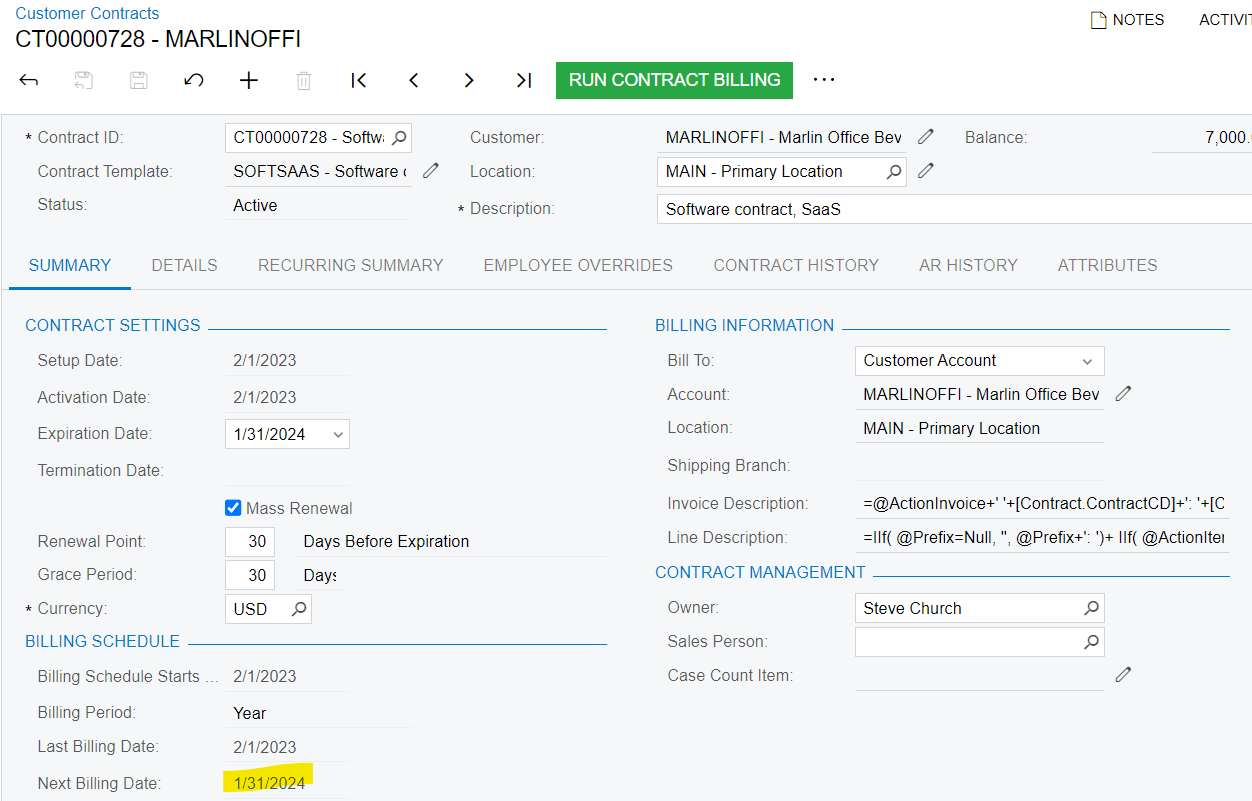
@MelNad  The "Last Billing Date" and "Next Billing Date" on a contract are read-only fields that cannot be modified in the user interface once the AR Invoice generated from contract billing is released. The next billing date is the date of the next billing invoice, generated according to the billing schedule.

To eliminate the effect on the GL side, we can use the action “Reverse and Apply to Memo” on AR Invoice. After that, you can end the contract and start a new contract to bill the required date.
 

6 replies

Forum|alt.badge.img+8
  • Semi-Pro I
  • October 20, 2023

Hi @MelNad Please confirm if you are referring to changing the Next Billing Date shown in the below screenshot.

Thanks


  • Author
  • Freshman I
  • October 20, 2023

Yes, it’s that. I tried to change activation date but the billing stay at the end of the month.


Forum|alt.badge.img+8
  • Semi-Pro I
  • October 20, 2023

Hi @MelNad I see the issue. Let me check  and revert.


Chris Hackett
Community Manager
Forum|alt.badge.img
  • Acumatica Community Manager
  • November 29, 2023

Hi @MelNad were you able to find a solution? Thank you!


KushaniPerera88
Acumatica Employee
Forum|alt.badge.img+3
  • Acumatica Employee
  • Answer
  • December 5, 2023

@MelNad  The "Last Billing Date" and "Next Billing Date" on a contract are read-only fields that cannot be modified in the user interface once the AR Invoice generated from contract billing is released. The next billing date is the date of the next billing invoice, generated according to the billing schedule.

To eliminate the effect on the GL side, we can use the action “Reverse and Apply to Memo” on AR Invoice. After that, you can end the contract and start a new contract to bill the required date.


jperlowin
Freshman I
  • Freshman I
  • April 18, 2024

I have a situation where all the time was not entered before the contract billing was done.  Unfortunately the customer ran another contract billing cycle thinking that it would pick up the time (which still wasn’t entered yet) so we are able to UNDO the last billing cycle, but now cannot bill the time in the correct month.  Even changing things, the billing period is now PERMANTLY 1 month ahead of the time entry.  We need a way to change the NEXT BILLING DATE in order to get the billing cycle back in sync with the time entry. Or do I have to cancel the contract and create a new one?  I tried upgrading and setting the activation date back a month, but that still didn’t change the Next Billing Date.