Answer

Cash Purchase Dates & Descriptions coming from Claims

  • February 24, 2025
  • 4 replies
  • 93 views

Forum|alt.badge.img

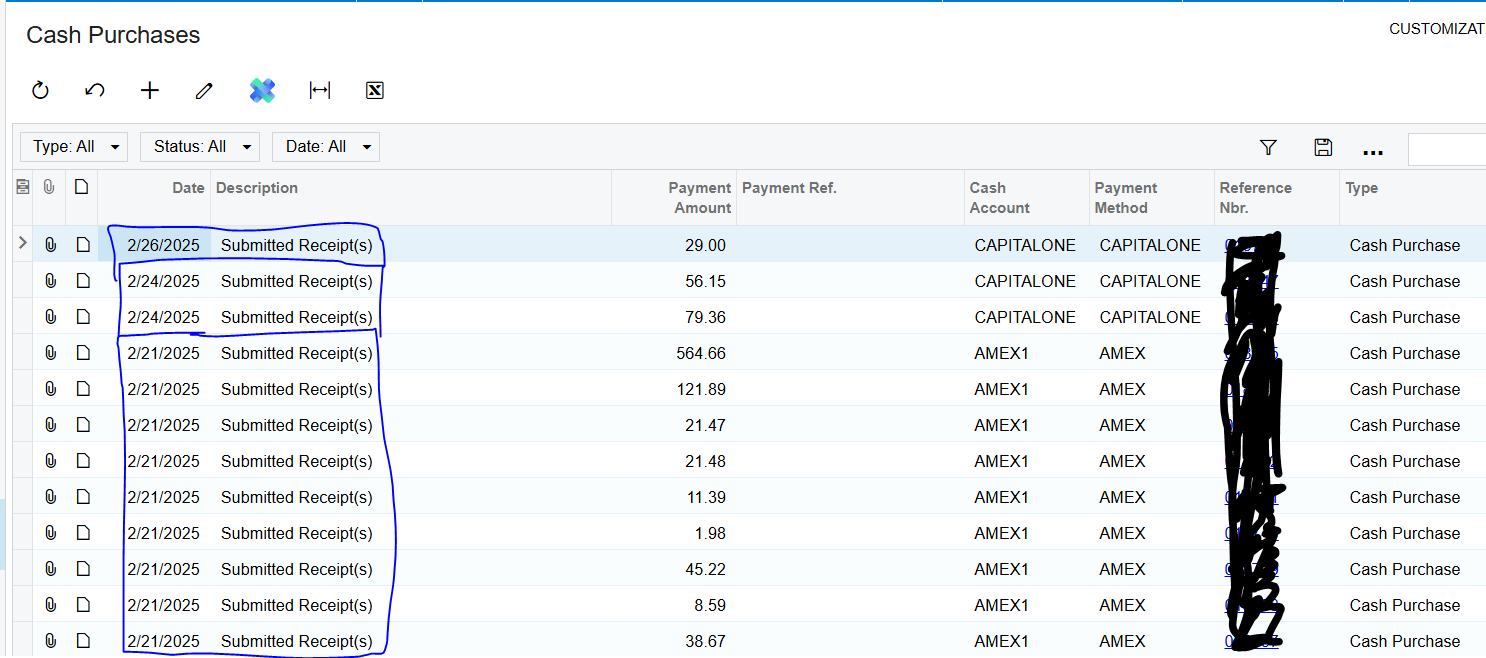
We are utilizing the expense receipt and expense claim process to capture our corporate credit card expenses.  We have noticed after releasing the claim at the time when expense receipts are converted into cash purchases that each receipt generates a cash purchase which matches the date and description of the claim not the date and expense of each receipt associated with the claim.  Why?  And can this be changed?  This causes a claim containing 30 different receipts to contain the exact same date and exact same description and little way of distinguishing them when looking at them from the cash purchase inquiries.  It also makes it very difficult during credit card reconciliation because the date of the expense does not match the date listed on the receipt.  Is there a setting that we need to change?  Or is this how it is intended to work?

Best answer by jhouser

@jacob14 Probably the only workaround is submitting separate claims for each receipt. You can skip the Expense Receipt screen and start by entering the expense claim and adding a line, which represents the receipt. 

4 replies

Forum|alt.badge.img
  • Author
  • Freshman I
  • February 26, 2025

Anyone else had any experience with this.  Here is a screenshot of cash purchases showing the date and description all coming over from the description of the expense claim and not from the expense receipts


  • Freshman I
  • August 14, 2025

Would love to know if you ever found a solution to this. We are struggling with this setup as well


Forum|alt.badge.img
  • Author
  • Freshman I
  • August 15, 2025

@Tanya53  unfortunately I haven’t heard anything.  It doesn’t appear that there is much interest in this topic.  Please report back if find a solution.  Thank you!


jhouser
Captain II
Forum|alt.badge.img+6
  • Captain II
  • Answer
  • August 16, 2025

@jacob14 Probably the only workaround is submitting separate claims for each receipt. You can skip the Expense Receipt screen and start by entering the expense claim and adding a line, which represents the receipt.