Hi @BarbaraPietersen23 .
Acumatica is blocking disposal because the asset is not marked reconciled, not because Convert Purchases still has open lines. Those two things are separate.
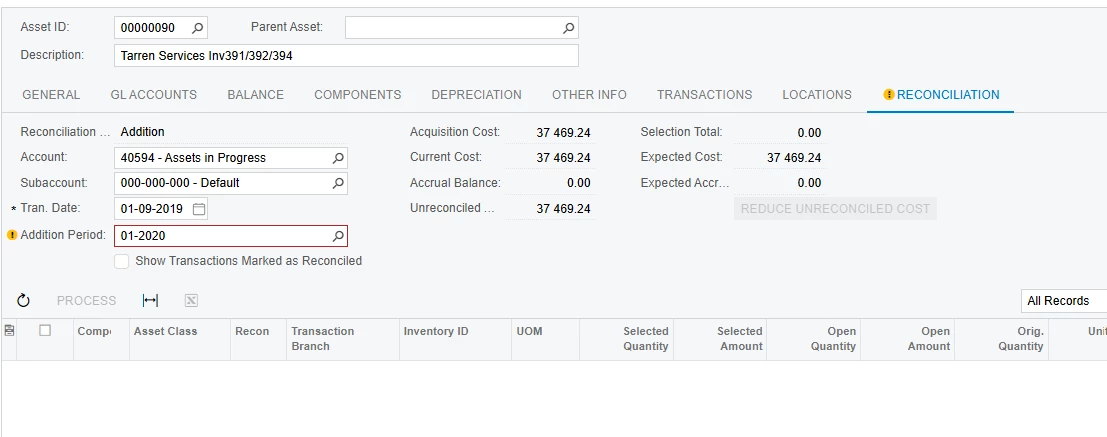
The system compares the asset’s cost to reconciled FA-clearing (accrual) amounts. If that match was never completed — common for assets created on Fixed Assets (FA303000), imported, or created from a purchase without Reconcile checked — disposal fails even when both screens look empty.
Fastest way to dispose (if you do not need GL matching)
On Fixed Assets Preferences (FA101000), uncheck Require Full Reconciliation Before Disposal.
That is the standard workaround when there is no purchase left to match. Dispose the leftover assets, then turn the checkbox back on if you still want the control going forward.
If you do need them reconciled
1. On the asset (FA303000) → Reconciliation tab
- Look at Accrual Balance / unreconciled amount, not only the grid.
- Clear filters (account, sub, period, branch) and show all transactions, not only unreconciled.
- If a FA-clearing line appears, select it and Process. That writes a reconciliation transaction (same account both sides; GL stays in balance) and marks the asset reconciled.
2. Find the original purchase
Convert Purchases to Assets only shows unreconciled FA-clearing lines. The purchase may already be marked reconciled, on another account/branch/period, or reversed/reclassed.
Search GL / AP for the asset cost hitting the FA clearing / accrual account. If you find it, match it on the asset’s Reconciliation tab.
Hope above helps!!