

Solved

Can Import Scenarios automate Convert Purchases to Assets?

  • March 26, 2026
  • 4 replies
  • 38 views

Forum|alt.badge.img

Hi All,


Has anyone successfully used an Import Scenario to automatically convert purchases to Fixed Assets in Acumatica?

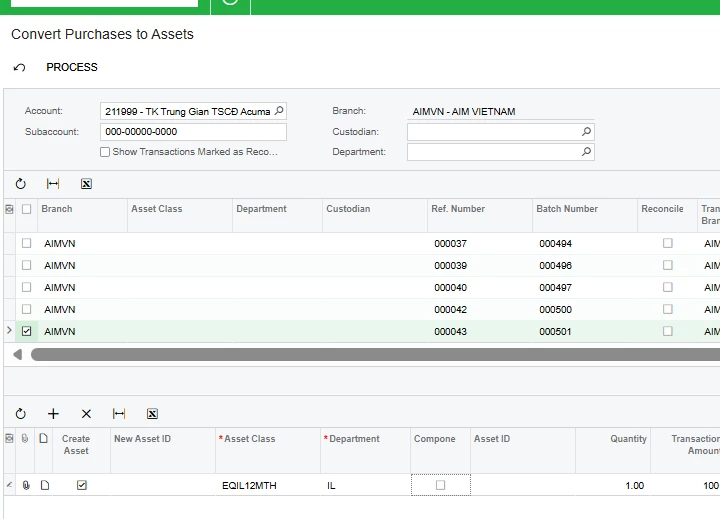
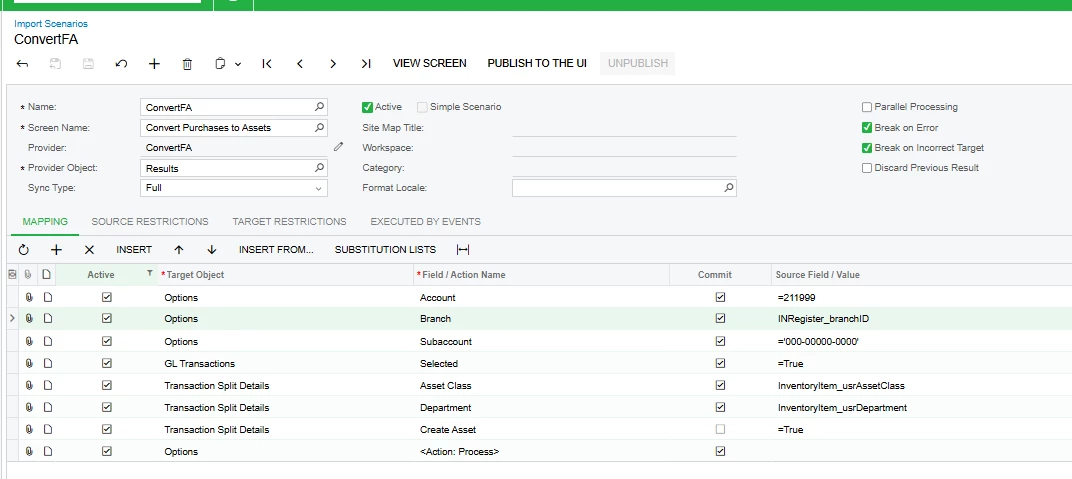
I have been testing the Convert Purchases to Assets screen with a Business Event + Import Scenario approach. The scenario runs successfully without errors, but no Fixed Asset is created in the end.

My understanding is that this screen relies on UI behavior:

  • select the transaction in the top grid
  • the detail line appears in the bottom grid
  • fill in Asset Class and Department
  • mark Create Asset
  • then click Process

The reason I am trying to automate this is because I want the FA number to be available immediately when the stock is issued/shipped out. My warehouse team needs to attach the FA code to the item at the time of issue, so I need the purchase-to-FA conversion to happen automatically and the FA code to be created right away during the issue-out process.

In my tests, the Import Scenario can run successfully, but it seems the asset is still not actually created.

Any advice or shared experience would be really appreciated. Thanks!
Any advice or shared experience would be really appreciated. Thanks!
Best answer by ELIJAHRSWK07

@hthuy24 Based on what I’ve seen, Import Scenarios are not a reliable way to automate Convert Purchases to Assets. That screen depends on processing-screen/UI behavior, so an import can complete successfully without actually creating the asset. If you need the FA number generated immediately during the issue/shipment flow, the safer approach is a customization or API-based process that creates the Fixed Asset record directly, with reconciliation handled separately if needed

4 replies

Manikanta Dhulipudi
Captain II
Forum|alt.badge.img+16

@hthuy24 Import Scenarios have limitations when working across multiple screens. They are designed to execute actions within a single screen and do not support processes that involve navigation to other screens, such as Create Shipment or Prepare Invoice, which depend on separate screens.


Forum|alt.badge.img
  • Author
  • Jr Varsity II
  • March 26, 2026

@hthuy24 Import Scenarios have limitations when working across multiple screens. They are designed to execute actions within a single screen and do not support processes that involve navigation to other screens, such as Create Shipment or Prepare Invoice, which depend on separate screens.

So do you mean that Import Scenarios are not a reliable solution for automate  Convert Purchases to Fixed Assets?


Manikanta Dhulipudi
Captain II
Forum|alt.badge.img+16

@hthuy24  Yes as per my knowledge.


ELIJAHRSWK07
Jr Varsity I
Forum|alt.badge.img
  • Jr Varsity I
  • Answer
  • March 26, 2026

@hthuy24 Based on what I’ve seen, Import Scenarios are not a reliable way to automate Convert Purchases to Assets. That screen depends on processing-screen/UI behavior, so an import can complete successfully without actually creating the asset. If you need the FA number generated immediately during the issue/shipment flow, the safer approach is a customization or API-based process that creates the Fixed Asset record directly, with reconciliation handled separately if needed

