Solved

Bank Feeds

  • September 8, 2026
  • 5 replies
  • 62 views

Forum|alt.badge.img

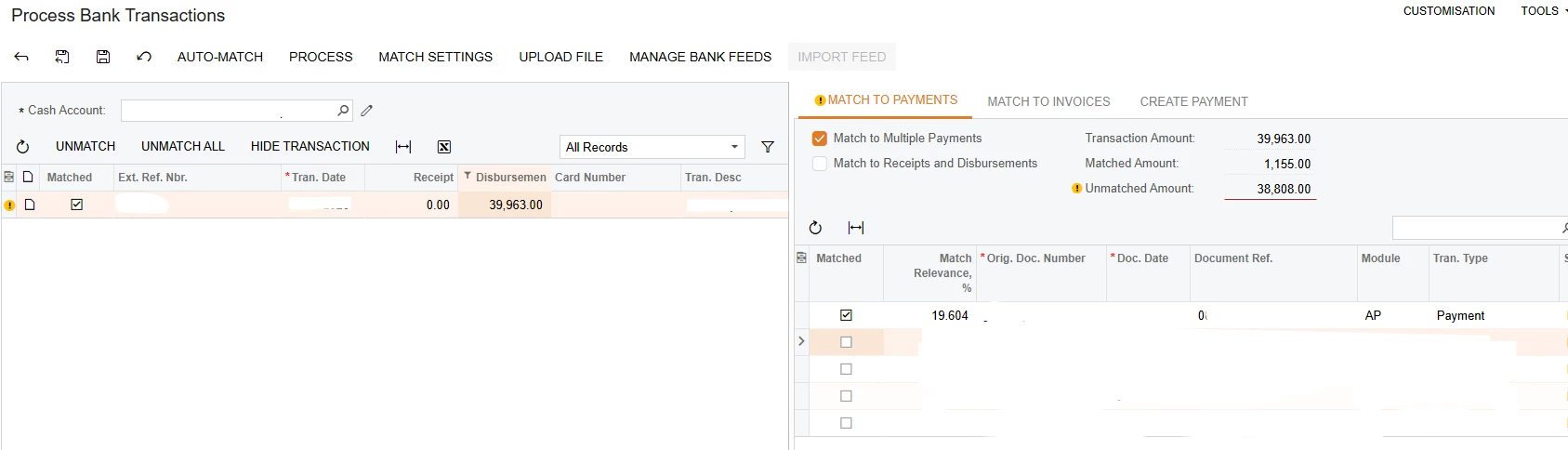
Hi, can I please get your input on this scenario? A customer has 2 AR invoices in Acumatica and a payment is created separately using 2 different cash accounts. However, the customer transferred the whole lump sum payment to one bank account. This now appears in Bank Feeds for one cash account only and cannot be processed because the amount isn’t matched. I can’t clear and reconcile this, what is the best approach to fix? Thanks


Best answer by Steve Milner

@MarkD Thanks for clarifying. Honestly I wouldn't refund it. Your customer already paid you. Sending the money back and asking them to pay twice more, to two accounts, to fix a bank rec on your side is a hard conversation to have, and it's slower than the fix in Acumatica. It's also messier than it looks. Both payments are applied, so before you can refund anything you'd have to record the lump sum as its own payment in the account it hit, refund that, then wait for two new transfers to show up before either of the original payments can match.

I get that the payments were entered the way the customer was supposed to pay. But Acumatica doesn't care what was supposed to happen. The cash account on a payment says which bank has the money, and right now one of them says 38,808 is in a bank that never got it. That's why the feed won't offer it up for matching. Mohammad's suggesting the same thing I did. Void the 38,808 payment on Payments and Applications, put it back in against the account the lump sum actually landed in, apply it to the same invoice, then match the bank line to both payments. The customer never knows.

If that 38,808 really needs to live in the other bank, move it and record a Funds Transfer for it. Then both banks have a line with something behind it.


5 replies

Steve Milner
Varsity III
Forum|alt.badge.img+2
  • Varsity III
  • September 9, 2026

@MarkD The Match to Payments tab only offers documents that sit in the same cash account as the bank transaction. The 38,808 payment your client recorded against the other cash account will never appear in that list, no matter how you set the matching options. You can't change the cash account on a released payment either. So the fix is to re-record that payment in the cash account the bank line belongs to: void it where it is, then enter it again against the right account.

Start on Checks and Payments (AP302000). Void the 38,808 payment there. That reverses it, so the bill is open to pay again. Enter a new payment for the same bill against the cash account the money actually left, apply it, and release. Then go back to Process Bank Transactions (CA306000), select the bank transaction, keep Match to Multiple Payments ticked, and select both payments. Once Matched Amount equals 39,963.00, click Process. Both payments get marked Cleared and the line reconciles normally.

Two things to watch. If the original payment sits in a closed period, set the Application Date on the voided payment to an open one before you release it. And the original payment plus its void will sit in the other cash account as offsetting uncleared items. Clear both on that account's next reconciliation statement so they stop carrying forward.

Your screenshot shows an AP payment. If this is really a customer receipt, the same steps apply on Payments and Applications (AR302000).

A funds transfer between the two cash accounts would move the cash, but you'd still be clearing items in the other account that no bank line backs. Void and re-enter is the cleaner path.


Forum|alt.badge.img
  • Author
  • Varsity III
  • September 9, 2026

Hi ​@smilner3 - Sorry for the confusion, my question was for customer, but my screenshot was disbursement. It was just a sample data, but in reality it is for a customer.

I understand the approach you’re saying, however, the transactions are correct. It’s just that the customer transferred the funds only to one account in lump sum and Acumatica won’t let them match since the other payment is recorded in a different cash account.

I think the easiest way is to transfer the lump sum payment back to customer and then ask the customer to send another payment separately on correct accounts. What do you think?


mohammadnawaz51
Varsity I
Forum|alt.badge.img+7

@MarkD the clean fix is to reverse/recreate the payment using the correct cash account, then match the lump sum bank feed transaction against the applicable AR payments/invoices.


Forum|alt.badge.img
  • Author
  • Varsity III
  • September 9, 2026

@mohammadnawaz51 - it’s been recorded in correct cash account. The customer is wrong here because they transfer the money to one account as a lump sum


Steve Milner
Varsity III
Forum|alt.badge.img+2
  • Varsity III
  • Answer
  • September 9, 2026

@MarkD Thanks for clarifying. Honestly I wouldn't refund it. Your customer already paid you. Sending the money back and asking them to pay twice more, to two accounts, to fix a bank rec on your side is a hard conversation to have, and it's slower than the fix in Acumatica. It's also messier than it looks. Both payments are applied, so before you can refund anything you'd have to record the lump sum as its own payment in the account it hit, refund that, then wait for two new transfers to show up before either of the original payments can match.

I get that the payments were entered the way the customer was supposed to pay. But Acumatica doesn't care what was supposed to happen. The cash account on a payment says which bank has the money, and right now one of them says 38,808 is in a bank that never got it. That's why the feed won't offer it up for matching. Mohammad's suggesting the same thing I did. Void the 38,808 payment on Payments and Applications, put it back in against the account the lump sum actually landed in, apply it to the same invoice, then match the bank line to both payments. The customer never knows.

If that 38,808 really needs to live in the other bank, move it and record a Funds Transfer for it. Then both banks have a line with something behind it.